Swing 視窗應用程式,使用者在文字欄位輸入以空格分隔的整數(如 3 5 2 562 125),點擊「計算」按鈕後,程式驗證輸入合法性(僅允許數字與空格),將字串分割轉換為 int[],遍歷找出最小值並顯示於標籤。
trim() 移除首尾空白,空字串提示「請輸入數字內容」。Character.isDigit(c) || c == ' ',若含非法字元提示「輸入包含非數字內容」並清空欄位。split(" +") 以一或多個空格分割,避免產生空字串元素。import java.awt.*;
import java.awt.event.*;
import javax.swing.*;
public class ArrayMinValueDemo extends JFrame {
private final JTextField inputField = new JTextField(30);
private final JLabel resultLabel = new JLabel(" ");
public ArrayMinValueDemo() {
setTitle("獲取一維陣列最小值");
setDefaultCloseOperation(EXIT_ON_CLOSE);
setBounds(100, 100, 480, 180);
setLayout(null);
JLabel hint = new JLabel("請在文本框中輸入多個整數,以空格為分隔符。例如:3 5 2 562 125");
hint.setBounds(10, 10, 450, 15);
add(hint);
inputField.setBounds(10, 35, 450, 25);
add(inputField);
JButton btnCalc = new JButton("計算");
btnCalc.setBounds(10, 70, 90, 25);
btnCalc.addActionListener(e -> calculateMin());
add(btnCalc);
resultLabel.setBounds(115, 70, 350, 25);
add(resultLabel);
setVisible(true);
}
private void calculateMin() {
String raw = inputField.getText().trim();
if (raw.isEmpty()) {
JOptionPane.showMessageDialog(this, "請輸入數字內容");
return;
}
// 字元合法性檢查
for (char c : raw.toCharArray()) {
if (!Character.isDigit(c) && c != ' ') {
JOptionPane.showMessageDialog(this, "輸入包含非數字內容");
inputField.setText("");
return;
}
}
String[] strs = raw.split(" +");
int[] nums = new int[strs.length];
for (int i = 0; i < strs.length; i++) {
nums[i] = Integer.parseInt(strs[i]);
}
int min = nums[0];
for (int n : nums) if (n < min) min = n;
resultLabel.setText("陣列中最小的數是:" + min);
}
public static void main(String[] args) {
SwingUtilities.invokeLater(ArrayMinValueDemo::new);
}
}
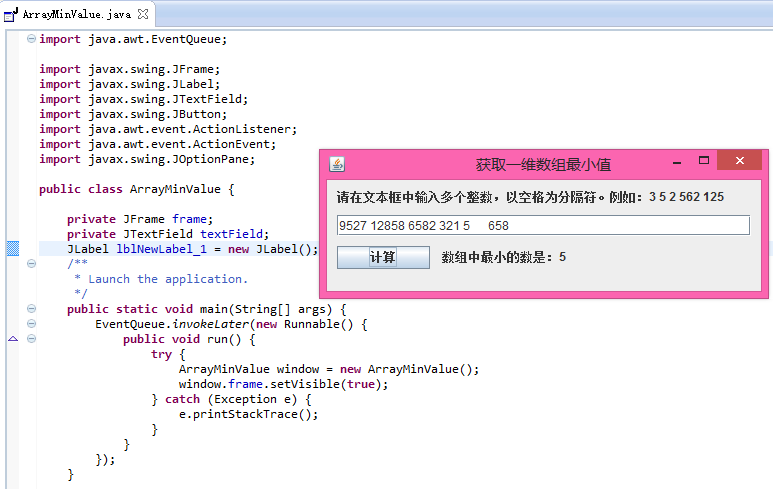
split(" +") 使用正則表達式處理多空格。NumberFormatException。