String info_wrap1[] = StringDealMethod.format(info, width-15, ft);
具體實現請參考《Java ME 連載(四)——繪製可自動換行文本》。
如何在指定區域內繪製整行文本,避免因字體或螢幕高度變化導致文本出現「半截字」?
bodyHeight = ((int) (height - head.menuHeight - menu.menuHeight) / ft.getHeight()) * ft.getHeight();
經上述處理,滾動區域高度 bodyHeight 總為字體高度的整數倍,即可避免字元截斷。
for (int i = 0; i < info_wrap1.length; i++) {
    graphics.drawString(info_wrap1[i], 5, i * ft.getHeight() + head.menuHeight + margin, Graphics.TOP | Graphics.LEFT);
}
graphics.clipRect(0, head.menuHeight + margin, width, bodyHeight);
graphics.translate(0, dir * currentPageIndex * bodyHeight);
文本繪製完成後,將座標變換回原位:
graphics.translate(0, -dir * currentPageIndex * bodyHeight);
private void drawScrollBar() {
    int barHeight = height - head.menuHeight - menu.menuHeight;
    graphics.setColor(Color.menuFrame);
    graphics.fillRect(width - 3, head.menuHeight, 2, barHeight);
    graphics.setColor(Color.selectBg);
    graphics.fillRect(width - 4, head.menuHeight + (currentPageIndex) * barHeight / page, 4, barHeight / page);
}
偵測到按鍵事件後,執行翻頁操作:
protected void keyPressed(int keyCode) {
    switch (keyCode) {
        case KeyID.SOFT_RIGHT: {
            String flag = "0";
            Object[] args = {flag, ""};
            controller.handleEvent(UIController.EventID.EVENT_MAIN_SCREEN, args);
            break;
        }
        default: ;
    }
    keyCode = getGameAction(keyCode);
    switch (keyCode) {
        case UP: {
            dir = -1;
            if (currentPageIndex > 0) currentPageIndex--;
            show();
            break;
        }
        case DOWN: {
            dir = 1;
            if (currentPageIndex < page - 1) currentPageIndex++;
            show();
            break;
        }
    }
}
本例方法能自適應偵測螢幕寬高,依據字體大小對文本分頁滾動顯示,實現效果如圖所示:
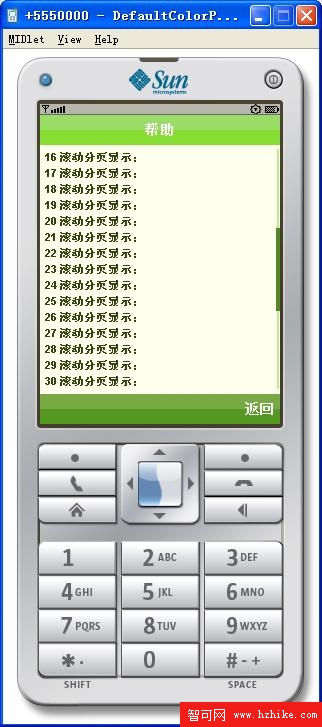
圖 1 滾動顯示效果