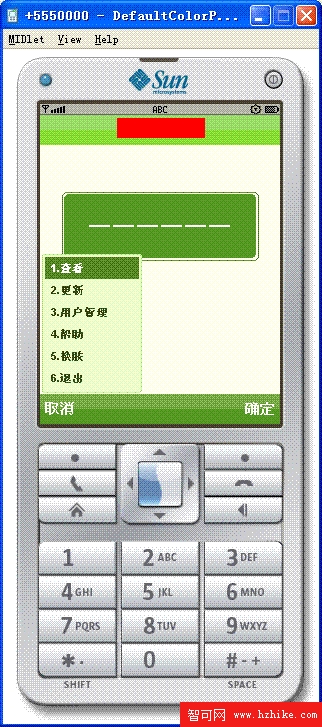
手機程式中選單用途極廣,Java ME 中如何繪製選單?下面分享實現的選單功能,效果如圖所示:
package com.token.view.components;

public class Color {
    public static int strong = 0xFF8C00;
    public static int warning1 = 0xFF4500;
    public static int warning2 = 0xFF0000;
    public static int error = 0xFF0000;
    public static int background = 0xF0FAE6;
    public static int menuFrame = 0xB8E58A;
    public static int label = 0xF0F8FF;
    public static int text = 0x314F12;
    public static int selectText = 0xFFFFFF;
    public static int selectBg = 0x548720;
    public static int cmdBarTop = 0x9FDB63;
    public static int cmdBarBottom = 0x81D130;
    public static int menuBg = 0xE0F5CB;
    public static int cmdSelectTop = 0x7DAB4F;
    public static int cmdSelectBottom = 0x5B9422;
    public static int linkClick = 0xFF0000;
    public static int frame = 0x458B00;
    public static int frameBg = 0x556B2F;
    public static final int GREY = 0xBBBBBB;
    public static final int BLACK = 0x0;
    public static final int WHITE = 0xFFFFFF;
    public static final int TRANSLUCENCY_WRITE = 0x55FFFFFF;
    public static final int TRANSLUCENCY_BLACK = 0x55000000;
    public static final byte STYLE_RED = 0;
    public static final byte STYLE_ORANGE = 1;
    public static final byte STYLE_YELLOW = 2;
    public static final byte STYLE_GREEN = 3;
    public static final byte STYLE_LIME = 4;
    public static final byte STYLE_CYAN = 5;
    public static final byte STYLE_AQUA = 6;
    public static final byte STYLE_SKY_BLUE = 7;
    public static final byte STYLE_BLUE = 8;
    public static final byte STYLE_PURPLE = 9;
    public static final byte STYLE_FUCHSIA = 10;
    public static final byte STYLE_MAGENTA = 11;
    public static final byte STYLE_BLACK = 12;
    public static int colorName = STYLE_GREEN;

    // 以下省略各風格顏色配置方法(redColor, orangeColor, ... blackColor)與切換邏輯
    // 完整代碼見原文
}
完整顏色風格切換代碼較長,此處僅列出核心常數與結構,詳細實現請參考原文。