WinInet/URLMon 雖方便,但難以精細控制:斷點續傳、自定 Header、超時策略、代理認證等。本文實作一個 CHttpSocket 類別,直接操作 TCP Socket 實現 HTTP/1.1 下載,封裝為 DLL 供上層呼叫。
GET /index.html HTTP/1.1\r\n
Host: www.example.com\r\n
Accept: */*\r\n
User-Agent: Mozilla/4.0 (compatible; MSIE 5.00; Windows 98)\r\n
Connection: Keep-Alive\r\n
Range: bytes=999-\r\n        ← 斷點續傳關鍵:從第 1000 字節開始
\r\n                                   ← 必須以空行結束
class CHttpSocket {
public:
    // 連線管理
    BOOL Socket(int nType = SOCK_STREAM);
    BOOL Connect(LPCTSTR pszHost, UINT nPort = 80);
    void Close();

    // Request 組裝與發送
    const char* FormatRequestHeader(
        char* pServer, char* pObject, long& nLength,
        char* pCookie = NULL, char* pReferer = NULL,
        long nFrom = 0, long nTo = -1, int nServerType = 0);
    BOOL SendRequest(const char* pRequest, long nLength);

    // Response 解析
    int GetServerState();                    // 200, 302, 404...
    int GetField(const char* szField, char* szValue, int nMaxLen); // 取單一欄位
    const char* GetResponseHeader(int& nLength); // 取完整 Header

    // 資料接收
    int Receive(void* pBuf, int nLen, int nFlags = 0);

    // 超時設定
    void SetSendTimeout(int nMs);
    void SetRecvTimeout(int nMs);
};
const char* CHttpSocket::FormatRequestHeader(...) {
    // 第1行
    strcat(m_req, "GET "); strcat(m_req, pObject); strcat(m_req, " HTTP/1.1\r\n");
    // Host
    strcat(m_req, "Host: "); strcat(m_req, pServer); strcat(m_req, "\r\n");
    // Referer (可選)
    if (pReferer) { strcat(m_req, "Referer: "); strcat(m_req, pReferer); strcat(m_req, "\r\n"); }
    // Accept
    strcat(m_req, "Accept: */*\r\n");
    // User-Agent
    strcat(m_req, "User-Agent: Mozilla/4.0 (compatible; MSIE 5.00; Windows 98)\r\n");
    // Connection
    strcat(m_req, "Connection: Keep-Alive\r\n");
    // Cookie (可選)
    if (pCookie) { strcat(m_req, "Cookie: "); strcat(m_req, pCookie); strcat(m_req, "\r\n"); }
    // Range (斷點續傳)
    if (nFrom > 0) {
        strcat(m_req, "Range: bytes=");
        char sz[20]; _ltoa(nFrom, sz, 10); strcat(m_req, sz); strcat(m_req, "-");
        if (nTo > nFrom) { _ltoa(nTo, sz, 10); strcat(m_req, sz); }
        strcat(m_req, "\r\n");
    }
    // 空行結束
    strcat(m_req, "\r\n");
    nLength = strlen(m_req);
    return m_req;
}
HTTP/1.1 200 OK → GetServerState() 回傳 200Content-Length:檔案總大小 (若無則可能為 Chunked 編碼)Location:3xx 重導向新網址Accept-Ranges: bytes:伺服器支援斷點續傳Last-Modified:檔案修改時間,供快取驗證\r\n 結束,其後為實體內容AfxParseURL() 解析 URL → 主機/埠/路徑Socket() → Connect()FormatRequestHeader() 組裝 Request (含 Range 斷點)SendRequest() 發送GetServerState() 檢查 2xxGetField("Content-Length") 取得檔案大小Receive() 寫入檔案,直到收滿 Content-Length 或連線關閉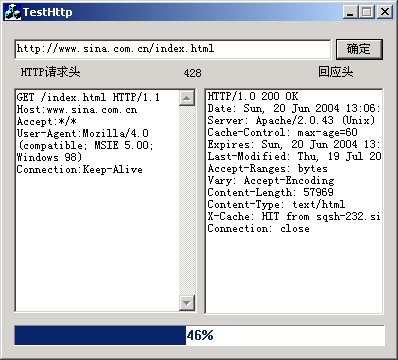
AfxBeginThread)PostMessage(WM_USER_PROGRESS, ...) 至 UI 執行緒Close() 關閉 Socket完整原始碼 (含 DLL 專案與測試對話框) 請參考本文配套下載。此實作為理解 HTTP 協議、Socket 程式設計、斷點續傳機制的優秀教學範例。