Windows 內建搜尋採循序掃描,面對深層目錄結構效率低落。本文實作一個採用多執行緒平行搜尋的 MFC 類別 CRapidFinder,大幅提升檔案查找速度,並提供暫停/繼續/停止等完整控制介面。
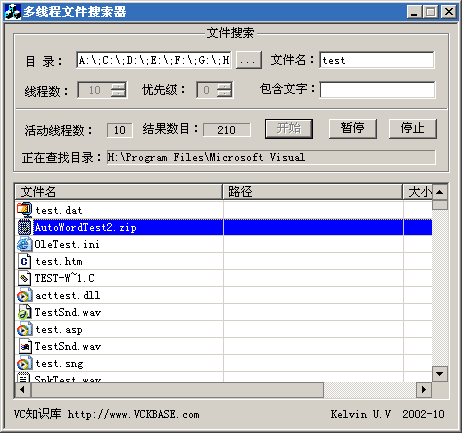
// 設定搜尋參數:主視窗句柄、檔名模式、起始路徑
void FinderSet(HWND MainHwnd, CString MatchName = "*.*", CString MatchDir = "");

// 設定執行緒數量與優先級
void ThreadSet(LONG MaxThreadCount = 5, int priority = 0);

// 搜尋選項設定
void FinderOption(FINDEROPTION FinderOption);

// 控制介面
BOOL StartFinder();   // 開始搜尋
void PauseFinder();   // 暫停
void ResumeFinder();  // 繼續
void StopFinder();    // 停止
void FinderReset();   // 重置
每個工作執行緒透過 PostMessage 向 UI 執行緒發送自訂訊息,回報進度與結果:
| 訊息 | 用途 | WPARAM | LPARAM |
|---|---|---|---|
WM_THREADEXIT | 執行緒結束 | 結束代碼 | - |
WM_THREADCOUNT | 活動執行緒數 | 執行緒數 | - |
WM_FINDERITEM | 搜尋結果 | 結果字串指標 | 檔案屬性 |
WM_THREADPAUSE | 程式暫停通知 | - | - |
WM_FINDERFOLDER | 目前掃描目錄 | 目錄字串指標 | - |
共享資源 CStringList m_DirList 作為「待掃描目錄佇列」:
WM_FINDERITEM單純檢查佇列為空不足夠,因為活動執行緒可能正在產生新目錄。真正結束條件:
m_DirList.IsEmpty() && m_ActiveCount == 0
其中 m_ActiveCount 以 InterlockedIncrement/Decrement 維護,記錄「正在掃描中」的執行緒數。
ThreadProc 精簡邏輯DWORD WINAPI CRapidFinder::ThreadProc(LPVOID lpParam) {
CRapidFinder* finder = (CRapidFinder*)lpParam;
CFileFind filefinder;
CStringList filelist;
CString PathStr, CurPath;
BYTE bNewActive = 1, bOldActive;
CString* lpFolder = new CString;
while (1) {
bOldActive = bNewActive;
// 檢查退出事件
if (WaitForSingleObject(finder->m_hExitEvent, 0) != WAIT_TIMEOUT) {
if (bOldActive) InterlockedDecrement(&finder->m_ActiveCount);
PostMessage(finder->m_MainhWnd, WM_THREADCOUNT, finder->m_ActiveCount, 0);
break;
}
// 無活動執行緒且佇列空 -> 結束
if (!finder->m_ActiveCount) {
SetEvent(finder->m_hExitEvent);
finder->m_ExitCode = finder->EXIT;
break;
}
// 從佇列取目錄(臨界區保護)
EnterCriticalSection(&finder->m_gCriticalSection);
if (finder->m_DirList.IsEmpty()) bNewActive = 0;
else {
bNewActive = 1;
*lpFolder = finder->m_DirList.RemoveHead();
CurPath = *lpFolder + _T("\\*.*");
}
LeaveCriticalSection(&finder->m_gCriticalSection);
// 活動狀態變化時更新計數
if (bNewActive != bOldActive) {
bNewActive ? InterlockedIncrement(&finder->m_ActiveCount)
: InterlockedDecrement(&finder->m_ActiveCount);
PostMessage(finder->m_MainhWnd, WM_THREADCOUNT, finder->m_ActiveCount, 0);
} else if (!bNewActive) continue;
// 通知 UI 目前掃描目錄
SendMessage(finder->m_MainhWnd, WM_FINDERFOLDER, (WPARAM)lpFolder, 0);
// 掃描檔案與目錄
if (filefinder.FindFile(CurPath)) {
do {
if (!filefinder.FindNextFile()) break;
if (filefinder.IsDots()) continue;
PathStr = filefinder.GetFilePath();
if (filefinder.IsDirectory()) {
EnterCriticalSection(&finder->m_gCriticalSection);
finder->m_DirList.AddTail(PathStr);
LeaveCriticalSection(&finder->m_gCriticalSection);
} else {
filelist.AddTail(PathStr);
}
} while (true);
}
// 比對檔案並回報結果
while (!filelist.IsEmpty()) {
PathStr = filelist.RemoveHead();
if (finder->MatchProc(PathStr))
SendMessage(finder->m_MainhWnd, WM_FINDERITEM, (WPARAM)&PathStr, 0);
}
}
delete lpFolder;
filefinder.Close();
return 0;
}
這是一個多執行緒應用的入門範例,不當之處請各位前輩指正。聯繫信箱:jruv@163.com