複刻 IE 瀏覽器右側側邊欄 (收藏夾/歷史/搜尋) 效果:CDialogBar 衍生 CIEBar,支援自繪 3D 邊框、標題文字、懸停/按下狀態的關閉按鈕、滑鼠拖曳邊框調整寬度 (限制最大寬度為工作區一半)、選單顯示/隱藏切換。
class CIEBar : public CDialogBar {
    // 繪製相關
    CRect m_VirClientRc;     // 虛擬客戶區 (不含邊框)
    CRect m_HideBtnRc;       // 關閉按鈕矩形
    BOOL m_bRaised = FALSE;  // 懸停狀態
    BOOL m_bPressed = FALSE; // 按下狀態
    BOOL m_bResize = FALSE;  // 拖曳調整中
    CToolTipCtrl m_TipCtrl;  // 工具提示

    // 訊息對應
    afx_msg void OnPaint();
    afx_msg void OnMouseMove(UINT nFlags, CPoint point);
    afx_msg void OnLButtonDown(UINT nFlags, CPoint point);
    afx_msg void OnLButtonUp(UINT nFlags, CPoint point);
    afx_msg void OnTimer(UINT nIDEvent); // 拖曳時繪製虛線框
    DECLARE_MESSAGE_MAP()
};
OnPaint
void CIEBar::OnPaint() {
    CPaintDC dc(this);
    CRect rcClient; GetClientRect(&rcClient);

    // 1. 繪製 3D 邊框 (DrawFrm)
    dc.Draw3dRect(&rcClient, GetSysColor(COLOR_3DHILIGHT), GetSysColor(COLOR_3DSHADOW));
    rcClient.DeflateRect(1,1);
    dc.Draw3dRect(&rcClient, GetSysColor(COLOR_3DLIGHT), GetSysColor(COLOR_3DDKSHADOW));

    // 2. 繪製標題文字 (DrawTitleTxt)
    CRect rcTitle = rcClient;
    rcTitle.bottom = rcTitle.top + 20;
    dc.SetBkMode(TRANSPARENT);
    dc.DrawText(_T("收藏夾"), &rcTitle, DT_CENTER|DT_VCENTER|DT_SINGLELINE);

    // 3. 繪製關閉按鈕 (DrawHideBtn)
    m_HideBtnRc = CRect(rcClient.right - 20, rcClient.top + 2, rcClient.right - 2, rcClient.top + 18);
    m_TipCtrl.AddTool(this, _T("關閉"), m_HideBtnRc, 1);

    dc.SelectStockObject(NULL_BRUSH);
    if (m_bRaised)
        dc.Draw3dRect(&m_HideBtnRc, GetSysColor(COLOR_BTNHIGHLIGHT), GetSysColor(COLOR_BTNSHADOW));
    else if (m_bPressed)
        dc.Draw3dRect(&m_HideBtnRc, GetSysColor(COLOR_BTNSHADOW), GetSysColor(COLOR_BTNHIGHLIGHT));

    HICON hIcon = AfxGetApp()->LoadIcon(IDI_HIDE_BTN);
    ::DrawIconEx(dc.m_hDC, m_HideBtnRc.left, m_HideBtnRc.top, hIcon, 16, 16, 0, NULL, DI_NORMAL);
}
OnMouseMove
void CIEBar::OnMouseMove(UINT nFlags, CPoint point) {
    // 關閉按鈕懸停/離開
    BOOL bInBtn = m_HideBtnRc.PtInRect(point);
    if (bInBtn && !m_bRaised) { m_bRaised = TRUE; InvalidateRect(m_HideBtnRc); }
    else if (!bInBtn && m_bRaised) { m_bRaised = FALSE; InvalidateRect(m_HideBtnRc); }

    // 拖曳調整寬度
    if (m_bResize) {
        // 繪製虛線框回饋 (XOR 模式)
        CDC* pDC = GetDC();
        pDC->DrawDragRect(&m_DragRect, CSize(2,2), &m_LastDragRect, CSize(2,2));
        m_LastDragRect = m_DragRect;
        ReleaseDC(pDC);
    }

    CDialogBar::OnMouseMove(nFlags, point);
}
OnLButtonDown
void CIEBar::OnLButtonDown(UINT nFlags, CPoint point) {
    // 判斷是否在右側邊框區域 (可調整寬度)
    CRect rcResize = m_VirClientRc;
    rcResize.left = rcResize.right;
    rcResize.right += IE_FRM_WIDTH; // 例如 4 像素

    if (rcResize.PtInRect(point)) {
        m_bResize = TRUE;
        SetCapture();
        GetWindowRect(&m_DragRect);
        m_LastDragRect = m_DragRect;
    }
    CDialogBar::OnLButtonDown(nFlags, point);
}
OnLButtonUp
void CIEBar::OnLButtonUp(UINT nFlags, CPoint point) {
    if (m_bResize) {
        ReleaseCapture();
        m_bResize = FALSE;
        // 計算新寬度,限制不超過工作區一半
        int newWidth = point.x - m_VirClientRc.left;
        CRect rcWork; SystemParametersInfo(SPI_GETWORKAREA, 0, &rcWork, 0);
        int maxWidth = rcWork.Width() / 2;
        if (newWidth > maxWidth) newWidth = maxWidth;
        if (newWidth < 100) newWidth = 100;

        // 重設 DialogBar 寬度
        CRect rcBar; GetWindowRect(&rcBar);
        GetParent()->ScreenToClient(&rcBar);
        rcBar.right = rcBar.left + newWidth;
        MoveWindow(&rcBar);
        GetDockingFrame()->RecalcLayout();
    }
    else if (m_HideBtnRc.PtInRect(point)) {
        // 點擊關閉按鈕
        GetDockingFrame()->ShowControlBar(this, FALSE, FALSE);
    }
    CDialogBar::OnLButtonUp(nFlags, point);
}
CMainFrame::OnCreate
int CMainFrame::OnCreate(LPCREATESTRUCT lpCreateStruct) {
    if (CMDIFrameWnd::OnCreate(lpCreateStruct) == -1) return -1;

    if (!m_IEBar.Create(this, IDD_IEBAR, CBRS_LEFT, 100) || !m_IEBar.InitIEBar())
        return -1;

    // 加入樹狀控制項示範
    CTreeCtrl* pTree = m_IEBar.GetTreeCtrl();
    pTree->ModifyStyle(0, TVS_HASLINES|TVS_LINESATROOT|TVS_HASBUTTONS);
    HTREEITEM hRoot = pTree->InsertItem(_T("根節點"));
    for (int i=0; i<40; ++i)
        pTree->InsertItem(_T("節點 ") + std::to_string(i+1).c_str(), hRoot);

    m_IEBar.EnableDocking(CBRS_ORIENT_HORZ);
    DockControlBar(&m_IEBar);
    return 0;
}
void CMainFrame::OnViewIEBar() {
    ShowControlBar(&m_IEBar, !m_IEBar.IsVisible(), FALSE);
}

void CMainFrame::OnUpdateViewIEBar(CCmdUI* pCmdUI) {
    pCmdUI->SetCheck(m_IEBar.IsVisible());
}
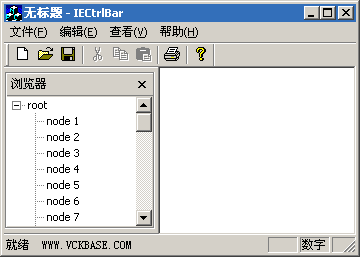
CDialogBar 獲得停靠/浮動/佈局管理能力完整原始碼請參考本文配套下載。此控制項可直接移植至任何 SDI/MDI 專案,亦可擴充為通用側邊欄容器。