org.eclipse.swt.custom.ViewForm 是 SWT 中一個功能強大的佈局容器,繼承自 Composite,專門用於管理頂部、底部、左側、右側及中心區域的控件佈局。本文通過完整代碼示例,演示如何使用 ViewForm 構建帶工具欄的表格界面。
package swt_jface.demo9;

import org.eclipse.swt.SWT;
import org.eclipse.swt.custom.ViewForm;
import org.eclipse.swt.layout.FillLayout;
import org.eclipse.swt.widgets.Display;
import org.eclipse.swt.widgets.Label;
import org.eclipse.swt.widgets.Shell;

public class ViewFormExample {
    Display display = new Display();
    Shell shell = new Shell(display);

    public ViewFormExample() {
        shell.setLayout(new FillLayout());

        final ViewForm viewForm = new ViewForm(shell, SWT.BORDER);
        Label label = new Label(viewForm, SWT.NONE);
        label.setText("Top center");

        viewForm.setTopCenter(label); // 設置頂部居中區域
        shell.setSize(400, 200);
        shell.open();

        while (!shell.isDisposed()) {
            if (!display.readAndDispatch()) display.sleep();
        }
        display.dispose();
    }

    public static void main(String[] args) {
        new ViewFormExample();
    }
}
關鍵點:ViewForm 提供 setTopLeft、setTopCenter、setTopRight、setBottomLeft、setBottomCenter、setBottomRight、setLeftTop、setLeftCenter、setLeftBottom、setRightTop、setRightCenter、setRightBottom 以及 setContent 等方法,靈活控制各區域控件。
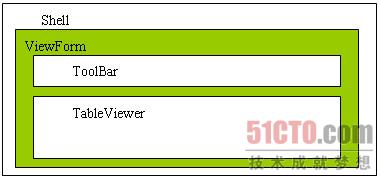
在實際開發中,常需在表格上方放置工具欄。將原本直接建立在 Shell 上的 TableViewer 改為建立在 ViewForm 內,並將工具欄置於頂部左側。
shell.setLayout(new FillLayout());
ViewForm viewForm = new ViewForm(shell, SWT.NONE);
viewForm.setLayout(new FillLayout());

// 1. 創建 TableViewer,父容器改為 viewForm
final TableViewer tv = new TableViewer(viewForm, SWT.BORDER | SWT.FULL_SELECTION);
// ... 省略 TableViewer 列設置、數據綁定代碼 ...

// 2. 創建工具欄
ToolBar toolBar = new ToolBar(viewForm, SWT.FLAT);
ToolBarManager toolBarManager = new ToolBarManager(toolBar);
actionGroup.fillActionToolBars(toolBarManager); // 將 Action 注入工具欄

// 3. 設置佈局:中心區域放表格,頂部左側放工具欄
viewForm.setContent(tv.getControl());    // 主體內容
viewForm.setTopLeft(toolBar);            // 頂部工具欄

shell.open();
| 區域設置方法 | 適用場景 |
|---|---|
setContent(Control) | 中心主內容區域(表格、樹、編輯器等) |
setTopLeft/TopCenter/TopRight | 頂部工具欄、標題、搜索框 |
setBottomLeft/BottomCenter/BottomRight | 狀態欄、分頁導航、按鈕組 |
setLeftTop/LeftCenter/LeftBottom | 左側導航樹、過濾面板 |
setRightTop/RightCenter/RightBottom | 右側屬性面板、預覽區 |
FillLayout 或 GridLayout。ToolBarManager 管理 Action,解耦業務邏輯。setContent(newControl) 並配合 layout() 刷新。SWT.BORDER 可視需求開啟。ViewForm 以其清晰的區域劃分,極大簡化了複雜界面的佈局代碼,是 SWT/JFace 開發中不可或缺的容器組件。