控制反轉(IoC)隨著輕量級容器的普及成為 Java 開發標配。Struts 2 早期版本(WebWork 2.2 前)自帶 IoC 容器,後因 Spring 生態壯大,決定委託 Spring 管理依賴。本文通過完整示例演示如何在 Struts 2 中整合 Spring 實現 IoC。
在專案構建路徑中加入 Spring 必需 JAR 包(建議按需引入模組化 JAR,如 spring-core、spring-beans、spring-context、spring-web 等),避免引入不必要的依賴。
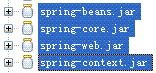
圖 1 所依賴的 Spring 的 jar 包
<?xml version="1.0" encoding="UTF-8"?>
<web-app version="2.4" xmlns="https://java.sun.com/xml/ns/j2ee"
 xmlns:xsi="https://www.w3.org/2001/XMLSchema-instance"
 xsi:schemaLocation="https://java.sun.com/xml/ns/j2ee https://java.sun.com/xml/ns/j2ee/web-app_2_4.xsd">
 <display-name> Struts 2 IoC Demo </display-name>
 <filter>
  <filter-name> struts-cleanup </filter-name>
  <filter-class> org.apache.struts2.dispatcher.ActionContextCleanUp </filter-class>
 </filter>
 <filter>
  <filter-name> struts2 </filter-name>
  <filter-class> org.apache.struts2.dispatcher.FilterDispatcher </filter-class>
 </filter>
 <filter-mapping>
  <filter-name> struts-cleanup </filter-name>
  <url-pattern> /* </url-pattern>
 </filter-mapping>
 <filter-mapping>
  <filter-name> struts2 </filter-name>
  <url-pattern> /* </url-pattern>
 </filter-mapping>
 <!-- 關鍵:Spring 容器啟動監聽器 -->
 <listener>
  <listener-class> org.springframework.web.context.ContextLoaderListener </listener-class>
 </listener>
 <welcome-file-list>
  <welcome-file> index.html </welcome-file>
 </welcome-file-list>
</web-app>struts.objectFactory = spring<?xml version="1.0" encoding="UTF-8"?>
<beans xmlns="https://www.springframework.org/schema/beans"
xmlns:xsi="https://www.w3.org/2001/XMLSchema-instance"
xsi:schemaLocation="https://www.springframework.org/schema/beans https://www.springframework.org/schema/beans/spring-beans-2.0.xsd">
<!-- Service 實現,默認單例 -->
<bean id="chatService" class="tutorial.ChatServiceImpl" />
<!-- Action 配置為 prototype,確保每次請求創建新實例 -->
<bean id="chatAction" class="tutorial.ChatAction" scope="prototype">
<property name="chatService">
<ref local="chatService" />
</property>
</bean>
</beans><!DOCTYPE struts PUBLIC
"-//Apache Software Foundation//DTD Struts Configuration 2.0//EN"
"https://struts.apache.org/dtds/struts-2.0.dtd">
<struts>
<include file="struts-default.xml" />
<package name="Struts2_IoC" extends="struts-default">
<!-- class 屬性對應 Spring bean id,而非類全名 -->
<action name="Chat" class="chatAction">
<result> /UserList.jsp </result>
</action>
</package>
</struts>// ChatService.java
package tutorial;
import java.util.Set;
public interface ChatService {
Set<String> getUserNames();
}
// ChatServiceImpl.java
package tutorial;
import java.util.HashSet;
import java.util.Set;
public class ChatServiceImpl implements ChatService {
public Set<String> getUserNames() {
Set<String> users = new HashSet<String>();
users.add("Max");
users.add("Scott");
users.add("Bob");
return users;
}
}package tutorial;
import java.util.Set;
import com.opensymphony.xwork2.ActionSupport;
public class ChatAction extends ActionSupport {
private static final long serialVersionUID = 8445871212065L;
private ChatService chatService;
private Set<String> userNames;
public void setChatService(ChatService chatService) {
this.chatService = chatService;
}
public Set<String> getUserNames() {
return userNames;
}
@Override
public String execute() {
userNames = chatService.getUserNames();
return SUCCESS;
}
}<%@ page contentType="text/html; charset=UTF-8" %>
<%@ taglib prefix="s" uri="/struts-tags" %>
<html>
<head><title>User List</title></head>
<body>
<h2>User List</h2>
<ol>
<s:iterator value="userNames">
<li><s:property /></li>
</s:iterator>
</ol>
</body>
</html>啟動應用,訪問 https://localhost:8080/Struts2_IoC/Chat.action,頁面顯示用戶列表:
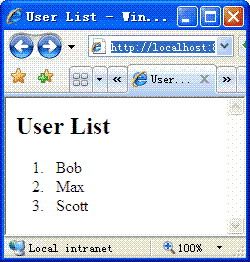
圖 2 用戶列表頁面
scope="prototype"。總結:通過 Spring 管理 Struts 2 Action 及其依賴是推薦做法,也可整合 Pico 等其他容器。