現代應用越來越重視可擴展性,Microsoft Office 的 VBA 即經典案例。腳本引擎讓最終用戶無需重新編譯部署即可定制業務邏輯。本文介紹輕量級、純 Java 實現的 BeanShell,展示如何將其嵌入應用賦予動態擴展能力。
| 語言 | Java 實現 | 特點 |
|---|---|---|
| JavaScript | Rhino | 標準 JS,廣泛使用 |
| Python | Jython | 完整 Python 語法 |
| Tcl/Tk | Jacl | 嵌入式傳統選擇 |
| Java 本身 | BeanShell | 語法與 Java 幾乎一致,零學習成本 |
BeanShell 的優勢在於:語法兼容 Java、可嵌入、同 JVM 共享對象引用、支持動態類型。
foo = "Foo";
four = (2 + 2) * 2 / 2;
print(foo + " = " + four); // print() 是內置命令

// 循環
for (i = 0; i < 5; i++) print(i);

// 直接使用 Swing API
button = new JButton("My Button");
frame = new JFrame("My Frame");
frame.getContentPane().add(button, "Center");
frame.pack();
frame.setVisible(true);
// 方法定義(可省略類型)
int multiply(a, b) { return a * b; }
print(multiply(12, 14)); // 168

// 對象定義:方法嵌套 + 返回 this
Employee() {
    age = 26; sex = "M"; name = "Turbo";
    int getAge() { return age; }
    String getSex() { return sex; }
    String getName() { return name; }
    return this;
}
turbo = Employee();
print("Name: " + turbo.getName());
核心類:bsh.Interpreter
import bsh.*;

Interpreter bsh = new Interpreter();

// 表達式求值
bsh.eval("foo = Math.sin(0.5)");
bsh.eval("bar = foo * 5; bar = Math.cos(bar);");

// 執行語句塊
bsh.eval("for(int i=0; i<10; i++) { System.out.println(\"hello\"); }");

// 載入腳本文件
bsh.source("myscript.bsh");

// 變量交互:set/get/eval
bsh.set("date", new Date());
Date date = (Date) bsh.get("date");
// 或
Date date = (Date) bsh.eval("date");

// 實現 Java 介面(如事件監聽)
bsh.eval("actionPerformed(e) { print(e); }");
ActionListener handler = (ActionListener) bsh.eval("return (ActionListener) this");
new JButton().addActionListener(handler);
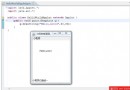
基於 JDK 1.4 demo 中的 Notepad,無修改源碼情況下動態添加「Script Editor」菜單。
public class BeanShell {
    private static NameSpace namespace;
    private static boolean running;
    private static Notepad notepad;

    public static void initBeanShell(Notepad pad) {
        notepad = pad;
        namespace = new NameSpace("Notepad embedded scripting engine.");
    }

    public static void runScript(String script) { /* ... */ }

    public static void runScript(String scriptInfo, Reader reader) {
        Interpreter interpreter = new Interpreter(reader, System.out, System.out, true, namespace);
        try {
            if (notepad != null) {
                JTextComponent editor = notepad.getEditor();
                interpreter.set("application", notepad); // 暴露應用對象
                interpreter.set("editor", editor);       // 暴露編輯器組件
                running = true;
                interpreter.eval(reader, namespace, scriptInfo);
            }
        } catch (Throwable t) {
            // 錯誤處理...
        } finally { running = false; }
    }
}
Notepad notepad = new Notepad();
JMenu editMenu = new JMenu("Script Editor");
JMenuItem editItem = new JMenuItem();
editMenu.add(editItem);
editItem.setAction(new ScriptEditorAction(notepad));
notepad.getMenubar().add(editMenu); // 直接操作菜單欄
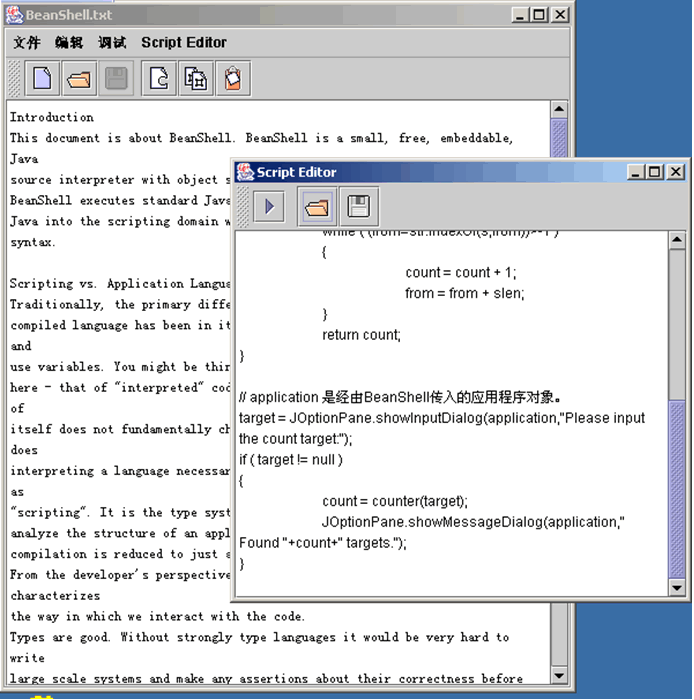
counter(s) {
    str = editor.getText().toLowerCase();
    s = s.toLowerCase();
    count = 0; from = 0; slen = s.length();
    while ((from = str.indexOf(s, from)) > -1) {
        count++; from += slen;
    }
    return count;
}

target = JOptionPane.showInputDialog(application, "Please input the count target:");
if (target != null) {
    count = counter(target);
    JOptionPane.showMessageDialog(application, "Found " + count + " targets.");
}
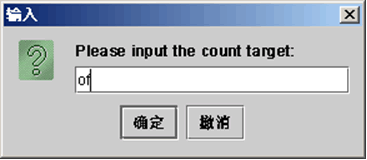
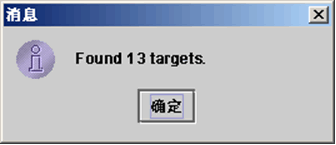
BeanShell 以 ~200KB 體積 提供了完整的 Java 動態執行能力。通過 Interpreter.set() 暴露應用核心對象,用戶腳本即可操控應用內部狀態。這種「同 JVM 共享引用」的特性,使其成為 Java 應用添加腳本擴展的極佳選擇——無論是宏錄製、規則引擎、還是用戶自定義邏輯。