承接前文隊列窗口設計,本文深入剖析 FTP 客戶端的上傳/下載管理模塊:從用戶觸發動作、任務入隊、後台線程處理、遞歸遍歷目錄、進度回調到異常處理的完整鏈路。
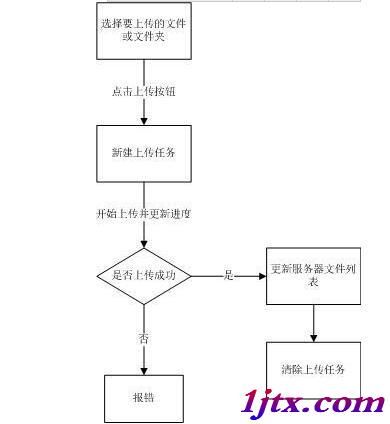
UploadActionpublic class UploadAction implements ActionListener {
private final LocalPanel localPanel;
@Override
public void actionPerformed(ActionEvent evt) {
int[] selRows = localPanel.localDiskTable.getSelectedRows();
if (selRows.length == 0) {
JOptionPane.showMessageDialog(localPanel, "請選擇上傳的文件或文件夾");
return;
}
String pwd = localPanel.frame.getFtpPanel().getPwd(); // 遠程當前目錄
FtpFile ftpFile = new FtpFile("", pwd, true);
Queue<Object[]> queue = localPanel.queue;
for (int row : selRows) {
Object val = localPanel.localDiskTable.getValueAt(row, 0);
if (val instanceof DiskFile) {
queue.offer(new Object[] { val, ftpFile }); // {本地文件, 遠程目標目錄}
}
}
}
}
UploadThread.run()public void run() {
while (conRun) {
try {
Thread.sleep(1000);
Queue<Object[]> queue = localPanel.queue;
Object[] queueValues = queue.peek();
if (queueValues == null) continue;
File localFile = (File) queueValues[0];
FtpFile remoteDir = (FtpFile) queueValues[1];
if (localFile != null) {
selPath = localFile.getParent();
copyFile(localFile, remoteDir); // 遞歸上傳
localPanel.frame.getFtpPanel().refreshCurrentFolder(); // 刷新遠程列表
}
// 任務完成移除隊列
Object[] now = queue.peek();
if (queueValues == null || now == null || !queueValues[0].equals(now[0])) continue;
queue.remove();
} catch (Exception e) { e.printStackTrace(); }
}
}
copyFile()private void copyFile(File file, FtpFile ftpFile) {
// 暫停檢查
while (localPanel.frame.getQueuePanel().isStop()) Thread.sleep(1000);
// 隊列頂部任務變更檢查
if (taskChanged()) return;
try {
String relPath = file.getParentFile().getPath().replace(selPath, "").replace("\\", "/");
ftpFile.setName(relPath);
String remotePath = ftpFile.getAbsolutePath();
if (file.isFile()) {
// ---- 文件上傳 ----
String remoteFile = remotePath + "/" + file.getName();
double mb = file.length() / Math.pow(1024, 2);
ProgressArg progress = new ProgressArg((int)(file.length()/1024), 0, 0);
String size = String.format("%.4f MB", mb);
UploadPanel up = localPanel.frame.getUploadPanel();
up.addRow(new Object[]{file.getAbsoluteFile(), size, remoteFile, ftpClient.getServer(), progress});
try (OutputStream put = ftpClient.put(remoteFile);
FileInputStream fis = new FileInputStream(file)) {
byte[] buf = new byte[1024];
int len;
while ((len = fis.read(buf)) > 0) {
Thread.sleep(0, 30); // 限速
put.write(buf, 0, len);
progress.setValue(progress.getValue() + 1);
}
progress.setValue(progress.getMax());
}
} else if (file.isDirectory()) {
// ---- 目錄遞歸 ----
String dirPath = file.getPath().replace(selPath, "").replace("\\", "/");
ftpFile.setName(dirPath);
ftpClient.cd(localPanel.frame.getFtpPanel().getPwd());
ftpClient.sendServer("MKD " + dirPath + "\r\n");
ftpClient.readServerResponse();
// 權限檢查:若遠程目錄創建失敗,退回到當前目錄
File check = new File(localPanel.frame.getFtpPanel().getPwd() + dirPath);
if (!check.exists()) ftpFile.setName(localPanel.frame.getFtpPanel().getPwd());
for (File sub : file.listFiles()) {
Thread.sleep(0, 50);
copyFile(sub, ftpFile);
}
}
} catch (Exception ex) { ex.printStackTrace(); }
}
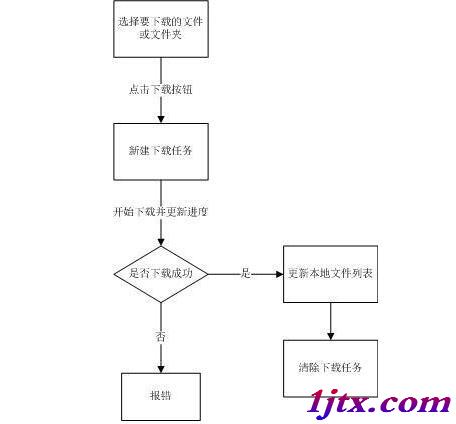
DownActionpublic class DownAction implements ActionListener {
private final FtpPanel ftpPanel;
@Override
public void actionPerformed(ActionEvent e) {
int[] rows = ftpPanel.ftpDiskTable.getSelectedRows();
if (rows.length == 0) return;
File localDir = ftpPanel.frame.getLocalPanel().getCurrentFolder();
for (int row : rows) {
FtpFile f = (FtpFile) ftpPanel.ftpDiskTable.getValueAt(row, 0);
if (f != null) ftpPanel.queue.offer(new Object[] { f, localDir });
}
}
}
DownThread.run()public void run() {
while (conRun) {
try {
Thread.sleep(1000);
ftpClient.noop(); // 保持連接
Object[] qv = ftpPanel.queue.peek();
if (qv == null) continue;
FtpFile f = (FtpFile) qv[0];
File local = (File) qv[1];
if (f != null) {
path = f.getPath();
ftpClient.cd(path);
downFile(f, local);
path = null;
ftpPanel.frame.getLocalPanel().refreshCurrentFolder();
}
Object[] now = ftpPanel.queue.peek();
if (qv == null || now == null || !qv[0].equals(now[0])) continue;
ftpPanel.queue.poll();
} catch (Exception e) { e.printStackTrace(); }
}
}
downFile()private void downFile(FtpFile file, File localFolder) {
while (ftpPanel.frame.getQueuePanel().isStop()) Thread.sleep(1000);
if (taskChanged()) return;
try {
String rel = file.getAbsolutePath().replaceFirst(path + "/", "");
if (file.isFile()) {
// ---- 文件下載 ----
try (TelnetInputStream is = ftpClient.get(file.getName());
FileOutputStream fos = new FileOutputStream(new File(localFolder, rel), true)) {
double mb = file.getLongSize() / Math.pow(1024, 2);
ProgressArg progress = new ProgressArg((int)(file.getLongSize()/1024), 0, 0);
String size = String.format("%.4f MB", mb);
DownloadPanel dp = ftpPanel.frame.getDownloadPanel();
dp.addRow(new Object[]{rel, size, new File(localFolder, rel).getAbsolutePath(), ftpClient.getServer(), progress});
byte[] buf = new byte[1024];
int len;
while ((len = is.read(buf)) > 0) {
Thread.sleep(0, 30);
fos.write(buf, 0, len);
progress.setValue(progress.getValue() + 1);
}
progress.setValue(progress.getMax());
}
} else {
// ---- 目錄遞歸 ----
File dir = new File(localFolder, rel);
dir.mkdirs();
ftpClient.cd(file.getName());
// 解析 LIST 返回的原始行
try (TelnetInputStream lis = ftpClient.list()) {
byte[] raw = new byte[2048];
int n = lis.read(raw);
int i = 0, j = 0;
while (i < n) {
if (raw[i] == 10 || raw[i] == 13) { // 換行符
String line = new String(raw, j, i - j);
j = i + (raw[i] == 13 ? 2 : 1);
if (line.isEmpty()) break;
String[] parts = line.split("\\s+");
if (parts.length > 8 && !".".equals(parts[8]) && !"..".equals(parts[8])) {
String fname = parts[8];
FtpFile sub = new FtpFile();
sub.setName(fname);
sub.setPath(file.getAbsolutePath());
sub.setSize(line.startsWith("d") ? "" : parts[4]);
downFile(sub, localFolder);
}
} else i++;
}
}
ftpClient.cdUp();
}
} catch (Exception ex) { ex.printStackTrace(); }
}
ProgressArg 封裝總量/當前值,配合自定義渲染器實時顯示進度條完整效果圖請參考系列文章「FTP軟件效果圖預覽之上傳功能(三)」與「下載功能(二)」。