使用 `HttpURLConnection` 下載文件時,`conn.getContentLength()` 返回 `-1`,無法獲取文件大小、顯示下載進度。
HTTP 規範:`Content-Length` 標頭非強制。以下情況會缺失:
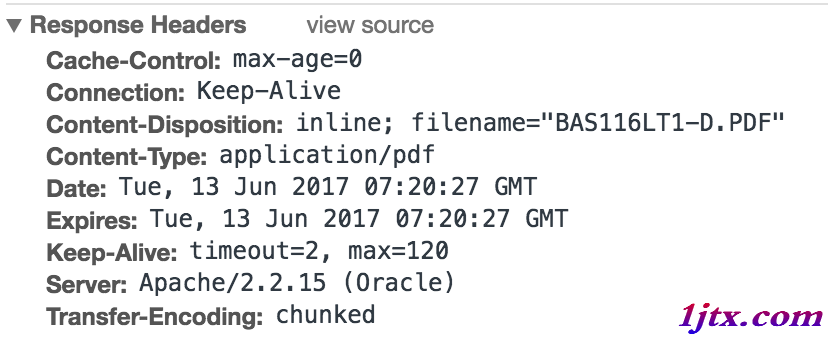
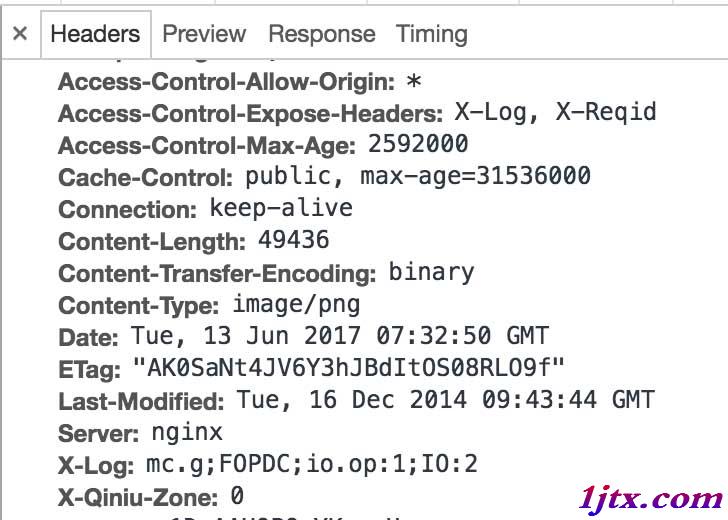
// 1. 設置 User-Agent 模擬瀏覽器
conn.setRequestProperty("User-Agent",
    "Mozilla/5.0 (Macintosh; Intel Mac OS X 10_12_5) AppleWebKit/537.36 (KHTML, like Gecko) Chrome/58.0.3029.110 Safari/537.36");

// 2. 可選:設置代理抓包分析(Fiddler/Charles)
String host = "127.0.0.1";
String port = "8888";
System.setProperty("proxySet", "true");
System.setProperty("proxyHost", host);
System.setProperty("proxyPort", port);
// 關鍵:要求服務端不壓縮,返回原始 Content-Length
conn.setRequestProperty("Accept-Encoding", "identity");
JavaDoc 證明:
By default, this implementation of HttpURLConnection requests that servers use gzip compression. Since getContentLength() returns the number of bytes transmitted, you cannot use that method to predict how many bytes can be read from getInputStream(). Instead, read that stream until it is exhausted: when read() returns -1.
默認請求 gzip 壓縮導致 `getContentLength()` 返回**傳輸字節數**(壓縮後),而非原始文件大小。設置 `identity` 禁用壓縮可獲取真實長度。
public void download(String urlStr, String destPath) throws IOException {
    HttpURLConnection conn = (HttpURLConnection) new URL(urlStr).openConnection();
    conn.setRequestProperty("Accept-Encoding", "identity"); // 禁用壓縮
    conn.setRequestProperty("User-Agent", "Mozilla/5.0...");

    try (InputStream in = conn.getInputStream();
         FileOutputStream out = new FileOutputStream(destPath)) {

        byte[] buffer = new byte[8192];
        int len;
        long total = 0;
        while ((len = in.read(buffer)) != -1) {
            out.write(buffer, 0, len);
            total += len;
            // 這裡可顯示進度:total / (Content-Length > 0 ? Content-Length : total)
        }
    }
}
| 方法 | 適用場景 | 可靠性 |
|---|---|---|
| `conn.getContentLengthLong()` (JDK 8+) | 支持 >2GB 文件 | 同 getContentLength() |
| `conn.getHeaderField("Content-Length")` | 直接讀取標頭字符串 | 同左 |
| HTTP HEAD 請求預檢 | 先發 HEAD 獲取長度,再 GET 下載 | 高(需服務端支持 HEAD) |
| Range 斷點續傳 | 大文件分段下載 | 最高(需服務端支持 Range) |