OSGi 應用由數百 Bundle 組成,版本依賴錯綜複雜。即使使用 Eclipse PDE,搭建特定 Bundle 的編譯環境也極其繁瑣:每次微小修改都需重新配置 Target Platform、解析依賴、導出構建。迫切需要一個**運行時編譯環境**,直接利用容器內已加載的 Bundle 作為編譯類路徑,實現「所見即所依」。
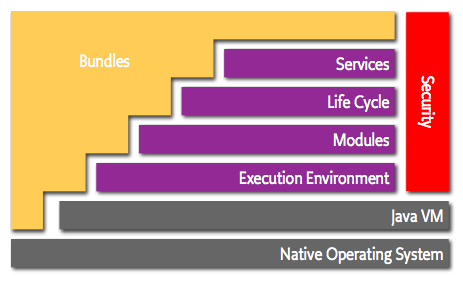
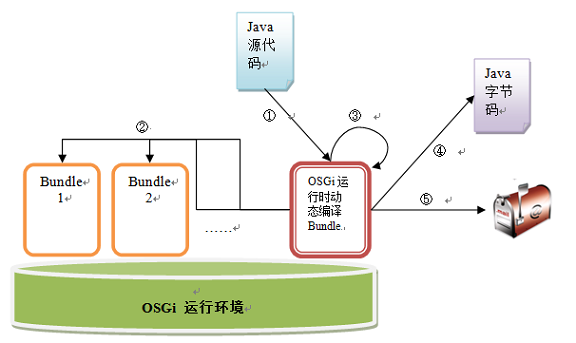
javax.tools.JavaCompiler 進行內存編譯。編譯類路徑需覆蓋以上所有可見類型。
JavaCompiler compiler = ToolProvider.getSystemJavaCompiler();
StandardJavaFileManager fm = compiler.getStandardFileManager(null, null, null);
// 設置編譯類路徑
fm.setLocation(StandardLocation.CLASS_PATH, compileClassPath); // Iterable

// 內存源碼對象
JavaFileObject fo = new InMemoryJavaFileObject(className, sourceCode);
Iterable<? extends JavaFileObject> files = Arrays.asList(fo);

// 編譯任務
StringWriter sw = new StringWriter();
Iterable<String> opts = Arrays.asList("-d", outputDir);
JavaCompiler.CompilationTask task = compiler.getTask(sw, fm, null, opts, null, files);
if (!task.call()) { /* sw.toString() 含錯誤信息 */ }

// 自定義 JavaFileObject
static class InMemoryJavaFileObject extends SimpleJavaFileObject {
    private final String content;
    InMemoryJavaFileObject(String className, String content) {
        super(URI.create("string:///" + className.replace('.', '/') + Kind.SOURCE.extension), Kind.SOURCE);
        this.content = content;
    }
    public CharSequence getCharContent(boolean ignore) { return content; }
}
JRE 環境兼容**:無 tools.jar 時,直接實例化 com.sun.tools.javac.api.JavacTool() 獲取編譯器。
採用三階段掃描策略,結果緩存至靜態 List,容器重啟前只執行一次。
Bundle[] bundles = bundleContext.getBundles();
for (Bundle b : bundles) {
    String loc = b.getLocation(); // 如 "initial@reference:file:plugins/org.eclipse.core.jobs_3.4.1.jar"
    loc = loc.split("@")[loc.split("@").length-1]; // 取 @ 後
    loc = loc.split(":")[loc.split(":").length-1]; // 取 : 後
    File f = new File("./eclipse/" + loc);
    allReferences.add(f);
}
List<String> allJars = searchFiles("..", ".jar"); // 遞歸收集絕對路徑
for (String jar : allJars) {
    File f = new File(jar);
    boolean hasNewer = false;
    for (File exist : allReferences) {
        if (isSameJar(f.getName(), exist.getName()) && isOlderVersion(f.getName(), exist.getName())) {
            hasNewer = true; break;
        }
    }
    if (!hasNewer) allReferences.add(f);
}

// 版本比較邏輯:解析文件名版本段,逐位比較
private boolean isOlderVersion(String a, String b) { ... }
耗時最長(大型應用 ~30s),但保證依賴完備性。
List<String> deepJars = Arrays.asList("com.mycompany.libs"); // 配置前綴
for (File jar : allReferences) {
    for (String prefix : deepJars) {
        if (jar.getName().startsWith(prefix)) {
            JarFile jf = new JarFile(jar);
            Enumeration<JarEntry> entries = jf.entries();
            while (entries.hasMoreElements()) {
                JarEntry e = entries.nextElement();
                if (e.getName().endsWith(".jar")) {
                    // 解壓到臨時目錄
                    File out = new File(tempDir, e.getName());
                    copy(jf.getInputStream(e), new FileOutputStream(out));
                    allReferences.add(out);
                }
            }
        }
    }
}
// 1. 獲取編譯類路徑
Iterable<? extends File> cp = Utils.getCompileClassPath(); // 返回 allReferences

// 2. 編譯
fm.setLocation(StandardLocation.CLASS_PATH, cp);
JavaCompiler.CompilationTask task = compiler.getTask(sw, fm, null, opts, null, files);
if (!task.call()) { log.error(sw); return; }

// 3. 收集輸出 .class 並郵件發送
File outDir = new File(outputDir);
List<File> attachments = Arrays.stream(outDir.listFiles())
    .filter(f -> f.getName().endsWith(".class")).collect(toList());
Utils.sendMail(smtpHost, "DynamicCompileTool", toEmail, attachments);
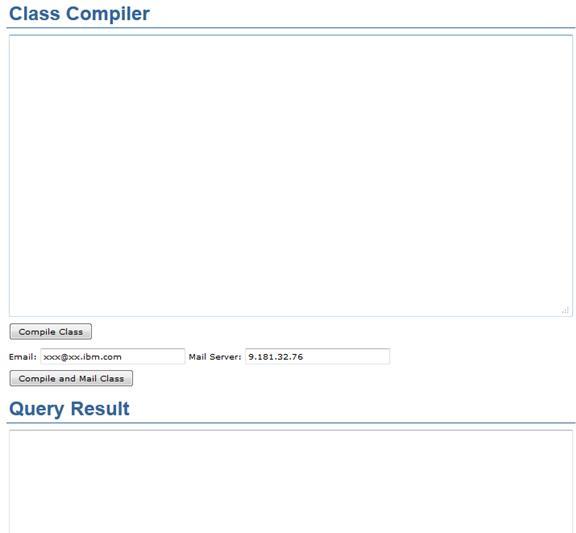
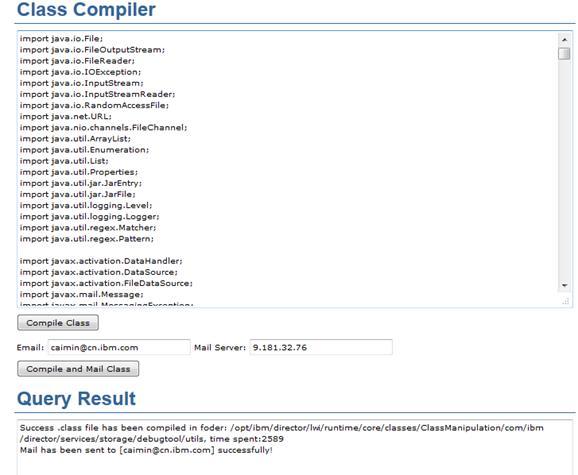
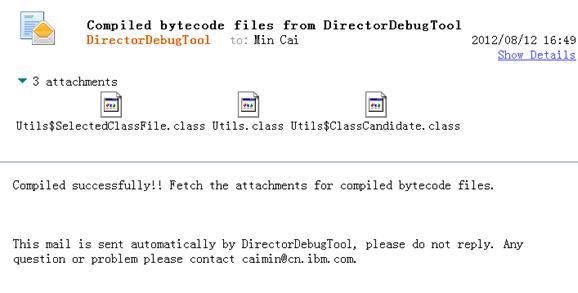
Utils.java),點擊編譯 → 2.5s 完成,郵件收到 .class 附件含內部類。
Bundle.update())。ClassLoader.getURLs() 構建類路徑實現運行時編譯。利用 JDK 6 javax.tools 與 OSGi 運行時元數據,構建了**零配置、依賴自發現、即時編譯**的開發利器:
此模式可推廣至熱修復、動態腳本、運行時 AOP 織入等進階場景,發揮 Java 動態編譯的最大價值。