預設 JComboBox 下拉選單向下彈出,若組件位於視窗底部會被遮擋。本文展示如何透過繼承 BasicComboBoxUI 並重寫 createPopup() 與 createArrowButton() 實現向上彈出效果。
package kissJava.JComboBox;

import java.awt.Dimension;
import javax.swing.*;
import javax.swing.plaf.*;
import javax.swing.plaf.basic.*;

public class PopupComboSample extends JFrame {
    private static final String[] LABELS = {
        "Chardonnay", "Sauvignon", "Riesling", "Cabernet",
        "Zinfandel", "Merlot", "Pinot Noir", "Sauvignon Blanc",
        "Syrah", "Gewurztraminer"
    };
    private JComboBox jcb;

    public PopupComboSample() {
        setTitle("下拉框向上彈出示範");
        setLayout(null);
        setDefaultCloseOperation(JFrame.EXIT_ON_CLOSE);

        jcb = new JComboBox<>(LABELS);
        // 關鍵:設定自訂 UI
        jcb.setUI((ComboBoxUI) MyComboBoxUI.createUI(jcb));
        jcb.setBounds(50, 150, 200, 20);
        add(jcb);

        setSize(300, 300);
        setLocationRelativeTo(null);
        setVisible(true);
    }

    public static void main(String[] args) {
        SwingUtilities.invokeLater(PopupComboSample::new);
    }

    static class MyComboBoxUI extends BasicComboBoxUI {
        private int newsBarTitleWidth = 0;

        public static ComponentUI createUI(JComponent c) {
            return new MyComboBoxUI();
        }

        // 1. 改變箭頭方向:向上
        @Override
        protected JButton createArrowButton() {
            return new BasicArrowButton(BasicArrowButton.NORTH);
        }

        // 2. 改變彈出方向:向上
        @Override
        protected ComboPopup createPopup() {
            BasicComboPopup popup = new BasicComboPopup(comboBox) {
                @Override
                public void show() {
                    // 計算彈出選單大小 (寬度同 comboBox,高度 5 行)
                    Dimension popupSize = new Dimension(200 - newsBarTitleWidth - 5, 17 * 5);
                    scroller.setMaximumSize(popupSize);
                    scroller.setPreferredSize(popupSize);
                    scroller.setMinimumSize(popupSize);

                    // 關鍵:y 為負值表示向上彈出
                    // show(invoker, x, y) - y 相對於 invoker 左上角
                    show(comboBox, newsBarTitleWidth, -17 * 5);
                }
            };
            popup.getAccessibleContext().setAccessibleParent(comboBox);
            return popup;
        }
    }
}
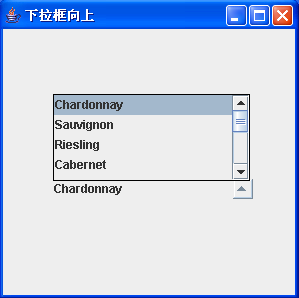
Swing 採用可換裝 Look & Feel 架構,JComboBox 透過 setUI(ComboBoxUI) 設定外觀與行為委派。BasicComboBoxUI 是 Metal/Windows 等 L&F 的基礎實作。
| 方法 | 用途 | 本例修改 |
|---|---|---|
| createArrowButton() | 建立下拉箭頭按鈕 | BasicArrowButton.NORTH (向上箭頭) |
| createPopup() | 建立彈出選單容器 | 回傳自訂 BasicComboPopup,重寫 show() |
| show() in Popup | 控制彈出位置與大小 | y = -height 實現向上彈出 |
show(Component invoker, int x, int y)
// invoker: 參考組件 (這裡是 comboBox)
// x, y: 相對於 invoker 左上角 (0,0) 的偏移
// y > 0: 向下;y < 0: 向上
static class SmartComboBoxUI extends BasicComboBoxUI {
    @Override
    protected ComboPopup createPopup() {
        return new BasicComboPopup(comboBox) {
            @Override
            public void show() {
                // 取得螢幕邊界
                Point loc = comboBox.getLocationOnScreen();
                int screenHeight = Toolkit.getDefaultToolkit().getScreenSize().height;
                int comboHeight = comboBox.getHeight();
                int popupHeight = getPopupHeightForRowCount(comboBox.getMaximumRowCount());

                // 判斷向下是否會超出螢幕
                boolean downwardFits = (loc.y + comboHeight + popupHeight) < screenHeight;

                Dimension popupSize = new Dimension(comboBox.getWidth(), popupHeight);
                scroller.setMaximumSize(popupSize);
                scroller.setPreferredSize(popupSize);
                scroller.setMinimumSize(popupSize);

                int y = downwardFits ? comboHeight : -popupHeight;
                show(comboBox, 0, y);
            }
        };
    }
}
原文提到「輸入框沒有線條顯示」,原因在於自訂 UI 未正確繪製邊框。修正方法:
@Override
public void paintCurrentValue(Graphics g, Rectangle bounds, boolean hasFocus) {
    super.paintCurrentValue(g, bounds, hasFocus);
    // 確保邊框繪製
    if (comboBox.isEditable()) {
        // 編輯模式下的編輯器繪製
    } else {
        // 唯讀模式下的渲染器繪製
        ListCellRenderer renderer = comboBox.getRenderer();
        Component c = renderer.getListCellRendererComponent(
            listBox, comboBox.getSelectedItem(), -1, false, false);
        c.setBounds(bounds);
        SwingUtilities.paintComponent(g, c, comboBox, bounds);
    }
}

// 或更簡單:確保安裝預設邊框
@Override
public void installUI(JComponent c) {
    super.installUI(c);
    // 確保有邊框
    if (comboBox.getBorder() == null) {
        comboBox.setBorder(UIManager.getBorder("ComboBox.border"));
    }
}