Java 標準 API 無原生支援半透明/異形視窗(需 JNI 平台相關代碼)。本文介紹一種純 Java 技巧:利用 java.awt.Robot.createScreenCapture() 截取全螢幕畫面作為視窗背景,配合位置同步與事件驅動更新,製造「半透明」視覺假象,並解決移動、焦點切換、遞歸更新等關鍵工程問題。
public class TransparentBackground extends JComponent {
    private JFrame frame; private Image background;
    public TransparentBackground(JFrame frame) {
        this.frame = frame; updateBackground();
    }
    public void updateBackground() {
        try {
            Robot robot = new Robot();
            Dimension dim = Toolkit.getDefaultToolkit().getScreenSize();
            background = robot.createScreenCapture(
                new Rectangle(0, 0, dim.width, dim.height));
        } catch (Exception ex) { ex.printStackTrace(); }
    }
    protected void paintComponent(Graphics g) {
        Point pos = getLocationOnScreen();
        g.drawImage(background, -pos.x, -pos.y, null);
    }
}
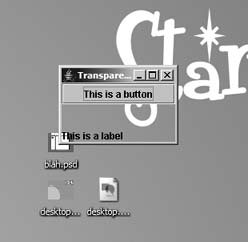
測試主程式:
public static void main(String[] args) {
    JFrame frame = new JFrame("Transparent Window");
    TransparentBackground bg = new TransparentBackground(frame);
    bg.setLayout(new BorderLayout());
    bg.add("North", new JButton("This is a button"));
    bg.add("South", new JLabel("This is a label"));
    frame.getContentPane().add("Center", bg);
    frame.pack(); frame.setSize(150,100); frame.show();
}
| 缺陷 | 原因 | 解決策略 |
|---|---|---|
| 移動視窗背景不更新 | paintComponent 僅在 resize 觸發 | 實作 ComponentListener,componentMoved/Resized/Shown 呼叫 repaint() |
| 桌面變化(其他視窗移動)不同步 | 無法持續監控全螢幕 | 監聽 WindowFocusListener(焦點得失)+ 專用執行緒節流更新 |
public class TransparentBackground extends JComponent
    implements ComponentListener, WindowFocusListener, Runnable {
    private JFrame frame; private Image background;
    private long lastUpdate = 0; public boolean refreshRequested = true;

    public TransparentBackground(JFrame frame) {
        this.frame = frame; updateBackground();
        frame.addComponentListener(this);
        frame.addWindowFocusListener(this);
        new Thread(this).start();
    }
    // ComponentListener
    public void componentShown(ComponentEvent e) { repaint(); }
    public void componentResized(ComponentEvent e) { repaint(); }
    public void componentMoved(ComponentEvent e) { repaint(); }
    public void componentHidden(ComponentEvent e) {}
    // WindowFocusListener
    public void windowGainedFocus(WindowEvent e) { refresh(); }
    public void windowLostFocus(WindowEvent e) { refresh(); }

    private void refresh() {
        if (frame.isVisible()) { repaint(); refreshRequested = true; lastUpdate = System.currentTimeMillis(); }
    }
    // Runnable:節流更新執行緒
    public void run() {
        try {
            while (true) {
                Thread.sleep(250);
                long now = System.currentTimeMillis();
                if (refreshRequested && (now - lastUpdate > 1000) && frame.isVisible()) {
                    Point loc = frame.getLocation();
                    frame.setVisible(false); // 隱藏自身避免截到自己
                    updateBackground();
                    frame.setVisible(true);
                    frame.setLocation(loc);
                    refresh();
                    lastUpdate = now; refreshRequested = false;
                }
            }
        } catch (Exception ex) { ex.printStackTrace(); }
    }
}refreshRequested 標記 + 1 秒冷卻期,確保「最後一次事件後 1 秒無新事件」才真正更新。frame.setUndecorated(true) 移除標題列/邊框,配合可拖動背景面板實現無邊框拖曳。setOpaque(false) + 繪製透明 PNG 圖片,實現異形視窗(如 MP3 播放器外觀)。public static void main(String[] args) {
JFrame frame = new JFrame("Transparent Window");
frame.setUndecorated(true);
TransparentBackground bg = new TransparentBackground(frame);
bg.snapBackground(); // 別名 updateBackground
bg.setLayout(new BorderLayout());
JPanel panel = new JPanel() {
protected void paintComponent(Graphics g) {
g.setColor(Color.blue);
Image img = new ImageIcon("mp3.png").getImage();
g.drawImage(img, 0, 0, null);
}
};
panel.setOpaque(false);
bg.add("Center", panel);
frame.getContentPane().add("Center", bg);
frame.pack(); frame.setSize(200,200); frame.setLocation(500,500); frame.setVisible(true);
}
Java SE 6 引入 com.sun.awt.AWTUtilities.setWindowOpacity()、setWindowShape() 等原生 API,並支援 Swing 組件直接繪製於 OpenGL 表面。現代專案應優先使用原生 API;本文技巧適用於受限於 Java 5 環境的存量專案維護。
截圖法以純 Java 實現「偽半透明視窗」,核心在於背景圖位置同步與事件驅動節流更新。雖非真正像素級 Alpha 混合,但在無原生支援環境下提供可接受的視覺效果,且展示了 Robot、Graphics2D、事件模型、多執行緒協調等核心 Swing 技術的綜合應用。