J2SE 1.4 新增 JFormattedTextField 與 JSpinner。外觀類似 JTextField,但行為不同:可指定輸入掩碼(如電話號碼 (###) ###-####),拒絕不符格式輸入;複雜情況下支援顯示/編輯雙格式化器(如日期編輯時可按光標位置滾動月/日)。
主要透過 MaskFormatter (javax.swing.text) 指定掩碼字符:
| 字符 | 含義 |
|---|---|
| # | 數字 |
| ? | 字母 |
| A | 字母或數字 |
| * | 任意字符 |
| U | 字母,小寫轉大寫 |
| L | 字母,大寫轉小寫 |
| H | 十六進制數字 (A-F,a-f,0-9) |
| ' | 轉義掩碼字符 |
亦可用 java.text.DateFormat/NumberFormat 指定格式。範例定義日期、社安號、電話掩碼:
DateFormat format = new SimpleDateFormat("yyyy--MMMM--dd");
DateFormatter df = new DateFormatter(format);
MaskFormatter mf1 = new MaskFormatter("###-##-####"); // SSN
MaskFormatter mf2 = new MaskFormatter("(###) ###-####"); // 電話
JFormattedTextField ftf1 = new JFormattedTextField(df);
ftf1.setValue(new Date()); // 初始值提示格式
MaskFormatter 可用 setPlaceholderCharacter('_') 設置佔位符。
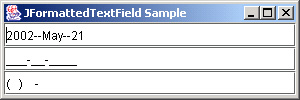
整合三種格式化欄位:
import java.awt.*;
import javax.swing.*;
import javax.swing.text.*;
import java.util.*;
import java.text.*;
public class FormattedSample {
  public static void main(String args[]) throws ParseException {
    JFrame f = new JFrame("JFormattedTextField Sample");
    f.setDefaultCloseOperation(JFrame.EXIT_ON_CLOSE);
    Container content = f.getContentPane();
    content.setLayout(new BoxLayout(content, BoxLayout.PAGE_AXIS));
    // 日期
    DateFormat format = new SimpleDateFormat("yyyy--MMMM--dd");
    DateFormatter df = new DateFormatter(format);
    JFormattedTextField ftf1 = new JFormattedTextField(df);
    ftf1.setValue(new Date());
    content.add(ftf1);
    // 社安號
    MaskFormatter mf1 = new MaskFormatter("###-##-####");
    mf1.setPlaceholderCharacter('_');
    content.add(new JFormattedTextField(mf1));
    // 電話
    MaskFormatter mf2 = new MaskFormatter("(###) ###-####");
    content.add(new JFormattedTextField(mf2));
    f.setSize(300, 100);
    f.show();
  }
}