Java 跨平台特性雖強,但某些場景(如軟體授權綁定硬體)需取得本機唯一識別碼。MAC 位址是常見選擇。本文示範在 Windows XP/NT/2000 環境下,透過 Runtime.exec() 執行 ipconfig /all,解析輸出流取得 MAC 位址的完整實作。
每個 Java 應用程式擁有唯一的 Runtime 實例,可透過 Runtime.getRuntime() 取得。其 exec(String command) 方法能啟動子程序並回傳 Process 物件,進而取得標準輸出/輸入流。
Process 封裝原生程序,提供:
getInputStream():讀取子程序標準輸出getOutputStream():寫入子程序標準輸入waitFor():等待子程序結束並取得退出碼Runtime.getRuntime().exec("cmd /c ipconfig /all") 執行指令BufferedReader 包裝 process.getInputStream() 逐行讀取Physical Address 的行(格式如 Physical Address. . . . . . . . . : 00-10-DC-A9-0B-2C)import java.io.*;
public class ReadMac {
public static String physicalAddress = "read Mac error!";
public static String checkPhysicalAddress() {
try {
String line;
Process process = Runtime.getRuntime().exec("cmd /c ipconfig /all");
BufferedReader reader = new BufferedReader(
new InputStreamReader(process.getInputStream()));
while ((line = reader.readLine()) != null) {
// Windows ipconfig /all 輸出中的關鍵字
if (line.indexOf("Physical Address") != -1) {
int colonIndex = line.indexOf(":");
if (colonIndex != -1) {
physicalAddress = line.substring(colonIndex + 2).trim();
break; // 找到第一張網卡的 MAC 即結束
}
}
}
process.waitFor();
} catch (Exception e) {
e.printStackTrace();
}
return physicalAddress;
}
public static void main(String[] args) {
System.out.println("本機 MAC 位址:" + ReadMac.checkPhysicalAddress());
}
}
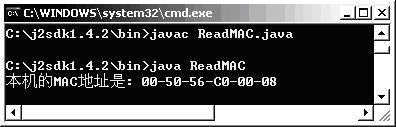
程式輸出範例:本機 MAC 位址:00-10-DC-A9-0B-2C
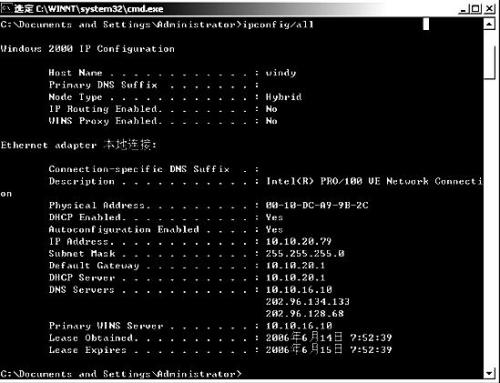
ipconfig 輸出格式。Linux/Mac 需改用 ifconfig 或 ip link 並調整解析邏輯。Physical Address,實務上可依介面名稱(如乙太網路、Wi-Fi)過濾。SecurityException。NetworkInterface.getNetworkInterfaces() 以純 Java 跨平台取得 MAC,不需呼叫外部指令,建議優先採用。