Eclipse 不僅是 Java IDE,更是一個插件擴展框架。本系列四部分教程將開發一款「射擊蟲子」遊戲插件,示範 Eclipse Plugin API、SWT、OpenGL 與 LWJGL 的整合應用。本文為起始篇,涵蓋插件專案建立、視圖模板生成、基本 UI 佈局、與任務視圖整合、以及運行時工作台測試。
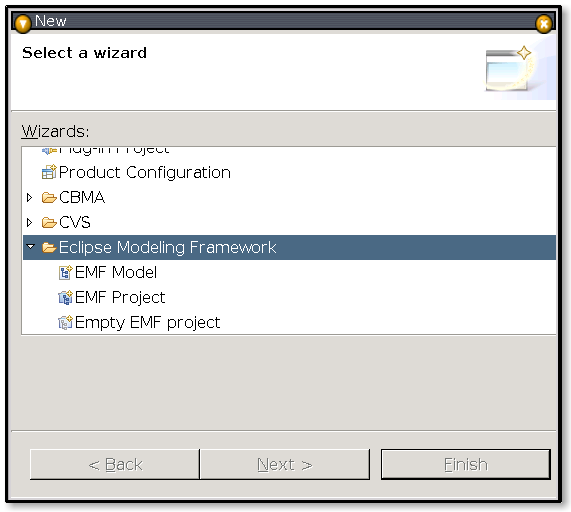
com.devworks.tutorial.shootout,目標平台 Eclipse 3.2,勾選 Create a Java Project、Generate an activator(類別 ShootoutPlugin)、This plug-in will make contributions to the UI。ShootoutView,類別名 ShootoutView,視圖名 Shootout View,分類 Devworks Tutorial,採用 TableViewer 模型。使用 File > Export > Deployable Plug-ins and fragments 匯出為 ZIP(EclipseShootout.zip)。關閉 Eclipse,將 ZIP 解壓至 eclipse/plugins/ 同級目錄,重啟後於 Window > Show View > Other 中即可看到 Devworks Tutorials > Shootout View。
為避免反覆安裝,使用 Run > Run... > Eclipse Application 建立啟動配置,勾選 Workspace Plug-ins 中的專案,即可在新 Eclipse 實例中即時測試。
修改 ShootoutView.createPartControl():引入 GridLayout(兩欄),TableViewer 佔滿兩欄(GridData.horizontalSpan=2),下方新增 Load Bugs、Start Game 兩個 Button。關鍵代碼:
GridLayout gridLayout = new GridLayout(); gridLayout.numColumns = 2;
parent.setLayout(gridLayout);
GridData gridData = new GridData(); gridData.horizontalSpan = 2; gridData.horizontalAlignment = SWT.FILL;
viewer.getTable().setLayoutData(gridData);
// ... 現有 viewer 設定 ...
Button loadBugsButton = new Button(parent, SWT.PUSH); loadBugsButton.setText("Load Bugs");
Button startGameButton = new Button(parent, SWT.PUSH); startGameButton.setText("Start Game");plugin.xml > Dependencies 新增 org.eclipse.core.resources。getTasks():透過 ResourcesPlugin.getWorkspace().getRoot().findMarkers(IMarker.TASK, true, IResource.DEPTH_INFINITE) 取得任務標記陣列。ViewContentProvider 持有 IMarker[] tasks 並提供 setTasks();ViewLabelProvider.getText() 回傳 marker.getAttribute(IMarker.MESSAGE, "<none>")。Load Bugs 按鈕加入 SelectionAdapter 呼叫 getTasks() 並 viewer.refresh(true)。於運行時工作台開啟 Tasks 視圖新增幾項任務,切換至 Shootout View 點擊 Load Bugs,表格即顯示任務文字,奠定後續「蟲子列表」資料來源。