Java Media Framework (JMF) 提供完整的 RTP/RTCP 媒體流網路傳輸支援。本文系統解析 JMF RTP 架構核心組件:SessionManager 會話管理、RTPManager 傳輸/接收管線、格式轉制邏輯、事件模型與整體傳輸模型,並提供關鍵代碼片段與圖解說明。
GlobalReceptionStats, GlobalTransmissionStats, ReceptionStats, TransmissionStats。ReceiveStream (遠端媒體流), SendStream (本地媒體流)。| 監聽器介面 | 核心事件類別 | 觸發情境 |
|---|---|---|
SessionListener | NewParticipantEvent, LocalCollisionEvent | 新參與者加入、SSRC 衝突 |
SendStreamListener | NewSendStreamEvent, ActiveSendStreamEvent, InactiveSendStreamEvent, LocalPayloadChangeEvent, StreamClosedEvent | 本地發送流建立/啟動/停止/格式變更/關閉 |
ReceiveStreamListener | NewReceiveStreamEvent, ActiveReceiveStreamEvent, InactiveReceiveStreamEvent, TimeoutEvent, RemotePayloadChangeEvent, ApplicationEvent | 遠端接收流偵測/啟動/停止/超時/格式變更/APP 包 |
RemoteListener | ReceiverReportEvent (RR), SenderReportEvent (SR), RemoteCollisionEvent | 接收 RTCP RR/SR 報告、遠端 SSRC 衝突 |
SR  → SenderReportEvent
RR  → ReceiverReportEvent
SDES → (Source Description, 承載於 Sender/Receiver Report)
BYE  → (隱含於 StreamClosedEvent/InactiveEvent)
APP → ApplicationEvent| 媒體類別 | RTP 封裝格式 (JMF 支援) |
|---|---|
| 音訊 | JAUDIO_G711_ULAW/rtp, DVI/rtp, G723/rtp, GSM/rtp |
| 視訊 | JPEG/rtp, H261/rtp, H263/rtp |
限制:JPEG 寬高須為 8 倍數;H.263 僅支援 352×288 (CIF)、176×144 (QCIF)、128×96 (SQCIF)。
// 從 Processor 取得軌道控制器
TrackControl[] tracks = processor.getTrackControls();
for (int i = 0; i < tracks.length; i++) {
    Format original = tracks[i].getFormat();
    Format supported = tracks[i].getSupportedFormats()[0];
    Format chosen = checkForVideoSizes(original, supported);
    if (chosen != null) tracks[i].setFormat(chosen);
}

Format checkForVideoSizes(Format original, Format supported) {
    Dimension size = ((VideoFormat) original).getSize();
    Format jpegFmt = new Format(VideoFormat.JPEG_RTP);
    Format h263Fmt = new Format(VideoFormat.H263_RTP);
    int width, height;

    if (supported.matches(jpegFmt)) {
        width  = (size.width  % 8 == 0) ? size.width  : (size.width  / 8) * 8;
        height = (size.height % 8 == 0) ? size.height : (size.height / 8) * 8;
    } else if (supported.matches(h263Fmt)) {
        if (size.width < 128)      { width = 128; height = 96; }
        else if (size.width < 176) { width = 176; height = 144; }
        else                       { width = 352; height = 288; }
    } else {
        return supported;
    }
    return new VideoFormat(null, new Dimension(width, height),
                           Format.NOT_SPECIFIED, null, Format.NOT_SPECIFIED)
           .intersects(supported);
}// 1. Processor 轉制後取得 DataSource
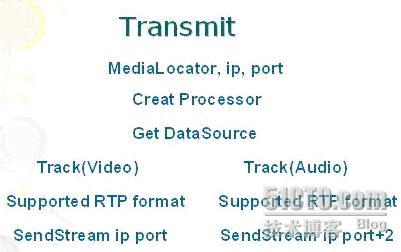
DataSource dataOutput = processor.getDataOutput();
PushBufferDataSource pbds = (PushBufferDataSource) dataOutput;
PushBufferStream[] pbss = pbds.getStreams(); // 每軌道一個 Stream
// 2. 建立 RTPManager 並初始化會話
RTPManager[] rtpMgrs = new RTPManager[pbss.length];
InetAddress destIP = InetAddress.getByName("192.168.1.100");
int basePort = 5000; // 視訊端口,音訊 = basePort + 2
for (int i = 0; i < pbss.length; i++) {
rtpMgrs[i] = RTPManager.newInstance();
SessionAddress localAddr = new SessionAddress(InetAddress.getLocalHost(), basePort + i*2);
SessionAddress destAddr = new SessionAddress(destIP, basePort + i*2);
rtpMgrs[i].initialize(localAddr);
rtpMgrs[i].addTarget(destAddr);
// 3. 建立發送流並啟動
SendStream sendStream = rtpMgrs[i].createSendStream(dataOutput, i);
sendStream.start();
}// 1. 建立 RTPManager 初始化本地會話
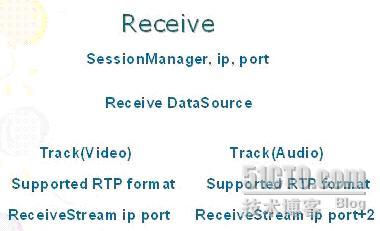
RTPManager rtpMgr = RTPManager.newInstance();
SessionAddress localAddr = new SessionAddress(InetAddress.getLocalHost(), 5000);
rtpMgr.initialize(localAddr);
// 2. 註冊接收流事件監聽器
rtpMgr.addReceiveStreamListener(new ReceiveStreamListener() {
@Override
public void update(ReceiveStreamEvent evt) {
if (evt instanceof NewReceiveStreamEvent) {
ReceiveStream stream = ((NewReceiveStreamEvent) evt).getReceiveStream();
DataSource ds = stream.getDataSource(); // 供 Player 播放
// 建立 Player 播放 ds ...
} else if (evt instanceof ByeEvent) {
// 遠端結束傳輸
}
}
});
// 3. 等待遠端傳輸 (addTarget 可選,若知遠端 IP)
rtpMgr.addTarget(new SessionAddress(InetAddress.getByName("192.168.1.100"), 5000));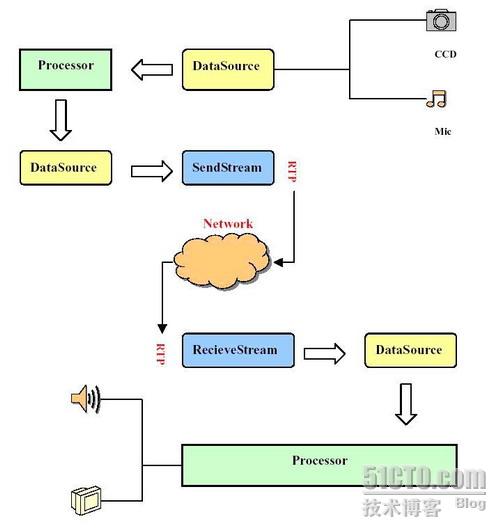
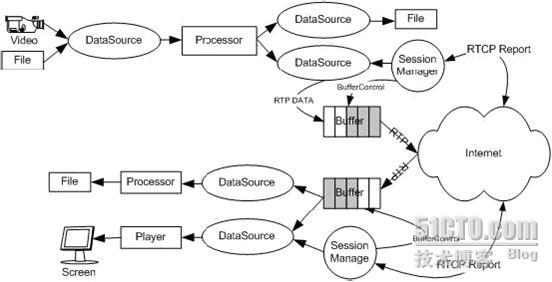
ReceiverReportEvent 計算丟包率/抖動,動態切換編碼碼率/解析度 (需重新 createSendStream)。JMF RTP 架構以 SessionManager 統一管理會話統計與流、RTPManager 負責傳輸/接收管線、事件模型提供精細狀態感知、格式轉制確保符合 RTP 封裝規格。掌握此架構有助於理解即時媒體傳輸核心原理,但實務開發請轉向現代化媒體框架。