Java Media Framework (JMF) 進行視訊捕獲的核心在於識別 VFW (Video for Windows) 裝置、取得 MediaLocator、並依據編碼格式(JPEG/H.263)進行解析度轉制,以滿足 RTP 傳輸規格。本文詳解 VFW 架構、JMF 裝置識別代碼、參數屬性檢測與關鍵格式轉制邏輯。
VFW 為 Microsoft 提供的 Windows 視訊開發工具包,核心模組:
| 模組 | 功能 |
|---|---|
| AVICAP.DLL | 視訊捕獲高階介面,處理 AVI I/O 與裝置驅動溝通 |
| MSVIDEO.DLL | DrawDib 函數,螢幕視訊繪製 |
| MCIAVI.DRV | MCI 命令解譯驅動 |
| AVIFILE.DLL | AVI 檔案高階存取 |
| ICM | 視訊壓縮/解壓縮編解碼器管理 |
| ACM | 音訊壓縮管理器 |
Windows 內建 VFW 組件,安裝時自動部署。
JMF 透過 CaptureDeviceManager 識別以 vfw: 開頭的裝置字串:
String str1 = "vfw:Logitech USB Video Camera:0";
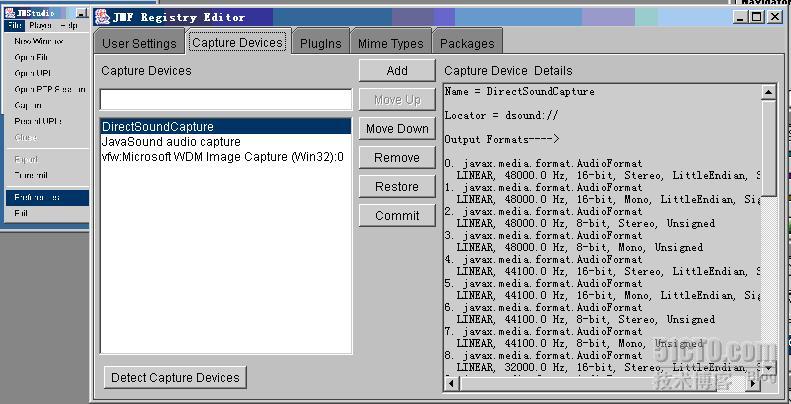
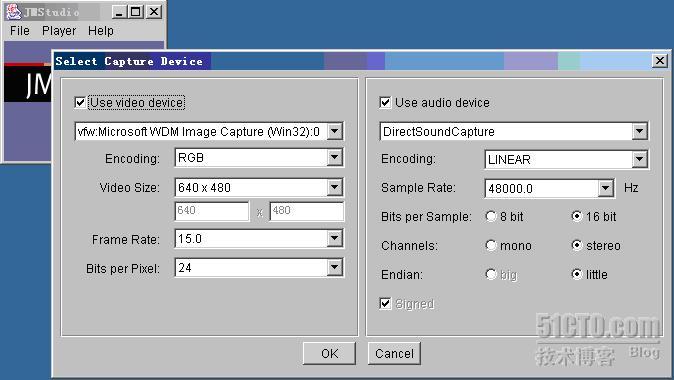
String str2 = "vfw:Microsoft WDM Image Capture (Win32):0";
CaptureDeviceInfo device = CaptureDeviceManager.getDevice(str2);
MediaLocator locator = device.getLocator();
執行 Detect Capture Devices 後,JMF 控制台將列出所有可用 VFW 裝置。
private MediaLocator autoDetect() {
    MediaLocator ml = null;
    VideoFormat currentFormat = null;
    Format[] videoFormats = null;

    System.out.println("AutoDetect for VFW");
    Vector deviceList = CaptureDeviceManager.getDeviceList(null);
    if (deviceList != null) {
        for (int i = 0; i < deviceList.size(); i++) {
            try {
                CaptureDeviceInfo di = (CaptureDeviceInfo) deviceList.elementAt(i);
                if (di.getName().startsWith("vfw:")) {
                    videoFormats = di.getFormats();
                    for (int j = 0; j < videoFormats.length; j++) {
                        if (videoFormats[j] instanceof RGBFormat) {
                            currentFormat = (RGBFormat) videoFormats[j];
                            break;
                        }
                    }
                    if (currentFormat == null) {
                        System.err.println("Search For RGBFormat Failed");
                        System.exit(-1);
                    }
                    ml = di.getLocator(); // 關鍵:取得 MediaLocator
                }
            } catch (Exception npe) {
                System.err.println("Unable to get Processor for device");
                System.exit(-1);
            }
        }
    } else {
        System.err.println("No Capture Device OK");
        System.exit(-1);
    }
    return ml;
}
屬性包含:裝置名稱、支援格式清單(RGBFormat, YUVFormat 等)、預設幀率、解析度範圍等。
RTP 傳輸對解析度有嚴格限制:
因此捕獲原始影像必須經過 Processor 的 TrackControl 進行格式轉制:
TrackControl[] tracks = processor.getTrackControls();
for (int i = 0; i < tracks.length; i++) {
    Format supported = tracks[i].getSupportedFormats()[0];
    Format chosen = checkForVideoSizes(tracks[i].getFormat(), supported);
    if (chosen != null) tracks[i].setFormat(chosen);
}

// 轉制核心邏輯
Format checkForVideoSizes(Format original, Format supported) {
    Dimension size = ((VideoFormat) original).getSize();
    Format jpegFmt = new Format(VideoFormat.JPEG_RTP);
    Format h263Fmt = new Format(VideoFormat.H263_RTP);
    int width, height;

    if (supported.matches(jpegFmt)) {
        width  = (size.width  % 8 == 0) ? size.width  : (size.width  / 8) * 8;
        height = (size.height % 8 == 0) ? size.height : (size.height / 8) * 8;
    } else if (supported.matches(h263Fmt)) {
        if (size.width < 128)      { width = 128; height = 96; }
        else if (size.width < 176) { width = 176; height = 144; }
        else                       { width = 352; height = 288; }
    } else {
        return supported; // 非目標格式不處理
    }
    return new VideoFormat(null, new Dimension(width, height),
                           Format.NOT_SPECIFIED, null, Format.NOT_SPECIFIED)
           .intersects(supported);
}di.getFormats() 確認目標編碼是否在支援清單中。NoProcessorException、IOException,提供使用者友善提示。processor.close()、dataSource.disconnect()。JMF 視訊捕獲關鍵在於:正確識別 VFW 裝置 → 取得 MediaLocator → 建立 Processor → 依據 RTP 規格對軌道進行格式轉制。掌握 checkForVideoSizes 邏輯,即可確保捕獲影像順利進入後續編碼、傳輸管線。