在 SCM、CRM、ERP 等中大型應用中,用戶常需根據實際情況靈活調整參數,使固定公式計算結果符合當前狀況——如不同時期商品折扣率、員工獎金比例隨業績變動。若每次變更都改程序,面對頻繁大量變更將不堪重負。本文介紹一種基於 BeanShell 腳本結合 JDOM 實現的簡單易擴展公式管理系統。
閱讀前建議對兩者有基礎了解。
主要目標:
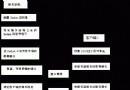
兩大核心用例:
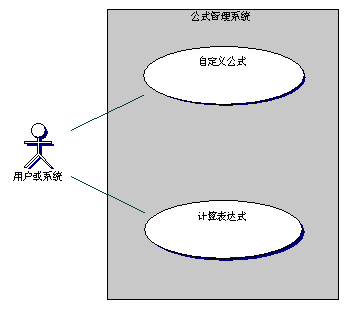
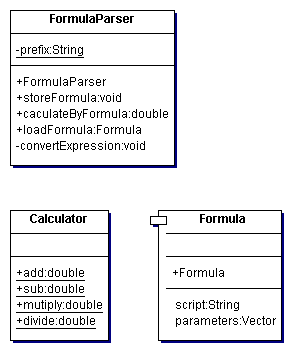
設計人員中至少應有一位語言專家,才能設計得更靈活簡單,為編碼鋪墊。
當系統某部分變化極大,需動態調用方法和參數時,可嘗試引入 BeanShell。若問題變簡單且靈活性大增,值得嘗試;若未簡化反更複雜,需反思方法或諮詢專家。不追求新技術,追求提高生產效率的新方法。
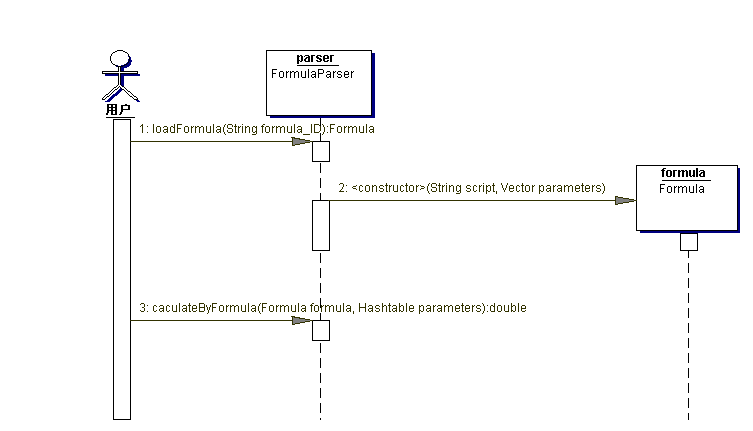
外部系統調用接口傳入:公式 ID + Hashtable「參數名-參數值」列表。FormulaParser 根據 ID 載入公式,賦值參數,按腳本計算。無 BeanShell 時需字符串解析轉換、賦值、求值——極複雜,尤其運算符優先級多時。作者曾見 1000+ 行代碼的簡單解析器,大部分在做字符串解析。
公式庫 XML 示例:
<formulas>
  <formula id="1001" name="F_DISCOUNT">
    <parameters>
      <parameter type="double" name="price"/>
      <parameter type="double" name="discount"/>
    </parameters>
    <script>result= Calculator.mutiply(price, discount)</script>
  </formula>
  <formula id="1002" name="F_BONUS">
    <parameters>
      <parameter type="double" name="sale"/>
      <parameter type="double" name="score"/>
    </parameters>
    <script>result= Calculator.add(Calculator.mutiply(sale, 0.1),
      Calculator.mutiply(score, 10000))</script>
  </formula>
</formulas>
每公式唯一 ID + 易記名字,含 parameters(參數列表)和 script(BeanShell 腳本)。優勢:無需解析表達式字符串,用 BeanShell 解釋器直接求值。
核心計算代碼(僅一行求值):
public double caculateByFormula(Formula formula, Hashtable parameters) {
    double result = 0.0;
    try {
        Interpreter i = new Interpreter();
        i.eval("import parse.*;");
        Vector para = formula.getParameters();
        Iterator it = para.iterator();
        while (it.hasNext()) {
            String[] dec = (String[])it.next();
            String declare = dec[1] + " " + dec[0];
            i.eval(declare);
            String value = ((Double)parameters.get(dec[0])).toString();
            if (value != null) {
                String assign_value = dec[0] + "=" + value;
                i.eval(assign_value);
            } else {
                System.out.println("參數名不符或不存在"); System.exit(1);
            }
        }
        // 關鍵一行:BeanShell 完成求值
        i.eval(formula.getScript());
        Double rst = (Double)i.get("result");
        result = rst.doubleValue();
    } catch (Exception e) {
        System.out.println("caculateByFormula(): " + e.getMessage());
    }
    return result;
}public Formula loadFormula(String formulaID) {
Vector paras = new Vector();
try {
SAXBuilder builder = new SAXBuilder();
Document doc = builder.build(prefix + "Formulas.xml");
Element root = doc.getRootElement();
List formulas = root.getChildren("formula");
Iterator it = formulas.iterator();
Element formula = null;
while (it.hasNext()) {
formula = (Element)it.next();
if (formula.getAttributeValue("id").equals(formulaID)) break;
}
List parameters = formula.getChild("parameters").getChildren();
Iterator itp = parameters.iterator();
while (itp.hasNext()) {
String[] s_para = new String[2];
Element e_para = (Element)itp.next();
s_para[0] = e_para.getAttributeValue("name");
s_para[1] = e_para.getAttributeValue("type");
paras.add(s_para);
}
Element script = formula.getChild("script");
String s_script = script.getTextTrim();
return new Formula(s_script, paras);
} catch (Exception e) {
System.out.println("loadFormula(): " + e.getMessage());
}
return null;
}
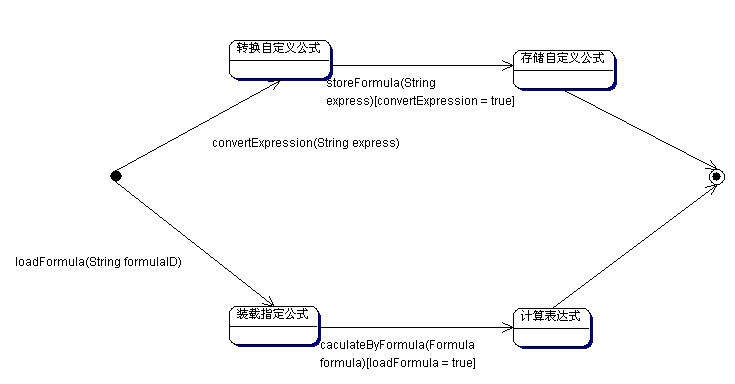
自定義公式功能非難事,甚至可直接編輯 XML。但開發友好界面時,將用戶輸入轉為參數列表和計算腳本不可避免陷入字符串解析。建議讓用戶直接寫 BeanShell 計算腳本——看公式庫示例腳本即可理解。此部分非本文重點,讀者自行選擇合適方式實現。
FormulaParser fp = new FormulaParser();
Hashtable paras = new Hashtable();
paras.put("price", new Double(100.0));
paras.put("discount", new Double(0.9));
System.out.println("計算結果:" + fp.caculateByFormula(fp.loadFormula("1001"), paras));
// 預期 90.0

FormulaParser fp1 = new FormulaParser();
Hashtable paras1 = new Hashtable();
paras1.put("sale", new Double(11000.0));
paras1.put("score", new Double(0.8));
System.out.println("計算結果:" + fp1.caculateByFormula(fp1.loadFormula("1002"), paras1));
// 預期 9100.0輸出:
計算結果:90.0
計算結果:9100.0
開發環境:JDK 1.3.1。
這就是 BeanShell 帶來的奇妙體驗。系統實用,可擴展更多運算法則、集成至現有工作、提供友好界面。增強版已成功應用於電信系統。方法未必最佳,歡迎討論。源碼見參考資料。衷心希望「開源世界裡充滿了思想者」。