在 Java 桌面開發中,有時需要直接在 SWT 視窗內嵌入 Microsoft Excel,以提供熟悉的試算表操作體驗。Eclipse SWT 透過 OLE (Object Linking and Embedding) 機制,支援在 Windows 平台上嵌入 ActiveX 控制項,例如 Excel.Sheet 或 Word.Document。本文示範如何建立一個簡單的 SWT 應用程式,將 Excel 完整嵌入至 Shell 視窗中,並顯示 Excel 原生的選單列與工具列。
package com.jrkui.example.excel;

import org.eclipse.swt.SWT;
import org.eclipse.swt.layout.FillLayout;
import org.eclipse.swt.ole.win32.OLE;
import org.eclipse.swt.ole.win32.OleClientSite;
import org.eclipse.swt.ole.win32.OleFrame;
import org.eclipse.swt.widgets.Display;
import org.eclipse.swt.widgets.Menu;
import org.eclipse.swt.widgets.Shell;

public class ExcelShell {
    public static void main(String[] args) {
        new ExcelShell().open();
    }

    public void open() {
        Display display = Display.getDefault();
        Shell shell = new Shell();
        shell.setSize(600, 400);
        shell.setText("Excel Window");
        shell.setLayout(new FillLayout());
        // 顯示 Excel 的選單列
        shell.setMenuBar(new Menu(shell, SWT.BAR));
        createExcelPart(shell);
        shell.open();
        while (!shell.isDisposed()) {
            if (!display.readAndDispatch())
                display.sleep();
        }
        display.dispose();
    }

    /**
     * 將 Excel 嵌入到 Shell 中
     * @param shell 父視窗
     */
    private void createExcelPart(Shell shell) {
        // OleFrame 實際上是一個 Composite,用於放置 OLE 控制項
        OleFrame oleFrame = new OleFrame(shell, SWT.NONE);
        // OleClientSite 提供一個場所用於把 OLE 對象嵌入到容器中
        // "Excel.Sheet" 表示的 OLE 對象是 Excel
        OleClientSite clientSite = new OleClientSite(oleFrame, SWT.NONE, "Excel.Sheet");
        // 顯示 OLE 對象,OLEIVERB_SHOW 表示顯示
        clientSite.doVerb(OLE.OLEIVERB_SHOW);
    }
}| 類別 | 用途 |
|---|---|
| OleFrame | 繼承自 Composite,作為 OLE 控制項的容器 |
| OleClientSite | 代表嵌入的 OLE 物件,負責與容器溝通 |
| OLE.OLEIVERB_SHOW | 動詞常數,指示 OLE 物件顯示並進入編輯模式 |
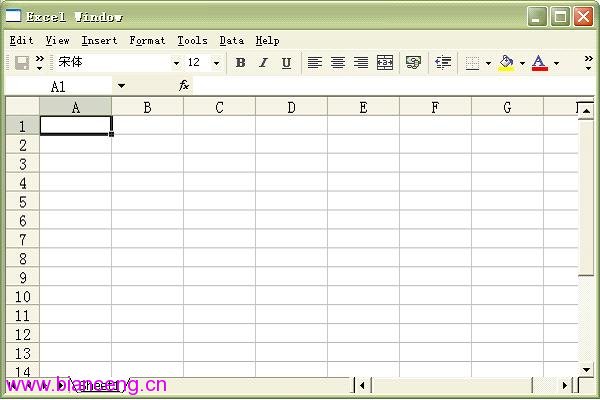
程式執行後會開啟一個 600x400 的視窗,內嵌完整的 Excel 介面,包含選單列、工具列、儲存格網格等。使用者可直接在視窗中編輯試算表、輸入公式、調整欄寬等,操作體驗與獨立開啟 Excel 無異。
OleClientSite.doVerb(int verb) 的參數決定 OLE 物件的啟動行為,常用值如下:
若要嵌入 Word,只需將 "Excel.Sheet" 改為 "Word.Document"。同理,支援 OLE 的其他應用程式 (如 PowerPoint、Visio) 亦可用相同方式嵌入。