在 MyEclipse 建立的 Spring 專案中使用 @Resource (JSR-250 標準註解) 時,常遇到「找不到類」編譯錯誤。原因是 MyEclipse 內建 Spring 庫缺少 common-annotations.jar。本文提供快速修復方案。
問題現象
import javax.annotation.Resource;  // 編譯錯誤:package javax.annotation does not exist
@Resource
private DataSource dataSource;
根本原因
MyEclipse「添加 Spring 開發能力」操作自動引入的 Spring 庫中,不包含 JSR-250 相關的 common-annotations.jar (javax.annotation.* 套件)。
解決方案:手動添加 JAR
- 前往 Spring 官網下載完整發佈包 (如
spring-framework-2.5.6-with-dependencies.zip)
- 解壓後在
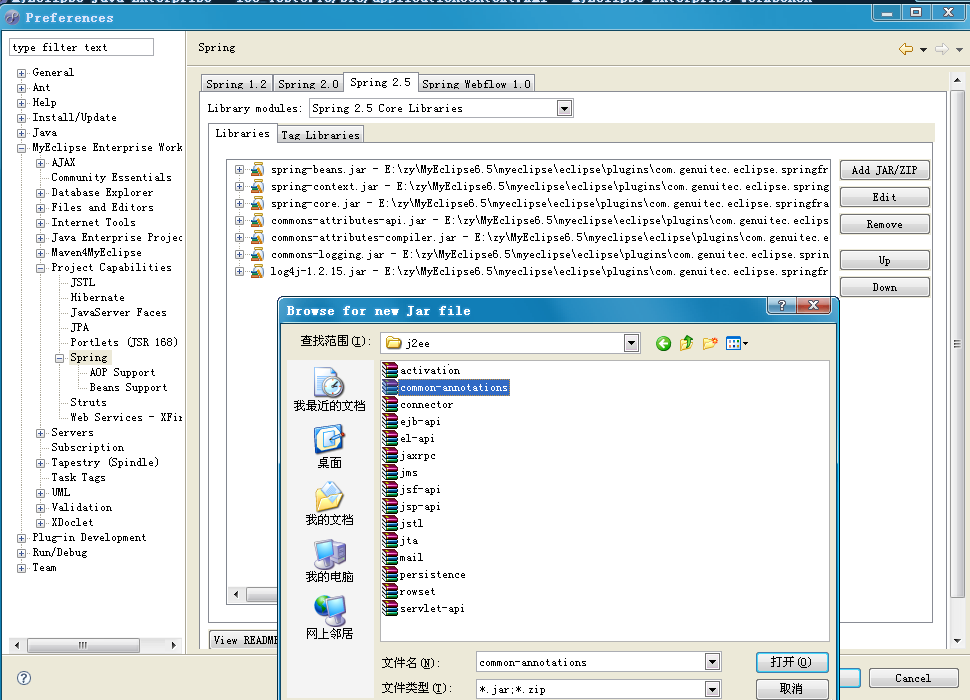
lib/j2ee/ 目錄找到 common-annotations.jar
- 將該 JAR 添加至專案 Classpath:
專案右鍵 → Build Path → Configure Build Path → Libraries → Add External JARs
永久修復:整合至 MyEclipse Spring 庫
為避免每次新專案都需手動添加,可將 JAR 直接放入 MyEclipse Spring 庫目錄:
- 找到 MyEclipse 安裝目錄下的 Spring 庫定義 (通常在
plugins/com.genuitec.eclipse.spring.libs_版本/)
- 將
common-annotations.jar 複製至對應 lib/ 目錄
- 重啟 MyEclipse
之後每次「添加 Spring 開發能力」會自動包含該 JAR。
同理適用於其他 JSR-250 註解
| 註解 | 套件 | 用途 |
|---|
@Resource | javax.annotation | 資源注入 (JNDI、DataSource 等) |
@PostConstruct | javax.annotation | 初始化回呼 |
@PreDestroy | javax.annotation | 銷毀回呼 |
@Generated | javax.annotation | 程式碼生成標記 |
同樣需要 common-annotations.jar。
替代方案:使用 Maven/Gradle 管理依賴
<!-- Maven -->
<dependency>
  <groupId>javax.annotation</groupId>
  <artifactId>javax.annotation-api</artifactId>
  <version>1.3.2</version>
</dependency>

--> 或 Spring 3+ 內建
<dependency>
  <groupId>org.springframework</groupId>
  <artifactId>spring-context</artifactId>
  <version>3.0.0.RELEASE</version>
</dependency>
建議專案遷移至 Maven/Gradle,徹底解決 JAR 管理問題。
驗證修復
重新編譯專案,import javax.annotation.Resource 應無錯誤,@Resource 注入正常工作。
- 上一篇文章: Spring 2.5 註解開發入門:@Service、@Autowired、@Qualifier 完整範例
- 下一篇文章: Hibernate 3.1 vs 3.2:identity 主鍵生成策略差異導致 MappingException 解決記
Copyright ©
程式碼之家 All Rights Reserved