Java 開發中讀取資源檔案失敗是常見痛點,根因在於執行環境不同導致「相對路徑」基準改變。本文系統梳理三種讀取方式,並給出生產環境可靠的最佳實踐。
repathtest
├─src
│ └─com
│   └─lavasoft
│     ├─test
│     └─res
├─docFile f = new File("src/com/lavasoft/res/a.txt");
File f = new File("doc/b.txt");/ 開頭repathtest)InputStream in = ReadFile.class.getResourceAsStream("/com/lavasoft/res/a.txt");/ 開頭,表示 classpath 根目錄src/main/resources 或編譯輸出目錄(target/classes)下的檔案package com.lavasoft.test;
import java.io.*;
public class ReadFile {
public static void main(String[] args) {
readTextA_ByClassPath();
readTextA_ByProjectRelativePath();
readTextB_ByProjectRelativePath();
}
// 專案相對路徑讀取包內檔案
public static void readTextA_ByProjectRelativePath() {
File f = new File("src/com/lavasoft/res/a.txt");
System.out.println(file2String(f, "GBK"));
}
// 專案相對路徑讀取包外檔案
public static void readTextB_ByProjectRelativePath() {
File f = new File("doc/b.txt");
System.out.println(file2String(f, "GBK"));
}
// Classpath 讀取包內檔案
public static void readTextA_ByClassPath() {
InputStream in = ReadFile.class.getResourceAsStream("/com/lavasoft/res/a.txt");
System.out.println(stream2String(in, "GBK"));
}
// 工具方法:File -> String
public static String file2String(File f, String charset) {
try { return stream2String(new FileInputStream(f), charset); }
catch (FileNotFoundException e) { e.printStackTrace(); return null; }
}
// 工具方法:InputStream -> String
public static String stream2String(InputStream in, String charset) {
StringBuilder sb = new StringBuilder();
try (Reader r = new InputStreamReader(in, charset)) {
char[] buf = new char[1024];
for (int len; (len = r.read(buf)) != -1; ) sb.append(buf, 0, len);
} catch (IOException e) { e.printStackTrace(); }
return sb.toString();
}
}-----------------readTextA_ByClassPath---------------------
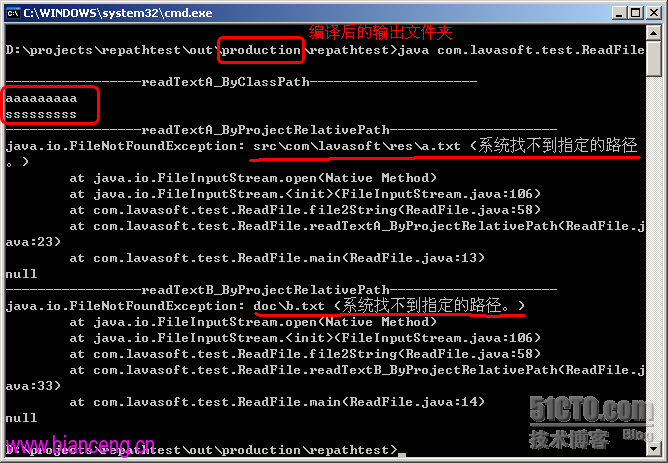
aaaaaaaaa
sssssssss
-----------------readTextA_ByProjectRelativePath---------------------
aaaaaaaaa
sssssssss
-----------------readTextB_ByProjectRelativePath---------------------
bbbbbbbbbbbIDE 中三種方式均成功,但脫離 IDE 僅 Classpath 方式存活。
// 當前類輸出目錄
Test.class.getResource("/").getFile()
// 指定資源絕對路徑
Test.class.getResource("/com/lavasoft/cfg/syscfg.properties").getFile()
new File(Test.class.getResource(cp).getFile()).getPath()輸出範例:D:\projects\...\out\production\...\com\lavasoft\cfg\syscfg.properties
所有需隨應用部署的資源檔案,必須放入 Classpath(src/main/resources),使用
Class.getResourceAsStream("/path")讀取。