前後端分離架構下,$.post() 是最常用的非同步資料交互方式。本文從參數解析、前端實作、後端配合到除錯技巧,完整呈現一個標準的 AJAX POST 流程。
$.post(url, [data], [callback], [type])
| 參數 | 類型 | 說明 | 必要性 |
|---|---|---|---|
url | String | 請求目標地址(相對/絕對路徑) | 必填 |
data | Object/String | 發送資料,{key: val} 格式自動序列化為 application/x-www-form-urlencoded | 選填 |
callback | Function | 成功回呼 function(response, status, xhr) | 選填 |
type | String | 預期回傳格式:json、xml、html、script、text、_default | 選填 |
testPost.php
<?php
header('Content-Type: application/json; charset=utf-8');
// 簡單示範:接收 name 參數並原樣回傳
$response = ['name' => $_POST['name'] ?? ''];
echo json_encode($response);
?>
ajax.html
<!DOCTYPE html>
<html>
<head>
    <meta charset="UTF-8">
    <title>jQuery AJAX POST 示範</title>
    <script src="https://code.jquery.com/jquery-3.7.1.min.js"></script>
</head>
<body>
    <form id="demoForm">
        <input type="text" name="name" id="name" placeholder="輸入姓名" required>
        <button type="submit" id="sub">提交</button>
    </form>
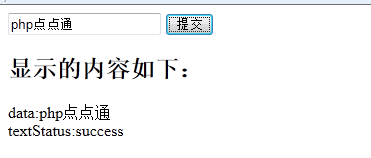
    <h2>伺服器回傳內容:</h2>
    <div id="result"></div>

    <script>
    $(document).ready(function() {
        $('#demoForm').on('submit', function(e) {
            e.preventDefault(); // 阻止表單傳統提交
            $.post('testPost.php',
                { name: $('#name').val() },
                function(data, textStatus) {
                    $('#result')
                        .append('data: ' + data.name + '<br>')
                        .append('textStatus: ' + textStatus + '<br>');
                },
                'json' // 明確指定期望 JSON,jQuery 會自動 parse
            );
        });
    });
    </script>
</body>
</html>
testPost.php$_POST['name'] → json_encode 回傳
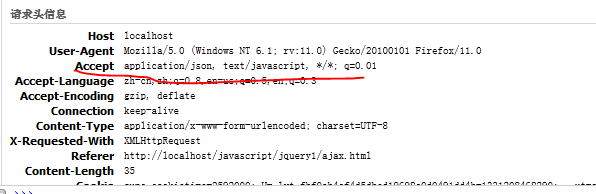
.fail(function(xhr, status, error) {
    console.error('AJAX 失敗:', status, error);
    $('#result').append('❌ 請求失敗:' + error);
});
$.ajax({
    url: 'api/user',
    type: 'POST',
    contentType: 'application/json',
    data: JSON.stringify({ name: 'John', age: 25 }),
    dataType: 'json',
    success: handleResponse
});
在 $.ajaxSetup() 中統一攜帶 Token:
$.ajaxSetup({
    headers: { 'X-CSRF-TOKEN': $('meta[name="csrf-token"]').attr('content') }
});
var xhr = $.post(...);
// 需要時呼叫
xhr.abort();
$.post() 是 $.ajax() 的簡寫,適合簡單 POST 場景。複雜需求(自定 Header、檔案上傳、進度監聽、取消請求)請直接使用 $.ajax() 或現代 fetch API。記住:永遠在後端設定 Content-Type: application/json 並在前端指定 dataType: 'json',避免解析失敗。