WPF 以 `
PathGeometry:根容器,屬性 `Figures` 為 `PathFigure:單一連續子圖形,屬性 `StartPoint` (起點)、`IsClosed` (是否閉合)、`Segments` (`PathSegment (抽象) 衍生類別:
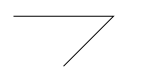
<Page xmlns="https://schemas.microsoft.com/winfx/2006/xaml/presentation"
      xmlns:x="https://schemas.microsoft.com/winfx/2006/xaml">
  <Path Stroke="Black" StrokeThickness="1">
    <Path.Data>
      <PathGeometry>
        <PathGeometry.Figures>
          <PathFigureCollection>
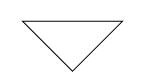
            <PathFigure StartPoint="100,50">
              <PathFigure.Segments>
                <PathSegmentCollection>
                  <LineSegment Point="200,50" />
                  <LineSegment Point="150,100" />
                </PathSegmentCollection>
              </PathFigure.Segments>
            </PathFigure>
          </PathFigureCollection>
        </PathGeometry.Figures>
      </PathGeometry>
    </Path.Data>
  </Path>
</Page>
設定 `
多個 `
<Page xmlns="https://schemas.microsoft.com/winfx/2006/xaml/presentation"
      xmlns:x="https://schemas.microsoft.com/winfx/2006/xaml">
  <Canvas Width="800" Height="800">
    <!-- 背景、飛船主體、細節、光效等數百個 Path 元素 -->
    <Path ... Data="F1 M ..." />
    <!-- 完整代碼見原文 -->
  </Canvas>
</Page>

上述 XAML 中 `Data="F1 M 10.1172,19.4509L 1.5,21.2192..."` 即為 Path Markup Syntax。指令對應:
此語法為 `
PathGeometry pg = new PathGeometry();
PathFigure pf = new PathFigure { StartPoint = new Point(100, 50) };
pf.Segments.Add(new LineSegment(new Point(200, 50), true));
pf.Segments.Add(new LineSegment(new Point(150, 100), true));
pf.IsClosed = true;
pg.Figures.Add(pf);
PathGeometry 以 `Figure` + `Segment` 分層模型,提供構建任意向量圖形的完整原語。配合 Path Markup Syntax 的緊湊表示,支援從手寫標記、設計工具匯出、程式碼動態生成等多種工作流。掌握其核心類別與指令語法,是 WPF 進階繪圖開發的基石。