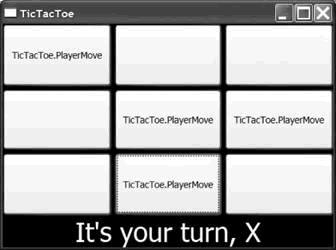
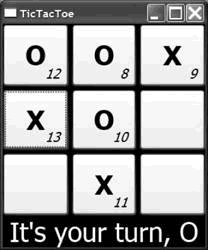
當按鈕內容為自訂類別 PlayerMove(含 PlayerName、MoveNumber)時,預設僅顯示型別名稱。透過 DataTemplate 指定 DataType,WPF 遇到該型別自動展開模板。
<DataTemplate DataType="{x:Type local:PlayerMove}">
  <Grid>
    <TextBlock Text="{Binding PlayerName}" FontSize="32" FontWeight="Bold" .../>
    <TextBlock Text="{Binding MoveNumber}" FontSize="16" FontStyle="Italic" .../>
  </Grid>
</DataTemplate>
將模板內重複屬性(字體、對齊等)移至具名樣式,再由 TextBlock.Style="{StaticResource CellTextStyle}" 引用。利於維護、支援換膚/主題(第 6 章詳述)。
<Style x:Key="CellTextStyle" TargetType="{x:Type TextBlock}">
  <Setter Property="FontSize" Value="32"/> ...
</Style>