上一章已完成 ITruckService 介面與 TruckServiceDataConnector。本章將完成 WorkflowTruckTrackingDataService 服務類別,並使用 wca.exe 產生自訂活動,進而建立關聯工作流與宿主應用程式的整合。
private static WorkflowRuntime _workflowRuntime = null;
private static ExternalDataExchangeService _dataExchangeService = null;
private static TruckServiceDataConnector _dataConnector = null;
private static object _syncRoot = new object();

public event EventHandler<TruckActivityEventArgs> TruckLeaving;
public event EventHandler<TruckActivityEventArgs> RouteUpdated;
public event EventHandler<TruckActivityEventArgs> TruckArrived;

private Guid _instanceID = Guid.Empty;
public Guid InstanceID { get { return _instanceID; } set { _instanceID = value; } }

private Int32 _truckID = -1;
public Int32 TruckID { get { return _truckID; } set { _truckID = value; } }
確保 ExternalDataExchangeService 與 TruckServiceDataConnector 僅註冊一次,並以 (InstanceID, TruckID) 為鍵管理服務實例。
public static WorkflowTruckTrackingDataService CreateDataService(Guid instanceID, WorkflowRuntime workflowRuntime, Int32 truckID)
{
    lock (_syncRoot)
    {
        if (_workflowRuntime == null) _workflowRuntime = workflowRuntime;
        if (_dataExchangeService == null)
        {
            _dataExchangeService = new ExternalDataExchangeService();
            _workflowRuntime.AddService(_dataExchangeService);
        }
        TruckServiceDataConnector connector = (TruckServiceDataConnector)workflowRuntime.GetService(typeof(TruckServiceDataConnector));
        if (connector == null)
        {
            _dataConnector = new TruckServiceDataConnector();
            _dataExchangeService.AddService(_dataConnector);
        }
        else _dataConnector = connector;
        return GetRegisteredWorkflowDataService(instanceID, truckID);
    }
}

public static WorkflowTruckTrackingDataService GetRegisteredWorkflowDataService(Guid instanceID, Int32 truckID)
{
    lock (_syncRoot)
    {
        WorkflowTruckTrackingDataService svc = TruckServiceDataConnector.GetRegisteredWorkflowDataService(instanceID, truckID);
        if (svc == null)
        {
            svc = new WorkflowTruckTrackingDataService(instanceID, truckID);
            TruckServiceDataConnector.RegisterDataService(svc);
        }
        return svc;
    }
}
private WorkflowTruckTrackingDataService(Guid instanceID, Int32 truckID)
{
    _instanceID = instanceID;
    _truckID = truckID;
}

~WorkflowTruckTrackingDataService()
{
    _workflowRuntime = null;
    _dataExchangeService = null;
    _dataConnector = null;
}

public string Read()
{
    return _dataConnector.RetrieveTruckInfo(InstanceID, TruckID);
}
public void RaiseTruckLeavingEvent(Int32 truckID, Int32 startingX, Int32 startingY)
{
    EnsureRuntime();
    _workflowRuntime.GetWorkflow(_instanceID); // 載入持久化實例
    TruckLeaving?.Invoke(this, new TruckActivityEventArgs(_instanceID, truckID, startingX, startingY));
}

public void RaiseRouteUpdatedEvent(Int32 truckID, Int32 X, Int32 Y)
{
    EnsureRuntime();
    _workflowRuntime.GetWorkflow(_instanceID);
    RouteUpdated?.Invoke(this, new TruckActivityEventArgs(_instanceID, truckID, X, Y));
}

public void RaiseTruckArrivedEvent(Int32 truckID)
{
    EnsureRuntime();
    _workflowRuntime.GetWorkflow(_instanceID);
    TruckArrived?.Invoke(this, new TruckActivityEventArgs(_instanceID, truckID));
}

private void EnsureRuntime()
{
    if (_workflowRuntime == null) _workflowRuntime = new WorkflowRuntime();
}
TruckService 專案已編譯產生 TruckService.dll。TruckService\bin\Debug 目錄。"C:\Program Files\Microsoft SDKs\Windows\v6.0A\Bin\Wca.exe" TruckService.dll /n:TruckFlowITruckService.Invokes.cs (CallExternalMethod 活動) 與 ITruckService.Sinks.cs (HandleExternalEvent 活動)。TruckFlow 專案:ren ITruckService.Invokes.cs ExternalEventActivities.csmove ExternalEventActivities.cs ..\..\..\TruckFlowren ITruckService.Sinks.cs ExternalEventHandlers.csmove ExternalEventHandlers.cs ..\..\..\TruckFlowTruckFlow 專案。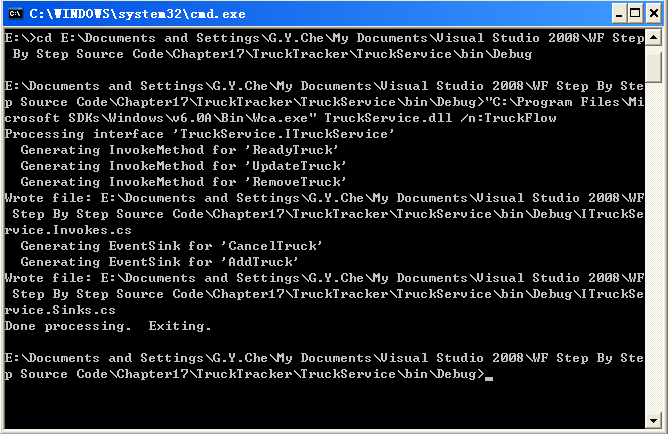
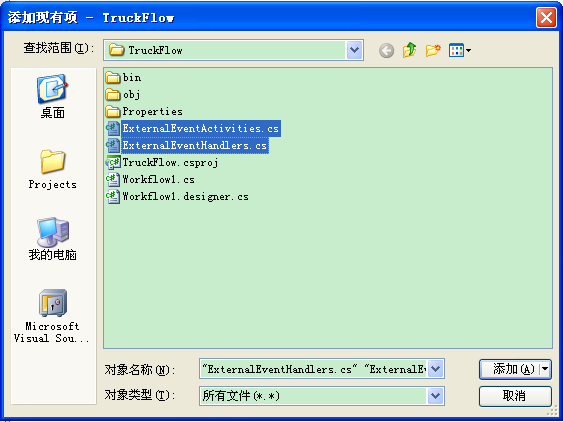
在 TruckFlow 專案加入對 TruckService 的參考,並編譯專案使自訂活動出現在工具箱。
CorrelationToken = TruckIDCorrelation,OwnerActivityName = Workflow1。繫結 StartingX→CurrentX、StartingY→CurrentY、TruckID→TruckID (皆為新相依屬性)。TestAtDestination。EventDrivenActivity 分支:CancelTruck 活動 (共用 TruckIDCorrelation,繫結 TruckID) → CodeActivity (CancelTruck 方法設定 _cancelTruck = true)。DelayActivity (1 秒) → CodeActivity (UpdateTruckPosition 計算新座標) → UpdateTruck 活動 (共用 TruckIDCorrelation,繫結 TruckID、X=CurrentX、Y=CurrentY)。TruckIDCorrelation,繫結 TruckID。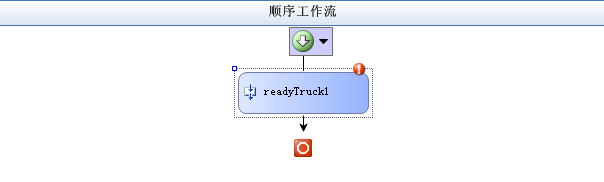
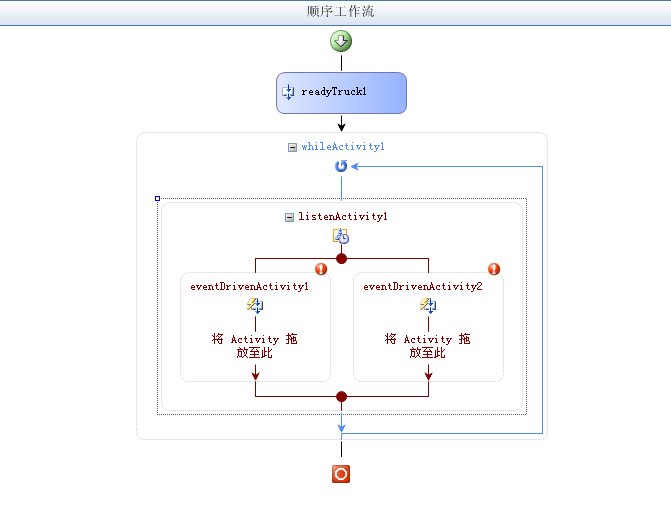
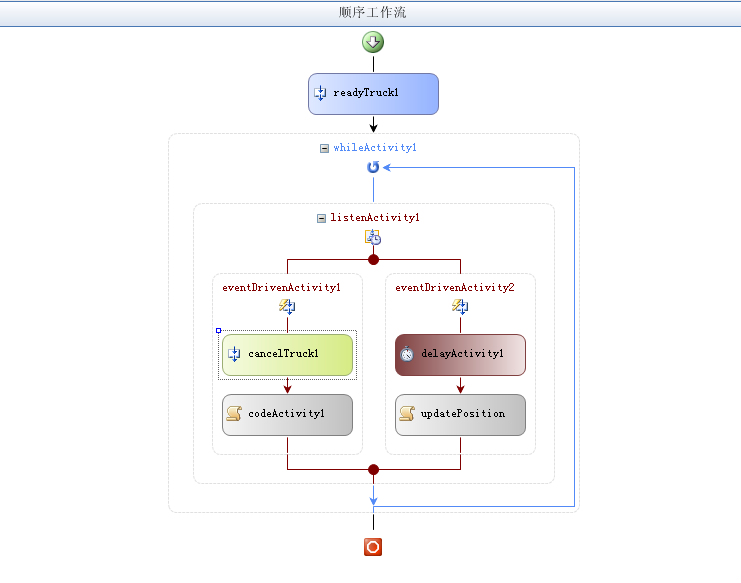
using System.IO;
using System.Xml;
using System.Xml.Serialization;

private bool _cancelTruck = false;
private TruckService.RouteInfo _routes = null;
private TruckService.Truck _myTruck = null;
private TruckService.Route _myRoute = null;
private TruckService.Destination _currentOrigin = null;
private TruckService.Destination _currentDestination = null;
public string Routes
{
    set
    {
        using (StringReader rdr = new StringReader(value))
        {
            XmlSerializer serializer = new XmlSerializer(typeof(TruckService.RouteInfo));
            _routes = (TruckService.RouteInfo)serializer.Deserialize(rdr);
        }
    }
}

public string TrackedTruck
{
    set
    {
        using (StringReader rdr = new StringReader(value))
        {
            XmlSerializer serializer = new XmlSerializer(typeof(TruckService.Truck));
            _myTruck = (TruckService.Truck)serializer.Deserialize(rdr);
        }
        TruckID = _myTruck.ID;
        // 尋找對應路線與起點/終點座標
        foreach (TruckService.Route route in _routes.Routes)
            if (route.ID == _myTruck.RouteID) { _myRoute = route; break; }
        _currentOrigin = FindDestination(_myRoute.Start);
        _currentDestination = _myRoute.Waypoints.Length > 0
            ? FindDestination(_myRoute.Waypoints[0].ID)
            : FindDestination(_myRoute.Stop);
        CurrentX = _currentOrigin.X;
        CurrentY = _currentOrigin.Y;
    }
}

private TruckService.Destination FindDestination(Int32 id)
{
    foreach (TruckService.Destination d in _routes.Destinations)
        if (d.ID == id) return d;
    return null;
}
private void TestAtDestination(object sender, ConditionalEventArgs e)
{
    if (_cancelTruck) { e.Result = false; return; }
    // 若距離目的地 < 3 像素視為到達
    bool atDest = Math.Abs((double)_currentDestination.X - CurrentX) < 3.0
               && Math.Abs((double)_currentDestination.Y - CurrentY) < 3.0;
    if (atDest)
    {
        if (_currentDestination.ID != _myRoute.Stop) // 有下一個路徑點
        {
            _currentOrigin = _currentDestination;
            for (int i = 0; i < _myRoute.Waypoints.Length; i++)
                if (_myRoute.Waypoints[i].ID == _currentOrigin.ID)
                {
                    _currentDestination = (i + 1 == _myRoute.Waypoints.Length)
                        ? FindDestination(_myRoute.Stop)
                        : FindDestination(_myRoute.Waypoints[i + 1].ID);
                    break;
                }
        }
        else e.Result = false; // 已達最終終點
    }
    e.Result = true; // 繼續 While 迴圈
}
private void CancelTruck(object sender, EventArgs e) { _cancelTruck = true; }

private void UpdateTruckPosition(object sender, EventArgs e)
{
    // 線性插值計算新座標
    double m = ((double)_currentDestination.Y - _currentOrigin.Y) / ((double)_currentDestination.X - _currentOrigin.X);
    double b = _currentDestination.Y - m * _currentDestination.X;
    int multiplier = (_currentDestination.X - _currentOrigin.X) < 0 ? -1 : 1;
    CurrentX += multiplier * 2;
    CurrentY = (int)(m * CurrentX + b);
}
TruckTracker 專案加入對 TruckFlow 的參考。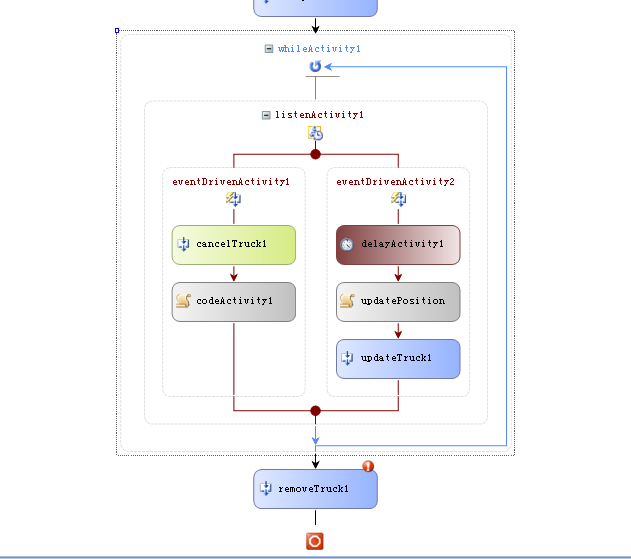
本章完整示範了 WF 本機通訊的關聯機制:從介面定義 (CorrelationParameter、CorrelationInitializer、CorrelationAlias)、資料連接器與服務類別的實作、wca.exe 產生強型別活動、到關聯工作流的設計與程式碼實作。透過 CorrelationToken 將多個活動綁定至同一張卡車識別碼,確保宿主與多個工作流實例間的資料不會混淆,展現 WF 在一對多通訊情境下的強大能力。