將上篇的驗證邏輯封裝為 Component,拖曳至表單設計介面即可透過屬性視窗視覺化配置控制項集合與驗證規則。
public partial class CtrlValidation : Component
{
    public CtrlValidation() { InitializeComponent(); typeCache = new TypeCache(); }
    public CtrlValidation(IContainer container) { container.Add(this); InitializeComponent(); typeCache = new TypeCache(); }

    TypeCache typeCache;
    List ctrlCollect = new List();

    [Description("控制項集合")]
    [Editor(typeof(DropEditor), typeof(UITypeEditor))]
    [DesignerSerializationVisibility(DesignerSerializationVisibility.Content)]
    public List CtrlCollect { get => ctrlCollect; set => ctrlCollect = value; }

    // DataSource/DataMember 繫結屬性(略,同標準資料繫結模式)

    #region 公開功能方法
    public bool CheckIsNull() { /* 遍歷 ctrlCollect 呼叫 TypeProcess.CheckNull */ }
    public bool CheckIsFormate() { /* 僅 TextEdit 呼叫 CheckFormate */ }
    public void SetCtrlClear() { ctrlCollect.ForEach(c => GetProcess(c).SetCtrlClear()); }
    public void SetCtrlEnable(bool enable) { ctrlCollect.ForEach(c => GetProcess(c).SetCtrlEnable(enable)); }
    public void SetCtrlDefault() { ctrlCollect.ForEach(c => GetProcess(c).SetCtrlDefault()); }
    public void ClearErrText() { ctrlCollect.ForEach(c => GetProcess(c).ClearErrText()); }
    public void LoadEditRowToText(DataRow row) { /* ... */ }
    public void SetCtrlTextToEditRow(DataRow row) { /* ... */ }
    #endregion

    TypeProcess GetProcess(SetControl ctrl) {
        object[] obj = new object[] { ctrl };
        return TypeFactory.CreateType(ctrl.ControlName.GetType().Name, obj, ctrl.ToString(), typeCache);
    }
} public class DropEditor : UITypeEditor
{
public override UITypeEditorEditStyle GetEditStyle(ITypeDescriptorContext context) {
return (context != null && context.Instance != null) ? UITypeEditorEditStyle.Modal : base.GetEditStyle(context);
}
public override object EditValue(ITypeDescriptorContext context, IServiceProvider provider, object value) {
IWindowsFormsEditorService iws = (IWindowsFormsEditorService)provider.GetService(typeof(IWindowsFormsEditorService));
if (iws != null) {
using (FrmChoose ui = new FrmChoose(context, (List)value)) {
if (iws.ShowDialog(ui) == DialogResult.OK) {
value = ui.Value;
context.OnComponentChanged();
}
}
}
return value;
}
} GridControl (DevExpress) 顯示控制項清單ComboBoxEdit 選擇資料繫結欄位(需先設定 DataSource/DataMember)arrType 白名單過濾支援型別DataMember 指定的 DataTable 欄位填充 ComboBoxArrayList arrType = new ArrayList {
typeof(DevExpress.XtraEditors.LookUpEdit), typeof(DevExpress.XtraEditors.TextEdit),
typeof(DevExpress.XtraEditors.DateEdit), typeof(DevExpress.XtraEditors.ComboBoxEdit),
typeof(RealSailing.UI.Common.UCSysParaslkEdit), typeof(RealSailing.UI.Control.TextBoxEx),
typeof(RealSailing.UI.Control.MemoEditEx), typeof(RealSailing.UI.Common.UCComboBox),
typeof(RealSailing.UI.Control.PopuLookUpedit), typeof(RealSailing.UI.Control.UCTextEdit)
};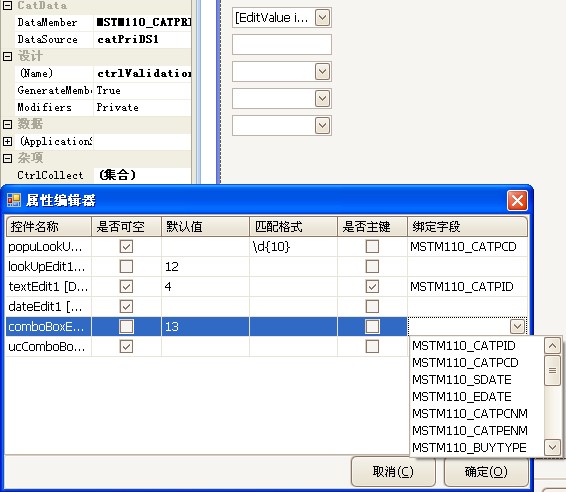
拖曳 CtrlValidation 至表單 → 自動載入白名單控制項 → 點擊 CtrlCollect 屬性省略號 → 彈出視窗逐項設定 NullAble、Default、Format、KeyFiled、FiledName → 確定完成 → 程式碼呼叫 8 大功能方法。
UITypeEditor + IWindowsFormsEditorService 實作模態屬性編輯器DesignerSerializationVisibility.Content 確保集合內容序列化至設計器代碼ITypeDescriptorContext 取得設計時容器與元件上下文DataSet 並提取欄位資訊