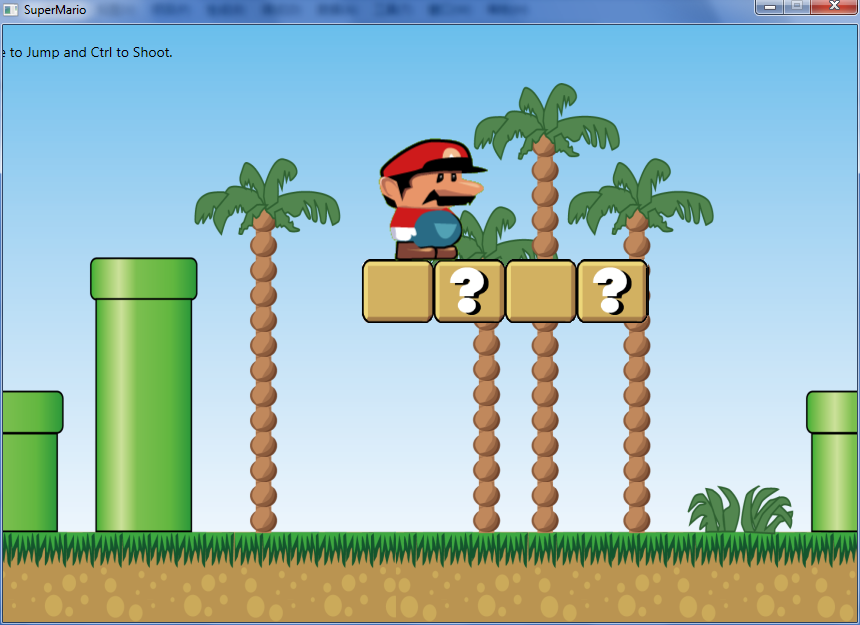
使用 WPF 2D 繪圖能力打造超級瑪利歐原型,已實作:角色走動/跳躍動畫、發射子彈、邊界檢測、場景捲軸。未含關卡設計與敵人 AI。
<Storyboard x:Key="walkLeftStoryboard">
  <ObjectAnimationUsingKeyFrames Duration="00:00:00.4" RepeatBehavior="Forever"
      Storyboard.TargetName="marioImage" Storyboard.TargetProperty="Source" />
</Storyboard>
<Image Name="marioImage">
  <Image.RenderTransform>
    <TranslateTransform x:Name="marioTranslate" X="0" Y="0"/>
  </Image.RenderTransform>
</Image>
C# 動態新增關鍵幀(需切割大圖,使用 System.Drawing,無法移植 Silverlight):
public static BitmapSource CreateBitmapSource(System.Drawing.Bitmap frame) {
    return Imaging.CreateBitmapSourceFromHBitmap(frame.GetHbitmap(), IntPtr.Zero, Int32Rect.Empty, BitmapSizeOptions.FromEmptyOptions());
}
internal static void AddKeyFrames(ObjectAnimationUsingKeyFrames animation, params System.Drawing.Bitmap[] frames) {
    double percent = 0, pace = 1.0 / frames.Length;
    foreach (var frame in frames) {
        animation.KeyFrames.Add(new DiscreteObjectKeyFrame(CreateBitmapSource(frame), KeyTime.FromPercent(percent)));
        percent += pace;
    }
}<Storyboard x:Key="walkLeftStoryboard">
<ObjectAnimationUsingKeyFrames Duration="00:00:00.4" RepeatBehavior="Forever"
Storyboard.TargetName="marioImage" Storyboard.TargetProperty="CurrentFrame" />
</Storyboard>
<game:AnimatedImage x:Name="marioImage" Image="/SuperMario;component/Images/mario.png"
CurrentFrame="0, 0, 0.5, 0.5" Width="134" Height="131">
<game:AnimatedImage.RenderTransform>
<TranslateTransform x:Name="marioTranslate" X="0" Y="0"/>
</game:AnimatedImage.RenderTransform>
</game:AnimatedImage>自訂控制項 AnimatedImage 模板:
<Style TargetType="local:AnimatedImage">
  <Setter Property="Template">
    <Setter.Value>
      <ControlTemplate TargetType="local:AnimatedImage">
        <Border BorderThickness="0">
          <Border.Background>
            <ImageBrush ImageSource="{Binding Image, RelativeSource={RelativeSource TemplatedParent}}"
                        Stretch="UniformToFill" AlignmentX="Left" AlignmentY="Top"
                        Viewbox="{Binding CurrentFrame, RelativeSource={RelativeSource TemplatedParent}}"/>
          </Border.Background>
        </Border>
      </ControlTemplate>
    </Setter.Value>
  </Setter>
</Style>
C# 新增關鍵幀(使用 Rect 結構):
internal static void AddKeyFrames(ObjectAnimationUsingKeyFrames animation, Rect[] frames) {
    double percent = 0, pace = 1.0 / frames.Length;
    foreach (var frame in frames) {
        animation.KeyFrames.Add(new DiscreteObjectKeyFrame(frame, KeyTime.FromPercent(percent)));
        percent += pace;
    }
}TileBrush 缺少 ViewBox 屬性,此方案無法移植。掛載於 CompositionTarget.Rendering 事件:
GameLoop gameLoop;
private void Window_Loaded(object sender, RoutedEventArgs e) {
    gameLoop = new GameLoop(player, Scenes.Level1);
    CompositionTarget.Rendering += CompositionTarget_Rendering;
}
void CompositionTarget_Rendering(object sender, EventArgs e) {
    gameLoop.ProcessChanges();
}public void ProcessChanges() {
TimeSpan timeSpan = DateTime.Now - lastTime;
double step = timeSpan.TotalSeconds;
lastTime = DateTime.Now;
double x = Sprite.X, y = Sprite.Y;
double dx = step * Sprite.Speed;
// 水平移動與場景捲軸
if (Sprite.IsWalkingLeft) { x -= dx; Scene.ScrollRight(x, dx); }
else if (Sprite.IsWalkingRight) { x += dx; Scene.ScrollLeft(x, dx); }
if (Map.CanMoveTo(x, Sprite.Y, Sprite.Width, Sprite.Height)) Sprite.X = x;
// 跳躍物理
if (Sprite.IsJumping) {
y -= (1 - Sprite.JumpTime) * step * 400;
if (Sprite.JumpTime < 1 && Map.CanMoveTo(Sprite.X, y, Sprite.Width, Sprite.Height)) {
Sprite.Y = y; Sprite.JumpTime += step;
} else { Sprite.IsJumping = false; Sprite.IsFalling = true; Sprite.JumpTime = 0; }
}
// 下落物理
else if (Sprite.IsFalling) {
y += 800 * Sprite.FallTime * step;
if (Map.CanMoveTo(Sprite.X, y, Sprite.Width, Sprite.Height)) {
Sprite.Y = y; Sprite.FallTime += step;
} else { Sprite.IsFalling = false; Sprite.FallTime = 0; }
}
// 站立檢測
else {
y += 1;
if (Map.CanMoveTo(Sprite.X, y, Sprite.Width, Sprite.Height)) {
Sprite.Y = y; Sprite.IsFalling = true; Sprite.FallTime = step;
}
}
}改用 XAML 向量圖形繪製動畫與場景物件,優勢:任意縮放不失真、動畫更流暢。