template.html:包含表格佔位符 $TableRow$、導航佔位符 $Navigation$、顏色佔位符 $BgColor$face.xml:表情文件名列表private void LoadQQFace(int page, int rows, int cols) {
currentPage = page;
string tpl = File.ReadAllText("template.html");
DataSet ds = new DataSet(); ds.ReadXml("face.xml");
DataTable dt = ds.Tables[0];
int total = dt.Rows.Count;
pageSize = (total + rows * cols - 1) / (rows * cols);
// 構建表格行
string tableRows = "";
for (int i = 1; i <= rows; i++) {
string tr = "";
for (int j = 1; j <= cols; j++) {
int idx = (i-1)*cols + (page-1)*rows*cols + j;
if (idx < total) {
string img = Application.StartupPath + @"\faces\" + dt.Rows[idx][0];
tr += $"
";
tableRows += tr;
}
// 替換佔位符
tpl = tpl.Replace("$TableRow$", tableRows)
.Replace("$LeftLimt$", (29 * (cols/2)).ToString())
.Replace("$RightLimt$", ((cols-3)*29).ToString())
.Replace("$BgColor$", ColorTranslator.ToHtml(BackColor))
.Replace("$Navigation$", $"");
// 寫入臨時文件並導航
string temp = Path.GetTempPath() + "tempHtmlFile.html";
File.WriteAllText(temp, tpl);
webBrowser1.Navigate(temp);
webBrowser1.DocumentCompleted += WebBrowser1_DocumentCompleted;
// 自適應窗體大小
Width = 29 * cols + 21;
Height = 29 * rows + 80;
}void WebBrowser1_DocumentCompleted(object sender, WebBrowserDocumentCompletedEventArgs e) {
var doc = webBrowser1.Document;
var prev = doc.GetElementById("linkPrev");
var next = doc.GetElementById("linkNext");
if (prev != null) {
prev.Click -= LinkPrev_Click;
if (currentPage > 1) prev.Click += LinkPrev_Click;
}
if (next != null) {
next.Click -= LinkNext_Click;
if (currentPage < pageSize) next.Click += LinkNext_Click;
}
}
void LinkPrev_Click(object sender, HtmlElementEventArgs e) => LoadQQFace(currentPage - 1, 8, 9);
void LinkNext_Click(object sender, HtmlElementEventArgs e) => LoadQQFace(currentPage + 1, 8, 9);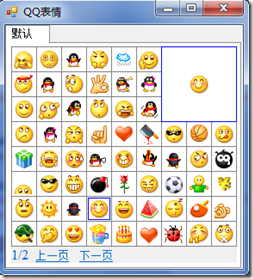
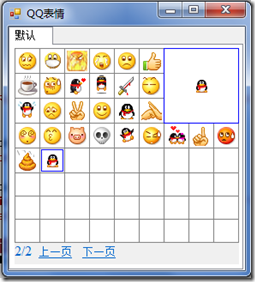
點擊表情如何插入聊天輸入框?需 JS 與 WinForm 交互 (window.external 或 ObjectForScripting),歡迎交流。