WF 4 內建 SqlWorkflowInstanceStore 功能強大但結構複雜(10 資料表、24 預存程序)。本文實作自訂持久化,同樣儲存至 SQL Server,但結構極簡。
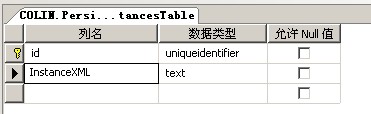
單一資料表 InstancesTable:
覆寫 BeginTryCommand 處理三大核心命令:
CreateWorkflowOwnerCommand:建立實例擁有者綁定SaveWorkflowCommand:序列化實例資料為 XML 存入資料表LoadWorkflowCommand:從資料表讀取 XML 反序列化還原實例核心程式碼:
public class XmlWorkflowInstanceStore : InstanceStore {
    public Guid ownerInstanceID;
    public XmlWorkflowInstanceStore() : this(Guid.NewGuid()) {}
    public XmlWorkflowInstanceStore(Guid id) { ownerInstanceID = id; }

    protected override bool TryCommand(InstancePersistenceContext context, InstancePersistenceCommand command, TimeSpan timeout) {
        return EndTryCommand(BeginTryCommand(context, command, timeout, null, null));
    }

    protected override IAsyncResult BeginTryCommand(InstancePersistenceContext context, InstancePersistenceCommand command, TimeSpan timeout, AsyncCallback callback, object state) {
        IDictionary<XName, InstanceValue> data = null;
        if (command is CreateWorkflowOwnerCommand) {
            context.BindInstanceOwner(ownerInstanceID, Guid.NewGuid());
        } else if (command is SaveWorkflowCommand) {
            data = ((SaveWorkflowCommand)command).InstanceData;
            Save(data);
        } else if (command is LoadWorkflowCommand) {
            try {
                var obj = InstancesTableBiz.GetInstancesTable(this.ownerInstanceID);
                byte[] bs = Encoding.UTF8.GetBytes(obj.InstanceXML);
                using (var ms = new MemoryStream(bs)) {
                    data = LoadInstanceDataFromFile(ms);
                }
                context.LoadedInstance(InstanceState.Initialized, data, null, null, null);
            } catch (Exception ex) { throw new PersistenceException(ex.Message); }
        }
        return new CompletedAsyncResult<bool>(true, callback, state);
    }

    protected override bool EndTryCommand(IAsyncResult result) {
        return CompletedAsyncResult<bool>.End(result);
    }

    // XML 反序列化為 Dictionary
    IDictionary<XName, InstanceValue> LoadInstanceDataFromFile(Stream inputStream) { ... }

    // 序列化儲存至資料表
    void Save(IDictionary<XName, InstanceValue> instanceData) { ... }

    // 輔助序列化/反序列化方法
    object DeserializeObject(NetDataContractSerializer serializer, XmlElement element) { ... }
    XmlElement SerializeObject(string elementName, object o, XmlDocument doc) { ... }
}public sealed class Read<TResult> : NativeActivity<TResult> {
public string BookmarkName { get; set; }
protected override bool CanInduceIdle { get { return true; } }
protected override void Execute(NativeActivityContext context) {
context.CreateBookmark(this.BookmarkName, new BookmarkCallback(this.Continue));
}
void Continue(NativeActivityContext context, Bookmark bookmark, object obj) {
this.Result.Set(context, (TResult)obj);
}
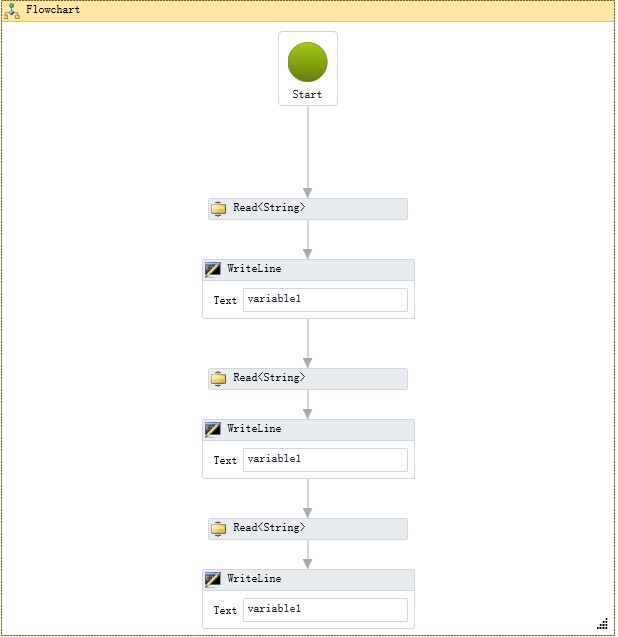
}
XmlWorkflowInstanceStore instanceStore = new XmlWorkflowInstanceStore();
WorkflowApplication application = new WorkflowApplication(new Activity1());
application.InstanceStore = instanceStore;
application.PersistableIdle = e => PersistableIdleAction.Unload;
application.Completed = args => Console.WriteLine("Completed: {0}", args.CompletionState);
application.Unloaded = args => { Console.WriteLine("Unloaded"); instanceUnloaded.Set(); };
instanceStore.ownerInstanceID = application.Id;
application.Run();
instanceUnloaded.WaitOne();
return application.Id;Start.aspx:啟動流程Default.aspx:進行 A、B、C 三關審核專案實際應用:所有審核流程使用書籤機制,比 Demo 複雜得多。自訂持久化另一優勢:微軟內建持久化在流程結束後自動刪除實例記錄,自訂版可保留完整歷程。