安裝某些軟體後,事件檢視器會殘留自訂事件日誌分類 (如圖所示)。軟體移除時未清理,造成雜亂。
regeditHKEY_LOCAL_MACHINE\SYSTEM\CurrentControlSet\Services\EventLog\Application⚠ 風險警告:若對應程式仍在運行且需寫入該日誌,刪除會導致錯誤。確認該分類確無用途再操作。
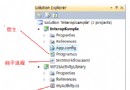
ProjectInstaller.cs,包含 EventLogInstallerEventLogInstaller 屬性:Log = "Application", Source = "My Application"
[RunInstaller(true)]
public class MyInstaller : Installer
{
    public MyInstaller()
    {
        EventLogInstaller installer = new EventLogInstaller();
        installer.Log = "Application";
        installer.Source = "My Application";
        Installers.Add(installer);
    }
}
同樣需加入自訂動作至安裝專案。
// 表單拖放 EventLog 元件 (eventLog1)
eventLog1.Source = "My Application";
eventLog1.WriteEntry("我的訊息");
EventLog log = new EventLog("Application", ".", "My Application");
log.WriteEntry("我的訊息");
log4net、NLog、文字檔、資料庫刪除殘留分類:登錄編輯器刪除對應鍵值。建立分類:Installer 方式最完整 (含自動清理)。使用時:克制寫入頻率,重要事件才進事件日誌。