在上一篇文章中,我們透過 BasicHttpBinding 直接實作 Client 與 Server 通訊的範例,初步認識了 WCF Channel Layer 的核心概念:Channel、Output/Input/Request/Reply/Duplex Channel、Channel Shape、Channel Manager、Channel Factory、Channel Listener、Binding Element 等。這些元件構成了 WCF 通訊管道的基礎,也讓我們能輕易地對 Channel Layer 進行擴展。
當現有的 Binding 或 Channel 無法滿足特殊需求時(例如 WCF 內建 Channel 不支援 Message Body 壓縮),就必須建立自訂 Channel 並注入 Channel Stack。但光建立 Custom Channel 是不夠的,因為 Runtime 時 Channel 是由 Channel Manager 建立,所以還需實作對應的 Channel Factory(發送端擴展)或 Channel Listener(接收端擴展),而它們最終又由 Binding Element 建立。整條鏈路為:Binding Element → Channel Factory & Channel Listener → Channel。
WCF Channel Layer 的大多數物件(Channel、Factory、Listener)本質上都是通訊物件,擁有狀態機制(Creating、Created、Opening、Opened、Closing、Closed…)。為了統一管理,WCF 定義了 ICommunicationObject 介面,包含:
State(回傳 CommunicationState 列舉)Open/Close/AbortOpening/Opened/Closing/Closed/Faulted抽象類別 CommunicationObject 實作了此介面,統一處理狀態轉換與事件觸發。自訂類別繼承它時,強烈建議 override 方法先呼叫 base 方法,讓基底類別處理狀態流轉。
依據訊息交換模式(MEP)不同,雙方 Channel 角色各異,這種結構差異稱為 Channel Shape,共四種:
| Shape | MEP | Sender Channel | Receiver Channel |
|---|---|---|---|
| Datagram | One-way | IOutputChannel | IInputChannel |
| Request/Reply | Request/Reply | IRequestChannel | IReplyChannel |
| Duplex | Duplex | IDuplexChannel | IDuplexChannel |
| P2P | Duplex | IDuplexChannel | IDuplexChannel |
IDuplexChannel 本質上繼承 IInputChannel + IOutputChannel。
本範例建立兩個 Channel:
IRequestChannel,用於發送端IReplyChannel,用於接收端為了觀察呼叫順序,每個方法僅輸出方法名稱。關鍵在於 InnerChannel 欄位:Channel 位於 Stack 中某層,執行完自身邏輯後必須將訊息傳遞給下一層 Channel。
public class MyRequestChannel : ChannelBase, IRequestChannel {
    private IRequestChannel InnerChannel { get; set; }
    public MyRequestChannel(ChannelManagerBase mgr, IRequestChannel inner) : base(mgr) {
        this.InnerChannel = inner;
    }
    // 所有 IRequestChannel 方法:列印名稱 → 呼叫 InnerChannel 對應方法
    // 所有 ChannelBase 虛擬方法:列印名稱 → 呼叫 InnerChannel 對應方法
}
MyReplyChannel 結構完全相同,實作 IReplyChannel 的接收相關方法。
Channel 由 Channel Manager 建立:發送端為 Channel Factory,接收端為 Channel Listener。兩者同樣形成 Stack。
public class MyChannelFactory<TChannel> : ChannelFactoryBase<TChannel> {
    private IChannelFactory<TChannel> InnerChannelFactory { get; set; }
    public MyChannelFactory(BindingContext context) {
        this.InnerChannelFactory = context.BuildInnerChannelFactory<TChannel>();
    }
    protected override TChannel OnCreateChannel(EndpointAddress addr, Uri via) {
        Console.WriteLine("MyChannelFactory.OnCreateChannel()");
        TChannel inner = this.InnerChannelFactory.CreateChannel(addr, via);
        return (TChannel)(object)new MyRequestChannel(this, inner as IRequestChannel);
    }
    // Open/Close/Abort 虛擬方法同理:列印 → 轉呼叫 InnerChannelFactory
}注意:InnerChannelFactory 透過 BindingContext.BuildInnerChannelFactory() 取得,而非建構式直接注入。
public class MyChannelListener<TChannel> : ChannelListenerBase<TChannel> where TChannel : class, IChannel {
    private IChannelListener<TChannel> InnerChannelListener { get; set; }
    public MyChannelListener(BindingContext context) {
        this.InnerChannelListener = context.BuildInnerChannelListener<TChannel>();
    }
    protected override TChannel OnAcceptChannel(TimeSpan timeout) {
        Console.WriteLine("MyChannelListener.OnAcceptChannel()");
        TChannel inner = this.InnerChannelListener.AcceptChannel(timeout);
        return new MyReplyChannel(this, inner as IReplyChannel) as TChannel;
    }
    // 其他 Accept/WaitForChannel 及 Open/Close/Abort 同理
}Binding Element 是將 Factory/Listener 掛入 Binding 的關鍵:
public class MyBindingElement : BindingElement {
    public override BindingElement Clone() => new MyBindingElement();
    public override T GetProperty<T>(BindingContext context) => context.GetInnerProperty<T>();
    public override IChannelFactory<TChannel> BuildChannelFactory<TChannel>(BindingContext context) {
        Console.WriteLine("MyBindingElement.BuildChannelFactory()");
        return new MyChannelFactory<TChannel>(context) as IChannelFactory<TChannel>;
    }
    public override IChannelListener<TChannel> BuildChannelListener<TChannel>(BindingContext context) {
        Console.WriteLine("MyBindingElement.BuildChannelListener()");
        return new MyChannelListener<TChannel>(context) as IChannelListener<TChannel>;
    }
}將 Binding Element 組裝進 BindingElementCollection,順序為:Encoding → Custom Element → Transport。
public class MyBinding : Binding {
    public override BindingElementCollection CreateBindingElements() {
        var elements = new BindingElementCollection();
        elements.Add(new TextMessageEncodingBindingElement());
        elements.Add(new MyBindingElement());
        elements.Add(new HttpTransportBindingElement());
        return elements.Clone();
    }
    public override string Scheme => "http";
}var binding = new MyBinding();
var listener = binding.BuildChannelListener<IReplyChannel>(new Uri("https://127.0.0.1:8888/messagingviabinding"));
listener.Open();
while (true) {
var channel = listener.AcceptChannel(TimeSpan.MaxValue);
channel.Open();
var ctx = channel.ReceiveRequest(TimeSpan.MaxValue);
Console.WriteLine("收到請求:\n{0}", ctx.RequestMessage);
var reply = Message.CreateMessage(MessageVersion.Soap12WSAddressing10, "https://artech.messagingviabinding", "手動建立的回覆訊息");
ctx.Reply(reply);
channel.Close();
}var binding = new MyBinding();
var factory = binding.BuildChannelFactory<IRequestChannel>();
factory.Open();
var channel = factory.CreateChannel(new EndpointAddress("https://127.0.0.1:8888/messagingviabinding"));
channel.Open();
var req = Message.CreateMessage(MessageVersion.Soap12WSAddressing10, "https://artech.messagingviabinding", "測試請求訊息");
var reply = channel.Request(req);
Console.WriteLine("收到回覆:\n{0}", reply);
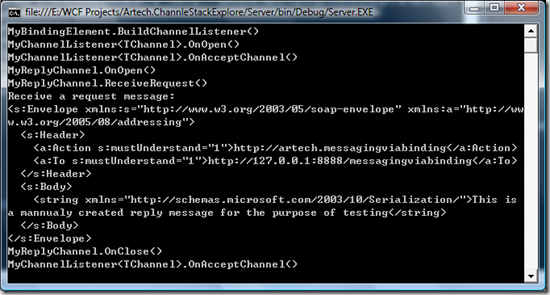
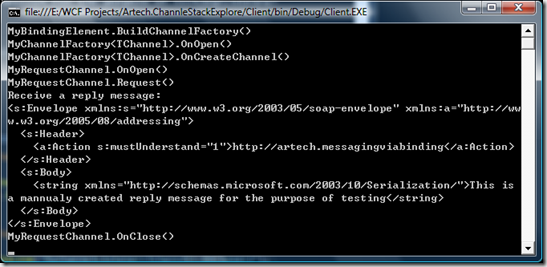
channel.Close(); factory.Close();執行結果會在 Console 依序印出 Channel、Factory、Listener、Binding Element 的各方法呼叫順序,清晰呈現整個 Stack 的運作流程。