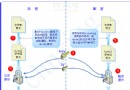
WF4 引入訊息關聯機制,確保工作流服務正確路由相關訊息。本文以簡單申請/審批流程示範 CorrelationHandle 與 XPathMessageQuery 設定。
[DataContract]
public class FlowForm
{
    [DataMember] public Guid FormNum { get; set; }
    [DataMember] public string FlowStatus { get; set; }
    [DataMember] public string ApplyName { get; set; }
    [DataMember] public string ApplyContent { get; set; }
}
兩個 ReceiveAndSendReply 區塊:
CanCreateInstance=True,接收 SendFlow 訊息,以 FormNum 初始化關聯,回覆表單資訊ApproveFlow 訊息,依 FormNum 關聯現有實例,更新狀態並回覆設計圖:
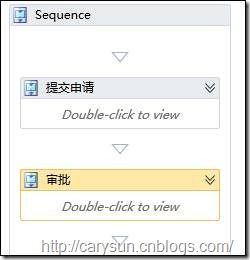
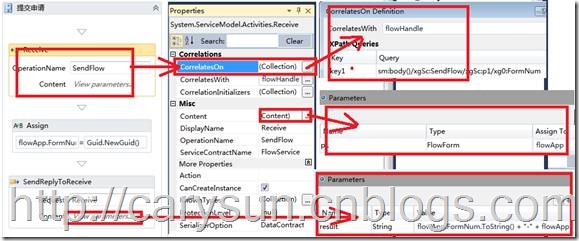
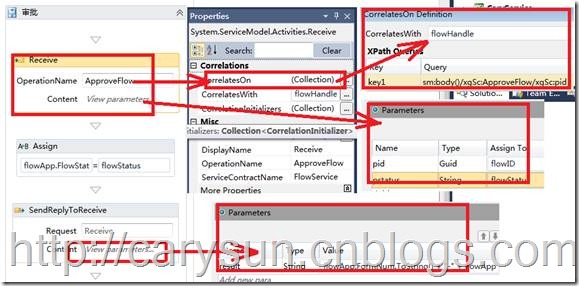
FlowForm flowApp、CorrelationHandle flowHandleCorrelatesWith="[flowHandle]",CorrelationInitializers 加入 RequestReplyCorrelationInitializer 綁定 __handle1,CorrelatesOn 用 XPath 擷取 FormNumCorrelatesWith="[flowHandle]",XPath 擷取 pid (FormNum) 進行關聯// 宿主
WorkflowServiceHost host = new WorkflowServiceHost(new Workflow1(), new Uri("https://localhost:8081/FlowService"));
host.Description.Behaviors.Add(new ServiceMetadataBehavior { HttpGetEnabled = true });
host.Open();
// 用戶端 (WebForm)
FlowForm flow = new FlowForm { ApplyName = txt1.Text, ApplyContent = txt2.Text, FlowStatus = "申請" };
var client = new FlowServiceClient();
listBox.Items.Add(client.SendFlow(flow)); // 取得 FormNum
// 審批
flow.FlowStatus = "審批";
listBox.Items.Add(client.ApproveFlow(flow.FormNum, flow.FlowStatus));
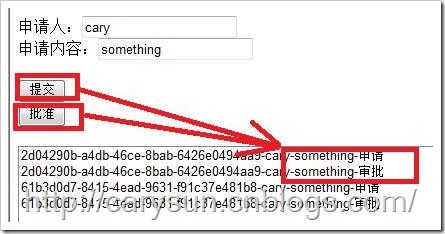
WF4 關聯機制靈活強大,透過 CorrelationHandle 與 XPath 即可實現複雜的長時間工作流服務協調。出處:https://carysun.cnblogs.com/