在技術示範中,我們常看到單一資料表的簡單範例,但實際開發中幾乎不會只有單表系統。同樣地,WCF RIA Services 的官方展示也多為單表操作,那麼在實際專案中,如何透過 RIA Services 有效檢索具有主從關係的關聯式資料呢?本文將以 Visual Studio 2010、Silverlight 4 與 WCF RIA Services Preview 為開發環境,搭配經典的 Chinook 範例資料庫,示範如何優雅地處理主從結構資料。
首先建立一個新的 Silverlight 專案,並在新專案對話方塊中勾選「啟用 .NET RIA 服務」(注意:此處顯示為 .NET RIA Services 而非 WCF RIA Services)。介面設計非常直觀:一個按鈕用於觸發資料載入,兩個 ListBox 分別顯示藝術家與其專輯列表。初始 XAML 佈局如下:
<Grid x:Name="LayoutRoot" Background="White">
  <StackPanel Width="400">
    <Button Content="Get Artist Information" x:Name="GetArtistButton" Click="GetArtistButton_Click" />
    <StackPanel Orientation="Horizontal">
      <StackPanel x:Name="ArtistsContext">
        <StackPanel Orientation="Horizontal">
          <TextBlock Text="Artists: " />
          <TextBlock Text="{Binding ElementName=ListOfArtists, Path=Items.Count}" />
        </StackPanel>
        <ListBox x:Name="ListOfArtists" Width="200" Height="300" DisplayMemberPath="Name" ItemsSource="{Binding}"/>
      </StackPanel>
      <StackPanel x:Name="AlbumsContext">
        <StackPanel Orientation="Horizontal">
          <TextBlock Text="Albums: " />
          <TextBlock Text="{Binding ElementName=ListOfAlbums, Path=Items.Count}" />
        </StackPanel>
        <ListBox x:Name="ListOfAlbums" DisplayMemberPath="Title" ItemsSource="{Binding}" Width="200" Height="300"/>
      </StackPanel>
    </StackPanel>
  </StackPanel>
</Grid>
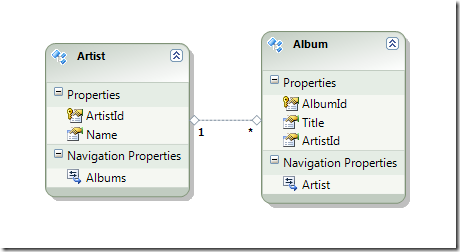
使用 Entity Framework (.NET 4) 建立實體模型,包含 Artist 與 Album 兩個實體及其關聯。建立完成後務必先編譯方案,以便在工具箱中找到模型類別。接著新增 Domain Service Class,記得勾選「為中繼資料產生關聯類別」,這會自動建立基礎的服務存根方法,如 GetArtists 與 GetAlbums。
最初的做法是在按鈕點擊事件中載入所有藝術家,並在使用者選取特定藝術家時,另行查詢該藝術家的專輯:
// 按鈕點擊:載入所有藝術家
ChinookContext ctx = new ChinookContext();
private void GetArtistButton_Click(object sender, RoutedEventArgs e)
{
    ArtistsContext.DataContext = ctx.Artists;
    ctx.Load(ctx.GetArtistsQuery());
}

// ListBox 選取變更:載入所選藝術家的專輯
private void ListOfArtists_SelectionChanged(object sender, SelectionChangedEventArgs e)
{
    ListBox theList = sender as ListBox;
    Artist a = theList.SelectedItem as Artist;
    ctx.Albums.Clear();
    AlbumsContext.DataContext = ctx.Albums;
    ctx.Load(ctx.GetAlbumsForArtistQuery(a.ArtistId));
}
這需要在伺服器端的 Domain Service 中新增查詢方法:
public IQueryable<Album> GetAlbumsForArtist(int ArtistId)
{
    return this.ObjectContext.Albums.Where(a => a.ArtistId == ArtistId);
}
上述做法雖然可行,但會產生多次往返伺服器的請求。若資料量不大且明確需要主從關聯檢視,為何不在初始查詢時就包含子資料?這需要修改自動產生的中繼資料類別。
在產生的 Artist.metadata.cs 中,可以看到 Artist 已擁有 EntityCollection<Album> Albums 導覽屬性。關鍵在於加上 [Include] 屬性,告知 RIA Services 在序列化時包含此關聯集合:
[Include]
public EntityCollection<Album> Albums;
接著在 Domain Service 新增包含關聯資料的查詢方法:
public IQueryable<Artist> GetArtistsWithAlbums()
{
    return this.ObjectContext.Artists.Include("Albums");
}
修改按鈕點擊邏輯改呼叫 GetArtistsWithAlbumsQuery,並移除 SelectionChanged 事件處理器。在 XAML 中利用繫結直接關聯主從資料:
<StackPanel x:Name="AlbumsContext" DataContext="{Binding ElementName=ListOfArtists, Path=SelectedItem}" >
  ...
  <ListBox x:Name="ListOfAlbums" DisplayMemberPath="Title" ItemsSource="{Binding Albums}" Width="200" Height="300"/>
</StackPanel>
重點在於 AlbumsContext 的 DataContext 繫結到藝術家 ListBox 的 SelectedItem,而專輯 ListBox 的 ItemsSource 直接繫結到 {Binding Albums}。由於初始查詢已包含 Albums 資料,客戶端無需額外請求即可即時顯示從屬資料。
雖然 Include 讓關聯資料載入變得非常容易,但必須謹慎使用。假設有 1,000 位客戶,若一次查詢包含所有訂單,傳輸資料量將龐大且影響效能。建議僅在資料量可控、確定需要完整主從檢視的情境下使用;大量資料或複雜關聯時,仍應採用分頁或按需載入策略。