影像本質是二維像素陣列,每像素為 (R,G,B,A) 四維向量。在 RGBA 色彩空間,5×5 矩陣乘以該向量即可實現色彩仿射變換(縮放、旋轉、平移),概念源自三維空間仿射變換。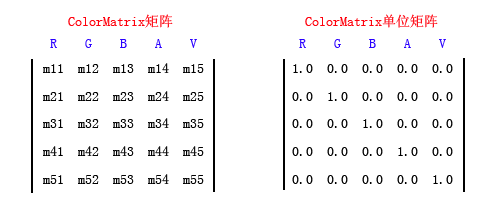
網路上常見「顏色旋轉 60 度」等說法實則誤導,色彩空間無幾何旋轉意義。下面給出實用矩陣範例。
移除彩色資訊,常用 NTSC 加權演算法:
R' = G' = B' = 0.299R + 0.587G + 0.114B
對應矩陣:
float[][] ptsArray = {
    new float[] {0.299f, 0.299f, 0.299f, 0, 0},
    new float[] {0.587f, 0.587f, 0.587f, 0, 0},
    new float[] {0.114f, 0.114f, 0.114f, 0, 0},
    new float[] {0, 0, 0, 1, 0},
    new float[] {0, 0, 0, 0, 1}
};
使用第 5 行第 1 欄 (m51) 加入位移量:
float[][] ptsArray = {
    new float[] {1, 0, 0, 0, 0},
    new float[] {0, 1, 0, 0, 0},
    new float[] {0, 0, 1, 0, 0},
    new float[] {0, 0, 0, 1, 0},
    new float[] {0.1f, 0, 0, 0, 1}  // 紅色 +0.1 (約 25.5 階)
};
第 5 行前三欄同加位移:
new float[] {0.1f, 0.1f, 0.1f, 0, 1} // 各通道 +0.1
對角線乘以係數 >1 提高對比,但直接這樣會導致溢位(像素值超過 255),畫面慘不忍睹。駭客技巧:在第 5 行加入極小位移 (0.001) 抑制溢位:
float[][] ptsArray = {
    new float[] {1.5f, 0, 0, 0, 0},
    new float[] {0, 1.5f, 0, 0, 0},
    new float[] {0, 0, 1.5f, 0, 0},
    new float[] {0, 0, 0, 1, 0},
    new float[] {0.001f, 0.001f, 0.001f, 0, 1}  // 微調防溢位
};
需依色彩權重計算,參考 Grafica Obscura。可用矩陣(s=1.2 為提高 20% 飽和度):
float rwgt = 0.3086f, gwgt = 0.6094f, bwgt = 0.0820f;
float s = 1.2f;
float[][] ptsArray = {
    new float[] {(1-s)*rwgt+s, (1-s)*rwgt, (1-s)*rwgt, 0, 0},
    new float[] {(1-s)*gwgt, (1-s)*gwgt+s, (1-s)*gwgt, 0, 0},
    new float[] {(1-s)*bwgt, (1-s)*bwgt, (1-s)*bwgt+s, 0, 0},
    new float[] {0, 0, 0, 1, 0},
    new float[] {0, 0, 0, 0, 1}
};
FileStream fs = new FileStream(image, FileMode.Open, FileAccess.Read);
Image img = Image.FromStream(fs, false, false);
Bitmap bmp = new Bitmap(img);
img.Dispose(); fs.Close();

Graphics g = this.CreateGraphics();
// ... 設定 ptsArray 同前 ...
ColorMatrix matrix = new ColorMatrix(ptsArray);
ImageAttributes attr = new ImageAttributes();
attr.SetColorMatrix(matrix, ColorMatrixFlag.Default, ColorAdjustType.Default);

// 原圖
g.DrawImage(bmp, 0, 0, 200, 150);
// 套用矩陣後
g.DrawImage(bmp, new Rectangle(205, 0, 200, 150), 0, 0, bmp.Width, bmp.Height, GraphicsUnit.Pixel, attr);

bmp.Dispose(); g.Dispose();
色彩矩陣研究空間廣大,許多專利圍繞此領域,亦是學術論文熱門題目。