PowerShell 預設不區分大小寫,亦提供區分大小寫版本:
| 運算子 | 意義 | 區分大小寫版本 | 忽略大小寫版本 |
|---|---|---|---|
| -eq | 等於 | -ceq | -ieq |
| -ne | 不等於 | -cne | -ine |
| -gt | 大於 | -cgt | -igt |
| -ge | 大於等於 | -cge | -ige |
| -lt | 小於 | -clt | -ilt |
| -le | 小於等於 | -cle | -ile |
| -like | 萬用字元比對 | -clike | -ilike |
| -match | 正則比對 | -cmatch | -imatch |
| -contains | 集合包含 | -ccontains | -icontains |
| -in | 值在集合中 | -cin | -iin |
"MaRui" -eq "marui"    # True
"MaRui" -ieq "MARUI"   # True
"MaRui" -ceq "MARUI"   # False
-and:邏輯 AND-or:邏輯 OR-not、!:邏輯 NOTif (條件) { 程式碼 }
elseif (條件) { 程式碼 }
else { 程式碼 }
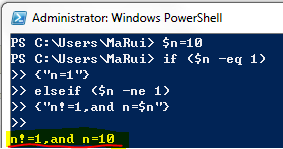
$n = 10
if ($n -eq 1) { "n=1" }
elseif ($n -ne 1) { "n!=1, and n=$n" }
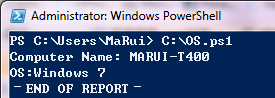
$ComputerName = (Get-WmiObject Win32_ComputerSystem).Name
$OS_Version = (Get-WmiObject Win32_OperatingSystem -ComputerName $ComputerName).Version

if (($OS_Version -eq "5.1.2600") -or ($OS_Version -eq "5.2.3790")) {
    Write-Host "Computer: $ComputerName"
    if ($OS_Version -eq "5.1.2600") { Write-Host "OS: Windows XP" }
    elseif ($OS_Version -eq "5.2.3790") { Write-Host "OS: Windows Server 2003" }
}
elseif (($OS_Version -eq "5.0.2195") -or ($OS_Version -eq "6.1.7600")) {
    Write-Host "Computer: $ComputerName"
    if ($OS_Version -eq "5.0.2195") { Write-Host "OS: Windows 2000 Server" }
    elseif ($OS_Version -eq "6.1.7600") { Write-Host "OS: Windows 7" }
}
else {
    Write-Host "$ComputerName is not supported."
}
"-- END OF REPORT --"
Switch (測試值) {
    比對值1 { 程式碼 }
    比對值2 { 程式碼 }
    Default { 預設程式碼 }
}
Switch ((Get-WmiObject Win32_ComputerSystem).DomainRole) {
    0 { "Standalone Workstation" }
    1 { "Member Workstation" }
    2 { "Standalone Server" }
    3 { "Member Server" }
    4 { "Backup Domain Controller" }
    5 { "Primary Domain Controller" }
    Default { "Cannot determine domain role" }
}
Switch (100) {
    (99 + 1)   { "99+1=100" }
    (1 + 100)  { "1+100=100" }
    (50 * 2)   { "50*2=100" }
    (33.333*3) { "33.333*3=100" }
}
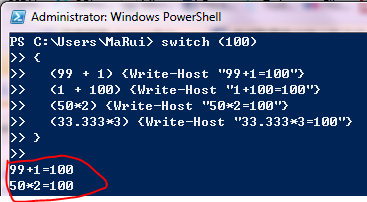
注意:Switch 會評估所有符合條件的區塊,不只第一個(除非使用 Break)。
-Regex:比對值視為正則表達式-Wildcard:比對值視為萬用字元模式-CaseSensitive:區分大小寫-File:逐行讀取檔案進行比對Switch -Regex -File "log.txt" {
"ERROR" { Write-Host "Error found: $_" -ForegroundColor Red }
"WARN" { Write-Host "Warning: $_" -ForegroundColor Yellow }
"INFO" { Write-Host "Info: $_" }
}
If/ElseSwitch(可讀性佳、效能好)If/ElseIf-CaseSensitive 明確控制比對行為掌握條件與邏輯控制,是編寫健壯自動化腳本的基石。