LINQ to SQL 資料多為「官方用法」,靈活變通技巧較少分享。作者實戰專案累積經驗,分享兩大實用技巧:Translate 方法載入部分欄位實體、修改查詢 SQL (如加入 NOLOCK)。
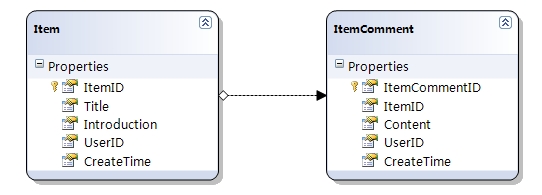
一般查詢會載入所有欄位:
public List<Item> GetItemsForListing(int ownerId)
{
    var query = from item in dataContext.Items
                where item.UserID == ownerId
                orderby item.CreateTime descending
                select item;
    return query.ToList();
}
問題:列表不需 Introduction,但仍傳輸龐大資料,頻寬與效能損耗大。
select new Item { ItemID = item.ItemID, Title = item.Title, ... }
執行時拋出 NotSupportedException:「不允許在查詢中顯式建構實體類型」。RTM 前版本有 Bug 產生重複物件,RTM 直接封殺此功能。
DataContext.Translate<T>(DbDataReader) 將讀取器資料轉換為實體集合,自動 Attach 到 DataContext,支援延遲載入導航屬性與後續更新。
public static List<Item> GetItemsForListing(int ownerId)
{
    ItemDataContext dataContext = new ItemDataContext();
    dataContext.Connection.Open();
    SqlCommand command = new SqlCommand(
        "SELECT [ItemID], [Title], [UserID], [CreateTime] FROM [Item] WHERE [UserID] = " + ownerId +
        " ORDER BY [CreateTime]", (SqlConnection)dataContext.Connection);
    using (DbDataReader reader = command.ExecuteReader(CommandBehavior.CloseConnection))
    {
        return dataContext.Translate<Item>(reader).ToList();
    }
}
CommandBehavior.CloseConnection:確保關閉 Reader 時同步關閉連線,避免連線洩漏 (DataContext 連線被顯式開啟後 Dispose 不會自動關閉)ToList() 立即具現化:Translate 回傳 IEnumerable<T> 延遲執行,必須在 Reader 關閉前具現化所有物件利用 DataContext.GetCommand(query) 取得 DbCommand,再執行並 Translate:
public static class DataContextExtensions
{
    public static List<T> ExecuteQuery<T>(this DataContext dataContext, IQueryable query)
    {
        DbCommand command = dataContext.GetCommand(query);
        dataContext.OpenConnection();
        using (DbDataReader reader = command.ExecuteReader())
        {
            return dataContext.Translate<T>(reader).ToList();
        }
    }
    private static void OpenConnection(this DataContext dataContext)
    {
        if (dataContext.Connection.State == ConnectionState.Closed)
            dataContext.Connection.Open();
    }
}
使用範例:
public static List<Item> GetItemsForListing(int ownerId)
{
    ItemDataContext dataContext = new ItemDataContext();
    var query = from item in dataContext.Items
                where item.UserID == ownerId
                orderby item.CreateTime descending
                select new { ItemID = item.ItemID, Title = item.Title, CreateTime = item.CreateTime, UserID = item.UserID };
    using (dataContext.Connection)
    {
        return dataContext.ExecuteQuery<Item>(query);
    }
}
若實體屬性名與資料庫欄位名不同 (透過 ColumnAttribute.Name 映射),匿名類型必須使用 資料庫欄位名:
[Column(Name = "UserID")] public int OwnerID { get; set; }

// 查詢時必須用 UserID 而非 OwnerID
select new { ..., UserID = item.OwnerID }
否則 Translate 找不到對應欄位導致屬性值為預設值。建議保持實體屬性名與資料庫欄位名一致。
擴充 ExecuteQuery 支援 withNoLock 參數:
public static List<T> ExecuteQuery<T>(this DataContext dataContext, IQueryable query, bool withNoLock)
{
    DbCommand command = dataContext.GetCommand(query, withNoLock);
    dataContext.OpenConnection();
    using (DbDataReader reader = command.ExecuteReader())
        return dataContext.Translate<T>(reader).ToList();
}

private static Regex s_withNoLockRegex = new Regex(@"(] AS \[t\d+\])", RegexOptions.Compiled);
private static string AddWithNoLock(string cmdText)
{
    var matches = s_withNoLockRegex.Matches(cmdText).Cast<Match>().OrderByDescending(m => m.Index);
    foreach (Match m in matches)
    {
        int splitIndex = m.Index + m.Value.Length;
        cmdText = cmdText.Substring(0, splitIndex) + " WITH (NOLOCK)" + cmdText.Substring(splitIndex);
    }
    return cmdText;
}
private static SqlCommand GetCommand(this DataContext dataContext, IQueryable query, bool withNoLock)
{
    SqlCommand command = (SqlCommand)dataContext.GetCommand(query);
    if (withNoLock) command.CommandText = AddWithNoLock(command.CommandText);
    return command;
}
使用:dataContext.ExecuteQuery<Item>(query, true);
產生 SQL:FROM [dbo].[Item] AS [t0] WITH (NOLOCK) —— 避免共享鎖,提升並發效能。
Translate 方法無法搭配 DataLoadOptions.LoadWith。預設延遲載入導致 N+1 查詢問題:
foreach (Item item in itemList)
    foreach (ItemComment comment in item.Comments) // 每次迴圈查詢資料庫
        Console.WriteLine(comment.Content);
正常情況用 LoadWith 解決:
DataLoadOptions loadOptions = new DataLoadOptions();
loadOptions.LoadWith<Item>(item => item.Comments);
dataContext.LoadOptions = loadOptions;
// 產生 LEFT OUTER JOIN 單一 SQL
若需同時享有部分欄位載入與 LoadWith,可能需查詢兩次資料庫並合併 (總比 N+1 查詢強)。