| 語句 | 語法 | 適用場景 |
|---|---|---|
| for | for (初始; 條件; 遞增) { 程式碼 } | 已知迴圈次數、計數器控制 |
| foreach | foreach ($item in $collection) { 程式碼 } | 遍歷集合/陣列每個元素 |
| ForEach-Object | $collection | ForEach-Object { 程式碼 } | 管線串流處理、記憶體效率佳 |
| while | while (條件) { 程式碼 } | 條件為真持續執行、次數未知 |
| do-while | do { 程式碼 } while (條件) | 至少執行一次,再判斷條件 |
| do-until | do { 程式碼 } until (條件) | 至少執行一次,直到條件為真 |
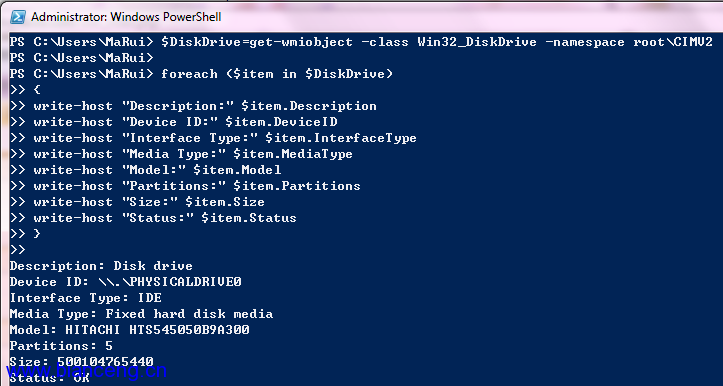
$DiskDrive = Get-WmiObject -Class Win32_DiskDrive -Namespace root\CIMV2
foreach ($item in $DiskDrive) {
    Write-Host "Description: " $item.Description
    Write-Host "Device ID: " $item.DeviceID
    Write-Host "Interface: " $item.InterfaceType
    Write-Host "Model: " $item.Model
    Write-Host "Size: " $item.Size
    Write-Host "Status: " $item.Status
}
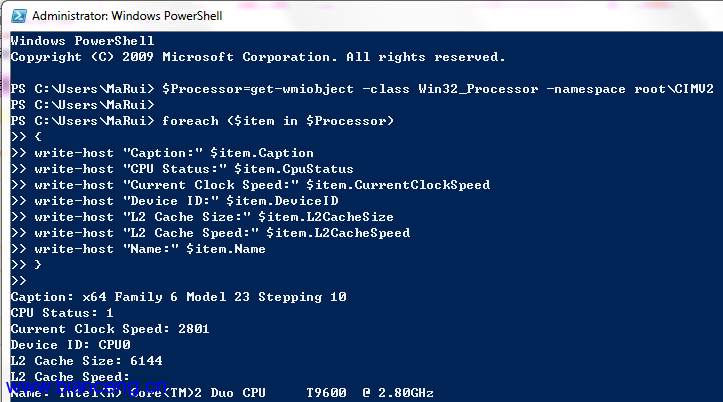
$Processor = Get-WmiObject -Class Win32_Processor -Namespace root\CIMV2
foreach ($item in $Processor) {
    Write-Host "Name: " $item.Name
    Write-Host "Cores: " $item.NumberOfCores
    Write-Host "Clock: " $item.CurrentClockSpeed "MHz"
    Write-Host "L2 Cache: " $item.L2CacheSize "KB"
}
Notepad
While (Get-Process -Name Notepad | Select-Object -ExpandProperty Responding) {
    Start-Sleep -Seconds 1
}
$time = Get-Date
Write-Host "Notepad stopped responding at: $time"
當記事本停止回應時輸出時間戳記。
Notepad
Do { Start-Sleep -Seconds 1 }
While (Get-Process -Name Notepad | Select-Object -ExpandProperty Responding)
$time = Get-Date
Write-Host "Notepad stopped responding at: $time"
Do {
    "Quit Now? (Y/N)"
    $input = Read-Host
} Until ($input -eq "Y")
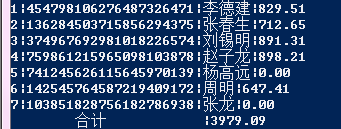
處理固定寬度文字資料,轉換為結構化輸出:
${C:\test.txt} | ForEach-Object {
    $total = 0; $id = 1
} {
    [void]($_ -match '^.{3}(?<id>\d+)(?<name>[\p{IsCJKUnifiedIdeographs}]+)(?<salary>[\d.]*)')
    $ofs = '|'
    "$($id;$id++;$matches.id;$matches.name;'{0:f2}' -f [float]$matches.salary)"
    $total += $matches.salary
} {
    "`tSubtotal`t`t|$total"
}
此例展示正則表達式命名捕捉群組、格式化字串、累加計算等進階技巧。
forforeach(效能最佳)ForEach-Object(串流處理、低記憶體)while / do-whiledo-untilforeach 陳述式比 ForEach-Object 快 2-3 倍,但需將集合完整載入記憶體ForEach-Object 或 Switch -File靈活運用各類迴圈,配合管線特性,能編寫出高效且易讀的 PowerShell 自動化腳本。