當報表需求涉及「一對多」關係(如:員工與其出差記錄、訂單與明細行),子報表 是最佳解決方案。本文以「員工出差記錄總表」為例,完整演示 RDLC 主子報表的設計、參數傳遞、資料篩選與後端程式碼實作。
Master.rdlc(主報表)與 Sub.rdlc(子報表)。Sub.rdlc,並新增參數(如 EmpOid)傳遞給子報表作為篩選條件。EmpOid,在 Table 的 Filters 頁籤設定篩選條件 =Parameters!EmpOid.Value,僅顯示該員工的出差記錄。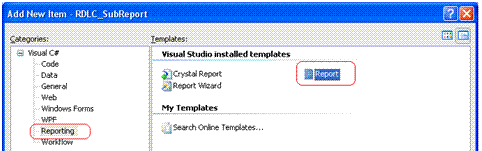
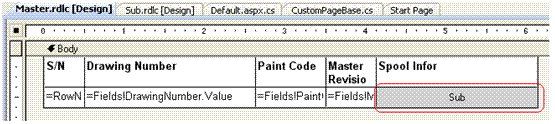
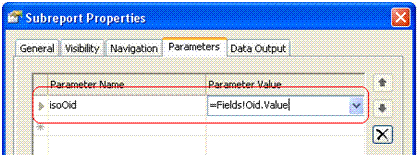
關鍵在於攔截 LocalReport.SubreportProcessing 事件,動態為子報表注入資料源:
public class CustomPageBase : Page {
private List<ReportDataSource> _subDataSources = new List<ReportDataSource>();
public void GetReportMultipleDataSourceFile(
List<ReportDataSource> reportDataSources,
string templatePath,
List<ReportParameter> parameters,
string fileType,
List<string> subDataSourceNames)
{
var viewer = new ReportViewer {
ProcessingMode = ProcessingMode.Local,
LocalReport = { ReportPath = Server.MapPath(templatePath) }
};
viewer.LocalReport.DataSources.Clear();
// 區分主/子報表資料源
foreach (var ds in reportDataSources) {
if (subDataSourceNames.Contains(ds.Name))
_subDataSources.Add(ds); // 暫存子報表資料
else
viewer.LocalReport.DataSources.Add(ds); // 主報表直接加入
}
// 訂閱子報表處理事件
viewer.LocalReport.SubreportProcessing += SubreportProcessingEventHandler;
if (parameters.Count > 0)
viewer.LocalReport.SetParameters(parameters);
// 渲染輸出
string mimeType, encoding, extension, deviceInfo = @"True public partial class _Default : CustomPageBase {
protected void ButtonGenerate_Click(object sender, EventArgs e) {
var reportDataSources = new List<ReportDataSource>();
var subDataSourceNames = new List<string>();
var ds = new ReportDataSet();
using (var conn = new SqlConnection(ConfigurationManager.ConnectionStrings["PQMSConnectionString"].ConnectionString)) {
var cmd = conn.CreateCommand();
// 主表資料:ISO_DRAWING 前 200 筆
cmd.CommandText = "SELECT TOP 200 Oid, DrawingNumber, CWPNo, PaintCode, MasterRevision FROM ISO_DRAWING";
new SqlDataAdapter(cmd).Fill(ds, "ISO_DRAWING");
// 子表資料:關聯的 SPOOL 明細
cmd.CommandText = @"SELECT S.Oid, S.ISOOid, S.SPOOLNo, S.Location, S.IssueNo, S.CP2
FROM SPOOL S INNER JOIN (SELECT TOP 200 OID FROM ISO_DRAWING) T ON S.ISOOID = T.OID";
new SqlDataAdapter(cmd).Fill(ds, "SPOOL");
}
reportDataSources.Add(new ReportDataSource("ReportDataSet_ISO_DRAWING", ds.ISO_DRAWING));
reportDataSources.Add(new ReportDataSource("ReportDataSet_SPOOL", ds.SPOOL));
subDataSourceNames.Add("ReportDataSet_SPOOL"); // 標記此資料源給子報表
GetReportMultipleDataSourceFile(reportDataSources, "Master.rdlc", new List<ReportParameter>(), "PDF", subDataSourceNames);
}
}| 環節 | 核心操作 | 常見坑點 |
|---|---|---|
| 模板關聯 | Subreport 控制項指定 .rdlc 檔 + 參數映射 | 參數名稱大小寫必須與子報表完全一致 |
| 資料篩選 | 子報表 Table 屬性 → Filters 設定參數比對 | 資料型別不匹配導致篩選失效 |
| 事件處理 | SubreportProcessing 事件中 Add DataSources | 未清空舊資料源導致重複顯示 |
| 資料源區分 | 傳入 subDataSourceNames 列表標記子報表專用資料 | 主子報表使用同名資料集造成衝突 |
掌握主子報表機制,即可輕鬆應對複雜的多層級報表需求。核心在於:模板參數映射正確 + 事件中精準注入對應資料源。