Jeffrey Richter 在 .NET 技術大會演示的 **CodeTimer** 簡單而強大:測量執行時間、CPU 時鐘週期、各代 GC 回收次數。本文完整重構實現,含進程/線程優先級提升、預熱、P/Invoke 讀取線程週期計數器。
public static class CodeTimer {
    public static void Initialize() { ... } // 提升優先級 + 預熱
    public static void Time(string name, int iteration, Action action) { ... } // 核心測量
}using System;
using System.Diagnostics;
using System.Runtime.InteropServices;
using System.Threading;
public static class CodeTimer {
public static void Initialize() {
Process.GetCurrentProcess().PriorityClass = ProcessPriorityClass.High;
Thread.CurrentThread.Priority = ThreadPriority.Highest;
Time("", 1, () => { }); // 預熱 JIT
}
public static void Time(string name, int iteration, Action action) {
if (string.IsNullOrEmpty(name)) return;
// 1. 黃色輸出名稱
ConsoleColor oldColor = Console.ForegroundColor;
Console.ForegroundColor = ConsoleColor.Yellow;
Console.WriteLine(name);
// 2. 強制 GC 基線
GC.Collect(GC.MaxGeneration, GCCollectionMode.Forced);
int[] gcCounts = new int[GC.MaxGeneration + 1];
for (int i = 0; i <= GC.MaxGeneration; i++)
gcCounts[i] = GC.CollectionCount(i);
// 3. 執行測量
Stopwatch sw = Stopwatch.StartNew();
ulong startCycles = GetCycleCount();
for (int i = 0; i < iteration; i++) action();
ulong cpuCycles = GetCycleCount() - startCycles;
sw.Stop();
// 4. 恢復顏色 + 輸出時間/週期
Console.ForegroundColor = oldColor;
Console.WriteLine($"\tTime Elapsed:\t{sw.ElapsedMilliseconds:N0}ms");
Console.WriteLine($"\tCPU Cycles:\t{cpuCycles:N0}");
// 5. 輸出各代 GC 次數
for (int i = 0; i <= GC.MaxGeneration; i++) {
int count = GC.CollectionCount(i) - gcCounts[i];
Console.WriteLine($"\tGen {i}:\t\t{count}");
}
Console.WriteLine();
}
// P/Invoke 讀取線程 CPU 週期 (Vista/Server 2008+)
private static ulong GetCycleCount() {
ulong cycles = 0;
QueryThreadCycleTime(GetCurrentThread(), ref cycles);
return cycles;
}
[DllImport("kernel32.dll")]
[return: MarshalAs(UnmanagedType.Bool)]
private static extern bool QueryThreadCycleTime(IntPtr threadHandle, ref ulong cycleTime);
[DllImport("kernel32.dll")]
private static extern IntPtr GetCurrentThread();
}| 環節 | 目的 | 關鍵點 |
|---|---|---|
| Initialize 提升優先級 | 減少 OS 調度干擾 | 進程 High + 線程 Highest,需管理員權限最佳 |
| 預熱調用 | 觸發 JIT 編譯 | 首次 `Time` 會編譯 IL→Native,預熱使後續測量穩定 |
| 強制 GC 基線 | 隔離測試代碼的 GC 影響 | 測量前強制 Full GC,記錄各代計數器基值 |
| CPU 週期計數 | 輔助參考指標 | `QueryThreadCycleTime` 僅統計線程獲得 CPU 時間,**不含 Sleep/等待** |
| GC 代別統計 | 直觀反映分配壓力 | Gen 0 頻繁 = 大量短命物件;Gen 2 = 大對象/長生命週期 |
CodeTimer.Initialize();
CodeTimer.Time("Thread Sleep", 1, () => Thread.Sleep(3000));
CodeTimer.Time("Empty Method", 10_000_000, () => { });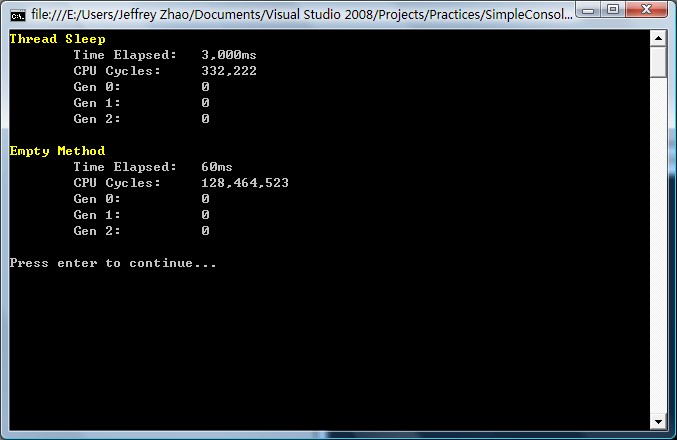
int iter = 100_000;
string s = "";
CodeTimer.Time("String Concat", iter, () => s += "a"); // 每次新建字符串
StringBuilder sb = new StringBuilder();
CodeTimer.Time("StringBuilder", iter, () => sb.Append("a")); // 緩衝區擴展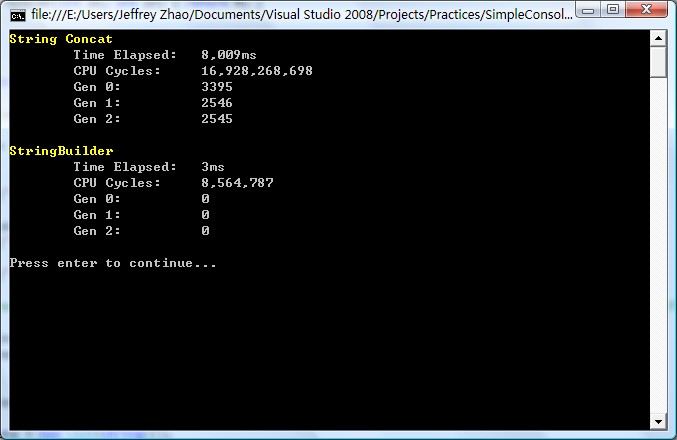
.NET Core 3.0+ 推薦 **BenchmarkDotNet** — 統計學嚴謹、自動預熱/迭代、多運行時支援、豐富報表。但 CodeTimer 以 **<50 行代碼** 實現核心功能,適合快速驗證、教學演示、無依賴環境。
「有數據,有真相」 — CodeTimer 讓性能優化從憑感覺變為憑證據。