承接上、中兩篇對訊息版本、建立、狀態機與基本操作的剖析,本文聚焦於 SOAP 訊息的另一核心組成——訊息標頭。依據 SOAP 1.1/1.2 規格,訊息由零或多個 Header 與唯一的 Body 組成。Header 承載控制資訊,具高度擴展性,也是實現 SOA 協定擴充的關鍵。WCF 提供了完整的型別體系支援 Header 程式設計。
Message.Headers:唯讀屬性,型別為 MessageHeaders,本質是 MessageHeaderInfo 集合。MessageHeaderInfo:抽象基類,定義 Name、Namespace、Actor、MustUnderstand、Relay、IsReferenceParameter 等 SOAP Header 核心屬性。MessageHeader:繼承 MessageHeaderInfo,提供靜態工廠方法 CreateHeader() 與寫入方法 WriteHeader(),支援將可序列化物件自動轉為 XML InfoSet。泛型類別 MessageHeader<T> 提供強型別建構體驗,屬性包含 Content、Actor、MustUnderstand、Relay。透過 GetUntypedHeader(name, ns) 轉為 MessageHeader 後,可加入 Message.Headers 集合。
定義集合資料契約 ApplicationContext(繼承 Dictionary<string,string>),透過 CallContext 實現執行緒內共享。程式碼示範:
var msg = Message.CreateMessage(MessageVersion.Default, "https://www.artech.com/myaction");
ApplicationContext.Current.UserName = "Foo";
ApplicationContext.Current.Department = "IT";
var header = new MessageHeader<ApplicationContext>(ApplicationContext.Current);
msg.Headers.Add(header.GetUntypedHeader(ApplicationContext.HeaderLocalName, ApplicationContext.HeaderNamespace));
生成 SOAP:
<s:Envelope ...>
  <s:Header>
    <a:Action ...>https://www.artech.com/myaction</a:Action>
    <ApplicationContext xmlns="https://www.artech.com/">
      <Context><Key>__username</Key><Value>Foo</Value></Context>
      <Context><Key>__department</Key><Value>IT</Value></Context>
    </ApplicationContext>
  </s:Header>
  <s:Body />
</s:Envelope>
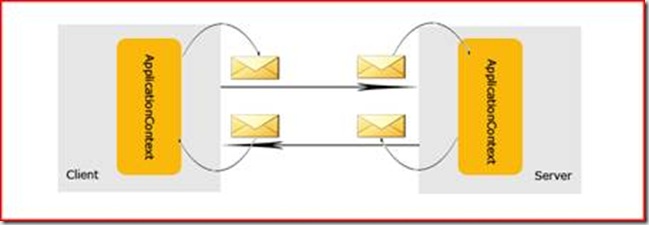
核心機制: 客戶端將 ApplicationContext 封裝為 Header 放入出站訊息;服務端從入站訊息取出並覆寫本地 CallContext;回覆時再將服務端 Context 放入出站 Header,客戶端收到後更新本地值。
關鍵 API: OperationContext.Current.IncomingMessageHeaders / OutgoingMessageHeaders。請求-回覆模式下,客戶端的 Outgoing = 請求 Header,Incoming = 回覆 Header;服務端相反。
public double Add(double x, double y)
{
    // 從請求 Header 取得 Context
    var ctx = OperationContext.Current.IncomingMessageHeaders.GetHeader<ApplicationContext>(
        ApplicationContext.HeaderLocalName, ApplicationContext.HeaderNamespace);
    ApplicationContext.Current.UserName = ctx.UserName;
    ApplicationContext.Current.Department = ctx.Department;

    // 修改並放入回覆 Header
    ApplicationContext.Current.UserName = "Bar";
    ApplicationContext.Current.Department = "HR/Admin";
    var header = new MessageHeader<ApplicationContext>(ApplicationContext.Current);
    OperationContext.Current.OutgoingMessageHeaders.Add(
        header.GetUntypedHeader(ApplicationContext.HeaderLocalName, ApplicationContext.HeaderNamespace));

    return x + y;
}
using (var scope = new OperationContextScope((IContextChannel)calculator))
{
    // 送出請求 Header
    var header = new MessageHeader<ApplicationContext>(ApplicationContext.Current);
    OperationContext.Current.OutgoingMessageHeaders.Add(...);

    Console.WriteLine(calculator.Add(1, 2));

    // 取得回覆 Header 並更新本地
    var ctx = OperationContext.Current.IncomingMessageHeaders.GetHeader<ApplicationContext>(...);
    ApplicationContext.Current.UserName = ctx.UserName;
    ApplicationContext.Current.Department = ctx.Department;
}
執行結果驗證雙向流轉:
// 服務端輸出
ApplicationContext.Current.UserName = "Foo"
ApplicationContext.Current.Department = "IT"

// 客戶端輸出
x + y = 3 when x = 1 and y = 2
ApplicationContext.Current.UserName = "Bar"
ApplicationContext.Current.Department = "HR/Admin"
架構師註記: 此模式實現了「有狀態」的服務呼叫,違背 SOA 無狀態原則,但在實際專案中常用於攜帶認證票證、租戶識別等橫切關注點。可進一步透過 WCF 擴展(如IClientMessageInspector/IDispatchMessageInspector)實現隱式傳遞,將邏輯從業務代碼中分離。