對嵌入式設備而言,存儲空間大小是關鍵參數,但調試時難以便捷測試不同記憶體規格的設備。模擬器成為理想選擇。本文介紹如何在 .NET MF 中透過代碼與 XML 配置兩種方式設定模擬器的 RAM 與 Flash Memory,並實現持久化存儲能力。
.NET MF 提供 MemoryManager 類型(Microsoft.SPOT.Emulator.Memory 命名空間)描述與模擬 RAM/FLASH。該類型不直接提供配置屬性,而是透過兩個屬性暴露:
RamManager:管理 RAMFlashManager:管理 Flash兩者均為模擬器組件,由 MemoryManager 根據配置動態創建。可在 Emulator.config 中完成配置。
RamManager 唯一可設定屬性為 Size(單位 byte)。配置文件中需先在 <Types> 區域宣告類型映射(如 C# 的 using),再在 <EmulatorComponents> 設定數值。以下範例以十六進位 0x2000000 設定 32MB RAM:
<?xml version="1.0" encoding="utf-8"?>
<Emulator>
  <Types>
    <MemoryManager>Microsoft.SPOT.Emulator.Memory.MemoryManager</MemoryManager>
    <RamManager>Microsoft.SPOT.Emulator.Memory.RamManager</RamManager>
  </Types>
  <EmulatorComponents>
    <MemoryManager>
      <RamManager type="RamManager">
        <Size format="HexNumber">2000000</Size>
      </RamManager>
    </MemoryManager>
  </EmulatorComponents>
</Emulator>
注意:模擬器預設 RAM 僅 1MB。曾在帶 VGA (640x480) 的 LCD 模擬器顯示大圖時遇到 System.OutOfMemoryException(分配 51205 區塊、614460 bytes 失敗),將 RAM 擴至 32MB 後問題解決。原因在於預設 1024KB 不足以容納 640*480*16/8=600KB 圖片加應用程式本身。
FlashManager 同樣作為 MemoryManager 屬性配置。Flash 存儲單位為扇區,一或多扇區組成功能不同的段,段再組成分區(MF 設備目前僅支援單分區,故只有一個根目錄,無盤符)。FlashManager 管理扇區,每對 FlashSector 標籤對應一結構:
public struct FlashSector {
    public uint Length;
    public FlashSectorUsage Usage;
    public FlashSectorPartition Partition;
    public FlashSectorBlock Block;
    // 建構函式...
}
與 RamManager 不同,FlashManager 無需指定 Size(由扇區自動計算),可設定屬性包括:
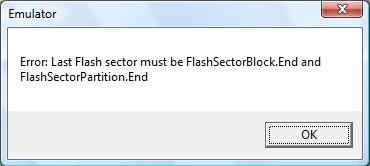
IsReadOnly (bool)MaxSectorEraseTime (uint)MaxWordWriteTime (uint)扇區配置規則:第一個扇區 Partition 與 Block 必須設為 Start(或 StartEnd 若為唯一扇區);最後一個扇區必須設為 End。Start 與 End 必須成對存在,否則 VS 會拋出異常。
| 成員名稱 | 描述 |
|---|---|
| Application | 存放 application code |
| Bootstrap | 存放 bootstrap code |
| Code | 存放 CLR code |
| Config | 存放配置資訊 |
| Deployment | 存放 client application code |
| Log | 存放操作記錄 |
| StorageA | 存放程式設計師定義資料 |
| StorageB | 存放程式設計師定義資料 |
這些描述資訊將被 .NET MF 用於優化與校驗程式。對應 XML 配置範例:
<Types>
  <FlashManager>Microsoft.SPOT.Emulator.Memory.FlashManager</FlashManager>
  <FlashSector>Microsoft.SPOT.Emulator.Memory.FlashSector</FlashSector>
</Types>
<MemoryManager>
  <FlashManager type="FlashManager">
    <FlashSectors>
      <FlashSector><Length format="HexNumber">10000</Length><Usage>Bootstrap</Usage><Partition>Start</Partition><Block>StartEnd</Block></FlashSector>
      <FlashSector><Length format="HexNumber">10000</Length><Usage>Config</Usage><Partition>None</Partition><Block>StartEnd</Block></FlashSector>
      <FlashSector><Length format="HexNumber">10000</Length><Usage>Code</Usage><Partition>None</Partition><Block>StartEnd</Block></FlashSector>
      <FlashSector><Length format="HexNumber">10000</Length><Usage>Deployment</Usage><Partition>None</Partition><Block>StartEnd</Block></FlashSector>
      <FlashSector><Length format="HexNumber">10000</Length><Usage>Log</Usage><Partition>None</Partition><Block>StartEnd</Block></FlashSector>
      <FlashSector><Length format="HexNumber">10000</Length><Usage>StorageA</Usage><Partition>None</Partition><Block>StartEnd</Block></FlashSector>
      <FlashSector><Length format="HexNumber">10000</Length><Usage>StorageB</Usage><Partition>End</Partition><Block>StartEnd</Block></FlashSector>
    </FlashSectors>
  </FlashManager>
</MemoryManager>
總計 1024KB Flash 空間,參考:相關文章
前述 Flash 非嚴格意義的 Flash,模擬器關閉後資料會丟失。SDK 的 EWRSampleEmulator(位於 ExtendedWeakReferences 目錄)展示了持久化機制:關閉時將 Flash 內容寫入本地檔案,下次啟動時從檔案初始化。以下繼承自 FlashManager 的類別實現此過程:
public class PersistentFlashManager : FlashManager {
    private readonly string flashPath;
    public PersistentFlashManager() {
        string emulatorPath = Assembly.GetEntryAssembly().GetModules()[0].FullyQualifiedName;
        this.flashPath = Path.ChangeExtension(emulatorPath, ".flash");
    }
    public override void InitializeComponent() {
        base.InitializeComponent();
        if (File.Exists(this.flashPath)) {
            using (FileStream stream = File.OpenRead(this.flashPath)) {
                if (stream.Length == this._size)
                    stream.Read(this._memory, 0, (int)this._size);
            }
        }
    }
    public override void UninitializeComponent() {
        using (FileStream stream = File.OpenWrite(this.flashPath))
            stream.Write(this._memory, 0, (int)this._size);
        base.UninitializeComponent();
    }
}
使用時需在 <Types> 宣告該類別與組件名稱,將預設 FlashManager 宣告替換為:
<FlashManager>MyNameSpace.PersistentFlashManager, MyAssemblyName</FlashManager>