虛擬儀器技術在高成本工業專案中扮演越來越重要的角色,嵌入式開發中的各類模擬器極大提升了開發效率。本文介紹微軟最新嵌入式開發框架 .NET Micro Framework(以下簡稱 .NET MF)的模擬器,闡述其啟動流程、組件鏈接與註冊等核心工作原理。
.NET MF 模擬器是 .NET MF CLR 的 Windows 版運行環境。其核心部分(執行引擎、類型系統、GC 等)與基礎類庫均與實體設備一致。差異僅在 HAL 層(Hardware Abstract Layer):模擬器的 HAL 層非真實硬體驅動,而是由 Windows 驅動替代。這充分體現了 MF 架構中層與層高度分離的設計,為模擬的真實性與準確性奠定基礎。
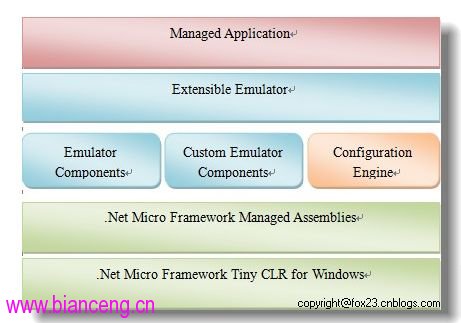
調試時在專案屬性選擇模擬器作為部署目標,部署過程會自動啟動模擬器運行程式,但這掩蓋了啟動細節。本質上模擬器是一個 .NET(通常為 Windows Forms)應用程式,只是加入了組件與 XML 配置文件。啟動時依序執行:
LoadDefaultComponents() 虛方法,透過 RegisterComponent 創建基本組件。可透過 Emulator.config 配置、替換或刪除預設組件,代碼中也可透過 Emulator 類屬性存取。Emulator.config,按需創建並註冊組件。此時呼叫 Emulator.Configure(XmlReader) 解析類型。Emulator 與自定義組件類的 SetupComponent 組裝組件。InitializeComponent 進行初始化。實際開發中,除非開發自定義模擬器組件,否則 Configure、SetupComponent、InitializeComponent 無需在代碼中手動呼叫。
程式化註冊需呼叫 RegisterComponent。配置引擎在 config 階段會呼叫該方法,LoadDefaultComponents() 內部實際也是呼叫它。使用 Reflector 可見其預設註冊內容:
protected virtual void LoadDefaultComponents() {
    this.RegisterComponent(new Hal());
    this.RegisterComponent(new ComPortCollection());
    this.RegisterComponent(new GpioCollection());
    this.RegisterComponent(new SpiBus());
    this.RegisterComponent(new MemoryManager());
    this.RegisterComponent(new TimingServices());
    this.RegisterComponent(new I2cBus());
    this.RegisterComponent(new SerialPortCollection());
    this.RegisterComponent(new NamedPipeServer());
}
手動註冊注意事項:若組件包含子組件,註冊子組件時需同時提供父組件給 RegisterComponent 重載方法。呼叫 UnregisterComponent 移除組件時,所有鏈接的子組件會自動刪除。例如 MemoryManager 含 RamManager 與 FlashManager 兩個子組件,移除父組件時兩者同步移除。
透過 Emulator.FindComponentById 存取已註冊組件,常用於初始化指定組件。SDK 的 SampleEmulator 中可見初始化按鈕的範例:
private void InitializeButton(Button button, string componentId, Keys key) {
    button.Port = _emulator.FindComponentById(componentId) as Gpio.GpioPort;
    button.Key = key;
}
另一常見用途:初始化時檢查必備組件是否存在且類型正確:
public override void InitializeComponent() {
    base.InitializeComponent();
    if (FindComponentById("Pin_Down") as GpioPort == null)
        throw new Exception("The component 'Pin_Down' is required by the emulator.");
    Thread uiThread = new Thread(StartForm);
    uiThread.Start();
}
本文暫到此結束,模擬器還有許多值得探討的細節,歡迎有興趣的朋友交流。