WPF 提供 FormattedText.BuildGeometry() 取得字形 Geometry,但三維渲染需要 MeshGeometry3D (頂點 + 三角形索引)。關鍵難點:**任意多邊形三角剖分 (Tessellation)** 數學複雜度極高。
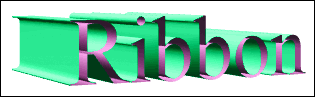
GetFlattenedPathGeometry)protected override void ProcessFigure(CircularList<Point> list, ...)
{
for (int i = 0; i <= list.Count; i++)
{
Point pt = list[i];
vertices.Add(new Point3D(pt.X, pt.Y, 0)); // 前緣
vertices.Add(new Point3D(pt.X, pt.Y, -Depth)); // 後緣
// 三角帶索引...
}
}
Line2D 結構處理平行線相交
DrawingBrush(new GeometryDrawing(brush, null, TextGeometry)) 可將向量字形繪製於三維平面Material 設定,提取 Brush 建構 DrawingBrush 再包裝回 DiffuseMaterialMaterialGroup 巢狀結構
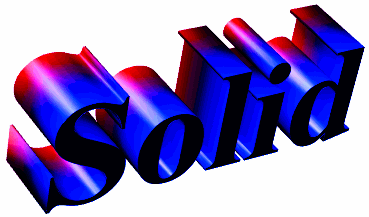
public class SolidText : DeepTextBase
{
    public SolidText()
    {
        // 組合三個子視覺元素
        Children.Add(new RibbonText { Depth = Depth });           // 側面
        Children.Add(new PlanarText());                           // 正面
        Children.Add(new PlanarText { Z = -Depth });              // 背面
    }

    // 屬性分發機制:將 Material/BackMaterial/Depth/Text 等屬性同步至三個子元素
    // ...
}設計精髓:繼承 ModelVisual3D 利用 Children 集合組合,轉換自動套用至所有子元素,屬性變更時分發同步。
EllipticalText:將輪廓點擴展為橢圓而非矩形,邊緣圓滑RoundedText:繼承 SolidText,以 EllipticalText 替換 RibbonText 側面EllipseWidth 控制 (預設 0.05),過大同樣導致 Z-fighting
ModelVisual3D
  └── ModelVisualBase (抽象,封裝 GeometryModel3D + MeshGeometry3D,Material/BackMaterial DP)
        └── Text3DBase (Text/FontFamily/FontSize/Origin DP,BuildGeometry → TextGeometry)
              └── DeepTextBase (+ Depth DP)
                    ├── GeometryTextBase (抽象,Triangulate → GetFlattenedPathGeometry → ProcessFigure)
                    │     ├── RibbonText
                    │     └── SliverText
                    ├── PlanarText (Triangulate 產生單一矩形平面,Material → DrawingBrush)
                    └── SolidText (組合 RibbonText + 2×PlanarText,屬性分發)
└── RoundedText (替換側面為 EllipticalText)CircularList<T>:循環緩衝區,索引自動模運算,簡化折線首尾相連處理GetFlattenedPathGeometry(tolerance):將 Bezier 曲線近似為折線,容差越小越精確pt.Y = 2*Origin.Y - pt.Y 翻轉IsAnimationProhibited 標記字體大小等觸發重建幾何的屬性