傳統二次開發多仰賴 SQL 腳本直接操作資料庫,雖簡單但缺點明顯:需深諳資料庫結構、易出錯、無法複用業務邏輯層代碼。本文探討利用 .NET 動態編譯 技術,將客製化邏輯編譯為組件並動態載入執行,實現靈活、安全、可維護的二次開發框架。
.NET 提供 System.CodeDom.Compiler 命名空間,支援在運行時編譯 C#/VB 代碼。核心類別:
CSharpCodeProvider:C# 代碼提供者CompilerParameters:編譯參數(參考組件、輸出路徑、優化選項等)CompilerResults:編譯結果,含錯誤資訊與編譯後組件using System;
using System.CodeDom.Compiler;
using Microsoft.CSharp;
using System.Reflection;
CodeDomProvider provider = new CSharpCodeProvider();
CompilerParameters cp = new CompilerParameters();
cp.ReferencedAssemblies.Add("System.dll");
string code = @"
using System;
public class MyClass {
public void Hello() {
Console.WriteLine(""Hello Dynamic!"");
}
}";
CompilerResults cr = provider.CompileAssemblyFromSource(cp, code);
if (cr.Errors.HasErrors) { /* 處理錯誤 */ }
else {
Assembly asm = cr.CompiledAssembly;
Type t = asm.GetType("MyClass");
object obj = asm.CreateInstance("MyClass");
MethodInfo mi = t.GetMethod("Hello");
mi.Invoke(obj, null); // 輸出: Hello Dynamic!
}直接拼接字串難以維護。使用 System.CodeDom 以物件模型構建代碼結構,再由 CodeGenerator 產生格式良好的原始碼。
public static CodeCompileUnit CreateExecutionClass(string ns, string className, string methodBody)
{
    CodeCompileUnit ccu = new CodeCompileUnit();
    CodeNamespace cns = new CodeNamespace(ns);
    cns.Imports.Add(new CodeNamespaceImport("System"));
    ccu.Namespaces.Add(cns);

    CodeTypeDeclaration clazz = new CodeTypeDeclaration(className);
    cns.Types.Add(clazz);

    CodeMemberMethod method = new CodeMemberMethod();
    method.Name = "Execute";
    method.Attributes = MemberAttributes.Public | MemberAttributes.Static;
    method.ReturnType = new CodeTypeReference(typeof(string));
    method.Parameters.Add(new CodeParameterDeclarationExpression(typeof(string), "input"));
    method.Statements.Add(new CodeSnippetStatement(methodBody));

    clazz.Members.Add(method);
    return ccu;
}針對「薪資計算演算法因客戶而異」等場景,設計資料庫驅動的動態編譯框架。
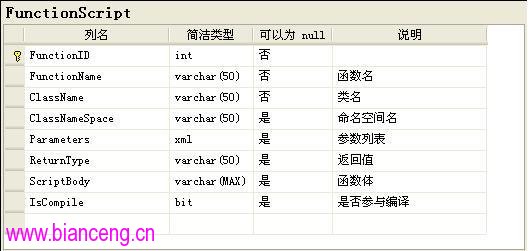
關鍵欄位:ScriptBody(方法本體)、Parameters(XML 格式參數定義)、ReturnType、ClassName、ClassNameSpace。
public List GetParameterList()
{
    var list = new List();
    if (this.Parameters != null)
    {
        foreach (var p in this.Parameters.Elements("Parameter"))
        {
            Type type = Type.GetType(p.Element("Type").Value);
            string name = p.Element("ParameterName").Value;
            list.Add(new CodeParameterDeclarationExpression(type, name));
        }
    }
    return list;
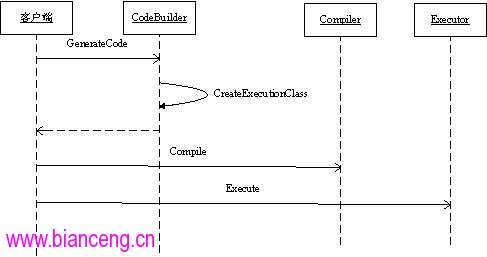
} public class CodeBuilder
{
private List scripts;
private string ns, className;
public CodeBuilder(List scripts) { /* 初始化 */ }
public string GenerateCode()
{
CodeCompileUnit ccu = new CodeCompileUnit();
CodeNamespace cns = new CodeNamespace(ns);
cns.Imports.Add(new CodeNamespaceImport("System"));
ccu.Namespaces.Add(cns);
CodeTypeDeclaration clazz = new CodeTypeDeclaration(className);
cns.Types.Add(clazz);
foreach (var script in scripts)
{
CodeMemberMethod method = new CodeMemberMethod();
method.Name = script.FunctionName;
method.Attributes = MemberAttributes.Public | MemberAttributes.Static;
foreach (var p in script.GetParameterList()) method.Parameters.Add(p);
if (!string.IsNullOrEmpty(script.ReturnType))
method.ReturnType = new CodeTypeReference(Type.GetType(script.ReturnType));
method.Statements.Add(new CodeSnippetStatement(script.ScriptBody));
clazz.Members.Add(method);
}
// 產生原始碼字串
CSharpCodeProvider provider = new CSharpCodeProvider();
CodeGeneratorOptions opts = new CodeGeneratorOptions { BracingStyle = "C", IndentString = "\t" };
using (StringWriter sw = new StringWriter())
{
provider.GenerateCodeFromCompileUnit(ccu, sw, opts);
return sw.ToString();
}
}
} public class DynamicCompiler
{
private StringCollection refs = new StringCollection { "mscorlib.dll", "System.dll" };
public void Compile(string code, string outputDll)
{
CompilerParameters cp = new CompilerParameters();
cp.CompilerOptions = "/target:library /optimize";
cp.OutputAssembly = outputDll;
cp.ReferencedAssemblies.AddRange(refs);
CSharpCodeProvider provider = new CSharpCodeProvider();
CompilerResults cr = provider.CompileAssemblyFromSource(cp, code);
if (cr.Errors.HasErrors) throw new Exception(/* 錯誤訊息 */);
}
}
public class Executor
{
public object Execute(string dllPath, string typeName, string methodName, params object[] args)
{
Assembly asm = Assembly.LoadFrom(dllPath);
Type t = asm.GetType(typeName);
object instance = asm.CreateInstance(typeName);
MethodInfo mi = t.GetMethod(methodName, BindingFlags.Static | BindingFlags.Public);
return mi.Invoke(instance, args);
}
}var f1 = new FunctionScript {
ClassName = "MyClass", ClassNameSpace = "My", FunctionName = "Calc",
ReturnType = "System.Decimal",
Parameters = XElement.Parse(@"System.Decimal amount { f1 });
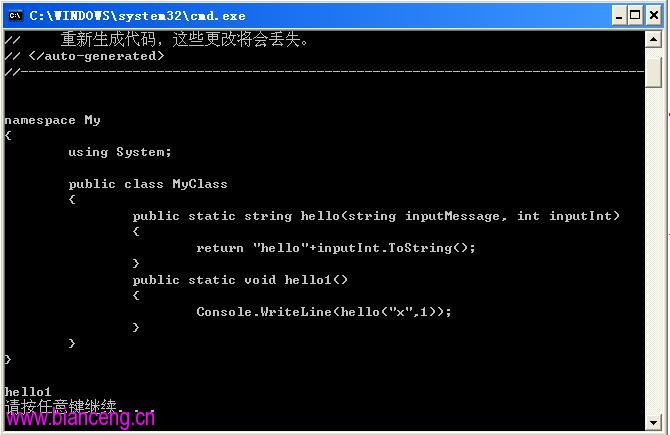
string code = builder.GenerateCode();
Console.WriteLine(code); // 查看產生的代碼
new DynamicCompiler().Compile(code, "BizLogic.dll");
object result = new Executor().Execute("BizLogic.dll", "My.MyClass", "Calc", 1000m);
Console.WriteLine("計算結果: " + result); // 1050
| 優點 | 缺點/風險 |
|---|---|
| 業務邏輯外部化,無需重新部署主程式 | 動態編譯有效能開銷,不宜高頻呼叫 |
| 可複用現有 .NET 類庫、LINQ、EF 等生態 | 安全性:需嚴格驗證腳本來源,防止惡意代碼注入 |
| 支援版本控管、測試、除錯(PDB) | 除錯較靜態代碼困難,建議記錄編譯錯誤日誌 |
| 參數強型別,編譯期即可發現錯誤 | 部署需確保目標機器安裝 .NET SDK 或 Build Tools |
動態編譯為 .NET 二次開發提供了強大而優雅的解決方案。結合 CodeDOM 結構化代碼生成、資料庫腳本管理、獨立編譯/執行組件,可構建出「業務邏輯即配置」的靈活架構。實務上建議搭配快取機制(如依腳本雜湊快取組件)、沙箱隔離(AppDomain/AppContainer)與完整的審計日誌,確保生產環境穩定安全。
完整原始碼下載:源碼下載連結