X.509 是 ITU-T 制定的數位憑證標準,基於公開金鑰基礎建設(PKI)。每張憑證包含一對金鑰:
流程:客戶端用伺服器的公開金鑰加密敏感資料(如帳密),伺服器用私鑰解密。只有持有私鑰者能解密,確保機密性。
| 特性 | UserName/Password | X.509 Certificate |
|---|---|---|
| 驗證開銷 | 需查詢資料庫比對,延遲較高 | 本機憑證存儲比對序號/指紋,極快 |
| 部署複雜度 | 低,僅需帳號管理 | 較高,需憑證發行、部署、存儲管理 |
| 適用場景 | B/S 系統、內部員工系統 | B2B、高安全性要求、跨網域服務 |
使用 Visual Studio Developer Command Prompt:
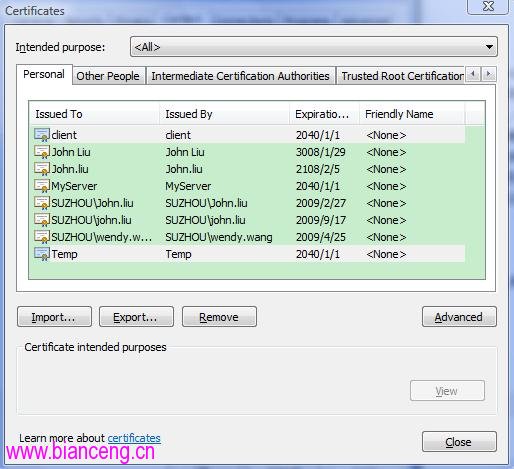
makecert -r -pe -n "CN=MyServer" -ss My -sky exchange
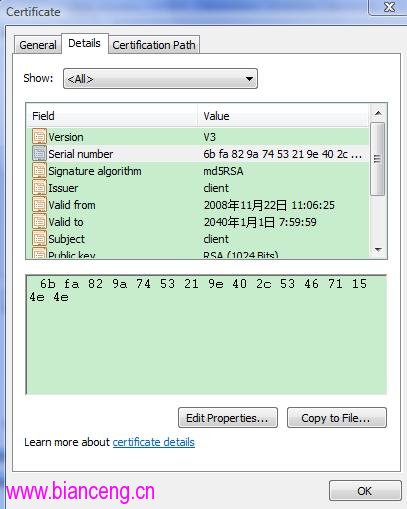
makecert -r -pe -n "CN=Client" -ss My -sky exchange分別產生伺服器與客戶端憑證,安裝至「個人」存儲區。記下客戶端憑證的序號(Serial Number),供服務端驗證使用。
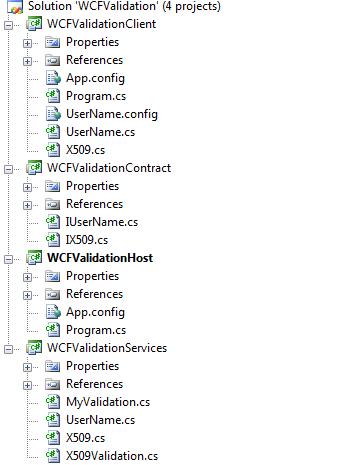
[ServiceContract]
public interface IX509
{
    [OperationContract]
    bool Test();
}

public class X509Service : IX509
{
    public bool Test() => true;
}public class X509Validator : X509CertificateValidator
{
public override void Validate(X509Certificate2 certificate)
{
// 僅允許特定序號的客戶端憑證
const string allowedSerial = "6bfa829a7453219e402c534671154e4e";
if (certificate.SerialNumber.ToLower() != allowedSerial)
throw new SecurityTokenValidationException("Invalid client certificate.");
}
}<system.serviceModel>
<behaviors>
<serviceBehaviors>
<behavior name="X509Behavior">
<serviceMetadata httpGetEnabled="true" httpGetUrl="https://localhost/X509"/>
<serviceDebug includeExceptionDetailInFaults="true"/>
<serviceCredentials>
<clientCertificate>
<authentication
customCertificateValidatorType="WCFValidationServices.X509Validator,WCFValidationServices"
certificateValidationMode="Custom" />
</clientCertificate>
<serviceCertificate
findValue="MyServer"
storeLocation="CurrentUser"
x509FindType="FindBySubjectName"/>
</serviceCredentials>
</behavior>
</serviceBehaviors>
</behaviors>
<bindings>
<netTcpBinding>
<binding name="x509Binding">
<security mode="Transport">
<transport clientCredentialType="Certificate"/>
</security>
</binding>
</netTcpBinding>
</bindings>
<services>
<service behaviorConfiguration="X509Behavior" name="WCFValidationServices.X509Service">
<endpoint address="" binding="netTcpBinding" bindingConfiguration="x509Binding"
contract="WCFValidation.IX509" name="X509" />
<host>
<baseAddresses>
<add baseAddress="net.tcp://localhost:8082/X509"/>
</baseAddresses>
</host>
</service>
</services>
</system.serviceModel><system.serviceModel>
<behaviors>
<endpointBehaviors>
<behavior name="ClientBehavior">
<clientCredentials>
<clientCertificate storeLocation="CurrentUser" findValue="Client" x509FindType="FindBySubjectName"/>
<serviceCertificate>
<authentication certificateValidationMode="None"/> <!-- 信任自簽憑證 -->
</serviceCertificate>
</clientCredentials>
</behavior>
</endpointBehaviors>
</behaviors>
<bindings>
<netTcpBinding>
<binding name="X509Binding">
<security mode="Transport">
<transport clientCredentialType="Certificate" protectionLevel="EncryptAndSign"/>
</security>
</binding>
</netTcpBinding>
</bindings>
<client>
<endpoint address="net.tcp://localhost:8082/X509"
binding="netTcpBinding" bindingConfiguration="X509Binding"
behaviorConfiguration="ClientBehavior"
contract="IX509" name="X509">
<identity><dns value="MyServer"/></identity>
</endpoint>
</client>
</system.serviceModel>// 客戶端呼叫代碼
var client = new X509Client("X509");
bool result = client.Test();
client.Close();
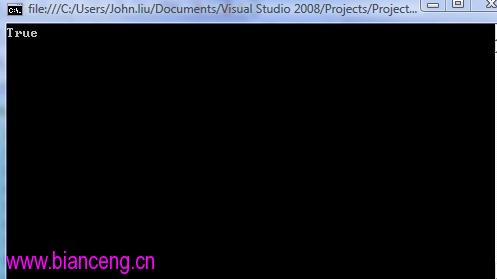
Console.WriteLine("驗證結果: " + result); // True
FindPrivateKey.exe 定位檔案並授權。certificateValidationMode="ChainTrust"。X.509 憑證驗證提供高強度、無狀態的身分認證機制,適合企業級服務整合與跨組織呼叫。雖部署較繁瑣,但透過自動化腳本與集中式憑證管理,可大幅降低維運成本。下一篇將介紹更輕量的 UserName/Password over Message Security 實作。