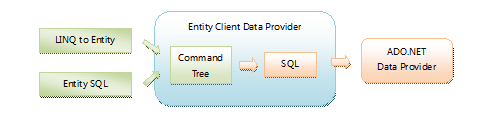
Entity Framework 提供兩種查詢方式:LINQ to Entities(強型別、語法糖)與 Entity SQL(字串基礎、類 T-SQL)。兩者最終都轉換為 Command Tree 再生成資料庫專屬 SQL,但執行計畫、除錯體驗、動態查詢彈性存在關鍵差異。本文深度解析底層機制並給出效能調優決策指南。
LINQ to Entities / Entity SQL
        ↓
   Command Tree (標準化查詢表示)
        ↓
   Provider-specific SQL Generation (SqlClient → T-SQL)
        ↓
   Database Execution
| 維度 | LINQ to Entities | Entity SQL |
|---|---|---|
| 語法形式 | C#/VB 強型別運算式 | 字串基礎,類 T-SQL |
| 編譯期檢查 | 完整型別安全、重構友善 | 執行期才驗證,易拼字錯誤 |
| SQL 生成控制 | 由 EF Provider 自動轉換,難以微調 | 開發者直接撰寫 E-SQL,間接控制 T-SQL |
| 動態查詢構建 | 需用 Expression Tree 或 PredicateBuilder,複雜 | 字串拼接極簡單,適合運行期組裝 |
| 除錯體驗 | SQL Profiler 看生成 SQL 常難以對應原始碼 | E-SQL 即準 SQL,所見即所得 |
| 參數化 | 自動參數化,防注入 | 需手動使用 ObjectParameter |
string city = "London";
using (var ctx = new Entities())
{
    var query = from c in ctx.Customers
                where c.Address.City == city
                select c;

    foreach (var c in query)
        Console.WriteLine(c.CompanyName);
}
string city = "London";
using (var ctx = new Entities())
{
    var query = ctx.CreateQuery<Customer>(
        "SELECT VALUE c FROM Customers AS c WHERE c.Address.City = @city",
        new ObjectParameter("city", city));

    foreach (var c in query)
        Console.WriteLine(c.CompanyName);
}
.AsNoTracking()、.Include()、.Take() 等擴充方法足以應對 90% 場景。SqlQuery 執行原生 SQL)。DbContext.Database.SqlQuery<T>() 直接撰寫 T-SQL,繞過 EF Provider 轉換層。// 1. 基礎查詢用 LINQ,確保型別安全
var baseQuery = ctx.Orders.Where(o => o.CustomerId == custId);
// 2. 複雜篩選條件動態組裝時,轉 Entity SQL
string esql = "SELECT VALUE o FROM Orders AS o WHERE o.CustomerId = @custId";
if (hasDateRange) esql += " AND o.OrderDate BETWEEN @start AND @end";
if (hasStatus) esql += " AND o.Status = @status";
var params = new[] { new ObjectParameter("custId", custId) /*, ... */ };
var results = ctx.CreateQuery<Order>(esql, params).ToList();
LINQ to Entities 是日常開發首選;Entity SQL 是效能調優與動態查詢的「核彈級」工具。理解兩者共享 Command Tree 管線,善用 SQL Profiler 觀察實際 T-SQL,才能在型別安全與執行效能間取得最佳平衡。