業務系統中,關鍵表的增刪改操作審計是合規與數據安全的剛需。本文揭秘Winform開發框架如何通過「基類事件驅動 + 實體攜帶用戶上下文 + 差異化內容比對」的組合拳,讓業務模塊僅需在BLL構造函數註冊一行事件綁定代碼,即可獲得完整、可讀、可追溯的操作日志能力。
框架構建 AbstractBaseDAL<T> 作為所有數據庫訪問類的超級基類,在其中定義操作日志委托與事件:
public delegate bool OperationLogEventHandler(string userId, string tableName, string operationType, string note, DbTransaction trans = null);

public abstract class AbstractBaseDAL<T> where T : BaseEntity, new() {
    public event OperationLogEventHandler OnOperationLog; // 操作日志事件
    // ...
}
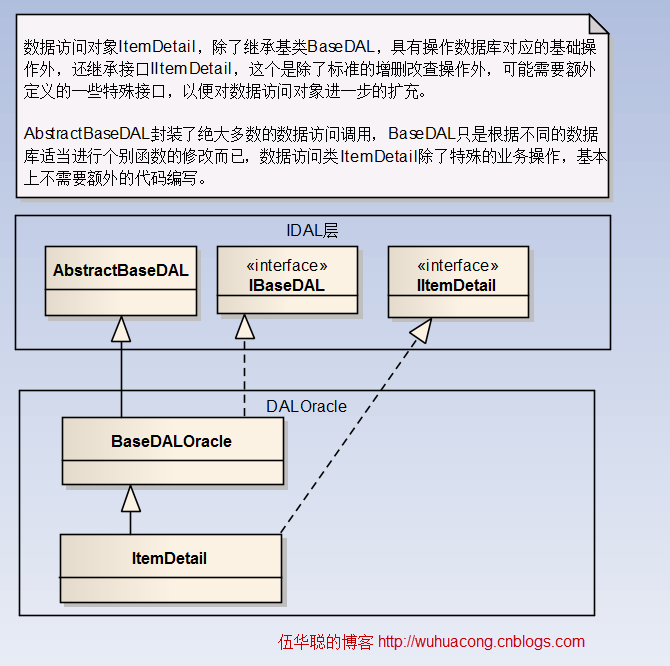
在 Insert、Update、Delete 等核心方法中,調用統一封裝的日志觸發方法(以更新為例):
public virtual bool Update(T obj, object primaryKeyValue, DbTransaction trans = null) {
    ArgumentValidation.CheckForNullReference(obj, "傳入的對象obj為空");
    OperationLogOfUpdate(obj, primaryKeyValue, trans); // 觸發日志記錄
    Hashtable hash = GetHashByEntity(obj);
    return Update(primaryKeyValue, hash, trans);
}

protected virtual void OperationLogOfUpdate(T obj, object id, DbTransaction trans = null) {
    if (OnOperationLog != null) {
        string operationType = "修改";
        string userId = obj.CurrentLoginUserId; // 關鍵:從實體獲取操作人
        Hashtable recordField = GetHashByEntity(obj);
        Dictionary<string, string> dictColumnNameAlias = GetColumnNameAlias();

        T objInDb = FindByID(id, trans); // 讀取數據庫舊值
        if (objInDb != null) {
            Hashtable dbrecordField = GetHashByEntity(objInDb);
            StringBuilder sb = new StringBuilder();
            foreach (string field in recordField.Keys) {
                string newValue = recordField[field].ToString();
                string oldValue = dbrecordField[field].ToString();
                if (newValue != oldValue) { // 僅記錄變更字段
                    string columnAlias = "";
                    if (dictColumnNameAlias.TryGetValue(field, out columnAlias) && !string.IsNullOrEmpty(columnAlias)) {
                        columnAlias = string.Format("({0})", columnAlias); // 附帶中文別名
                    }
                    sb.AppendLine(string.Format("{0}{1}:", field, columnAlias));
                    sb.AppendLine(string.Format("\t {0} -> {1}", oldValue, newValue));
                    sb.AppendLine();
                }
            }
            string note = sb.ToString();
            OnOperationLog(userId, this.tableName, operationType, note, trans); // 拋出事件
        }
    }
}
避免在海量業務方法簽名中添加 userId 參數,框架在 BaseEntity 中引入非持久化屬性 CurrentLoginUserId:
[DataContract]
public class BaseEntity {
    private string m_CurrentLoginUserId;
    [DataMember]
    public string CurrentLoginUserId {
        get { return m_CurrentLoginUserId; }
        set { m_CurrentLoginUserId = value; }
    }
}
業務層調用前僅需賦值:entity.CurrentLoginUserId = LoginUserInfo.ID;,底層自動捕獲,零侵入式傳遞操作人身份。
權限系統建立專表 T_ACL_OperationLog 存儲審計記錄。BLL基類中封裝靜態處理方法 OperationLog.OnOperationLog,自動豐富用戶IP、MAC、公司等上下文信息:
OperationLogInfo info = new OperationLogInfo();
info.TableName = tableName;
info.OperationType = operationType;
info.Note = note;
info.CreateTime = DateTime.Now;
if (!string.IsNullOrEmpty(userId)) {
    UserInfo userInfo = BLLFactory<User>.Instance.FindByID(userId, trans);
    if (userInfo != null) {
        info.User_ID = userId;
        info.LoginName = userInfo.Name;
        info.FullName = userInfo.FullName;
        info.Company_ID = userInfo.Company_ID;
        info.CompanyName = userInfo.CompanyName;
        info.MacAddress = userInfo.CurrentMacAddress;
        info.IPAddress = userInfo.CurrentLoginIP;
    }
}
return BLLFactory<OperationLog>.Instance.Insert(info, trans);
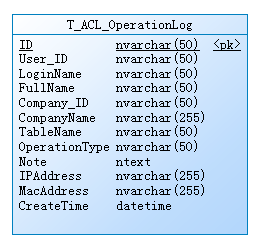
以機構管理(OU)模塊為例,構造函數中綁定事件即可啟用全自動審計:
public class OU : BaseBLL<OUInfo> {
    public OU() : base() {
        base.Init(this.GetType().FullName, System.Reflection.Assembly.GetExecutingAssembly().GetName().Name);
        // 一行代碼接入操作日志
        baseDal.OnOperationLog += new OperationLogEventHandler(WHC.Security.BLL.OperationLog.OnOperationLog);
        this.ouDal = baseDal as IOU;
    }
}
權限模塊提供可視化配置界面,支持按表名、操作類型篩選日志,雙擊查看字段級變更明細,並可配置哪些表啟用審計。
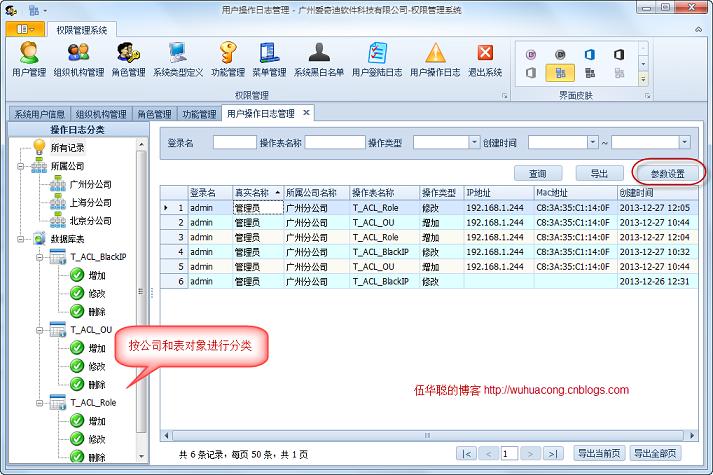
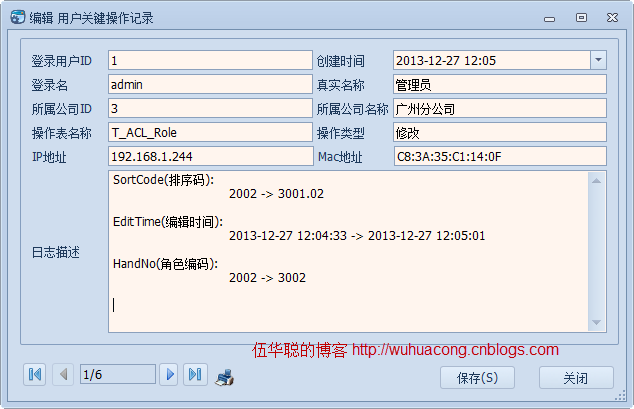
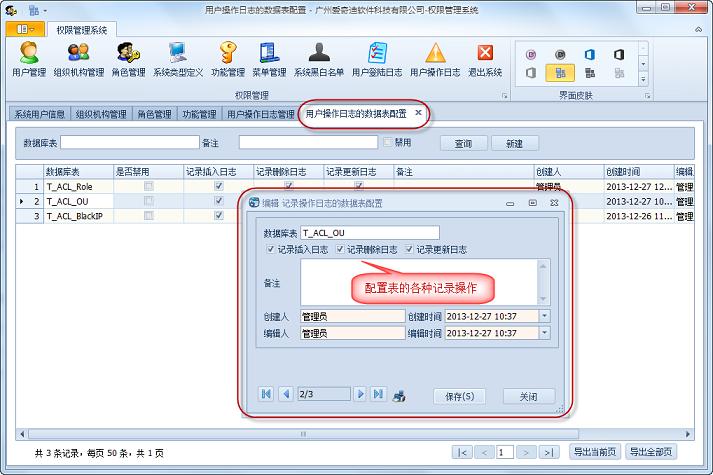
該方案通過「基類事件定義 + 實體上下文傳遞 + 差異化比對 + 統一持久化」四層架構,將審計能力下沉至框架核心,業務開發零感知接入,兼顧性能(僅記錄變更字段)與可讀性(含中文別名),是企業級框架治理數據安全的典範實踐。