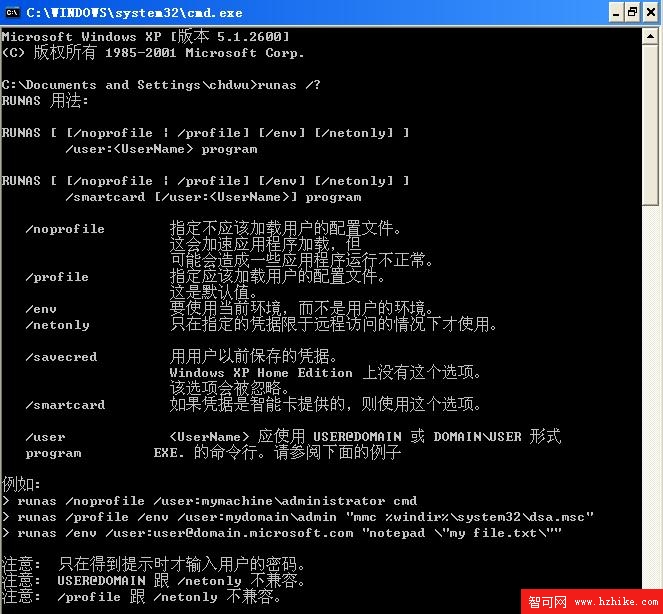
Process.Start 配合 runas 動詞或命令列 runas /user:... 僅能在第一個提示輸入使用者名稱,密碼仍需手動輸入,無法在單一命令/程式碼中完整提供認證,導致無法全自動化。
using System;
using System.Diagnostics;
using System.Security;

namespace MainTest
{
    public class ProcessUserLogonHelper
    {
        // 範例調用
        private void InvokeExample()
        {
            var phelper = new ProcessUserLogonHelper();
            Process pro = phelper.CreateProcessWithUserToken(
                @"C:\Program Files\Internet Explorer\iexplore.exe",
                "bestreme.com", "chdwu", "************");
            pro.Start();
        }

        // 完整參數版本
        public Process CreateProcessWithUserToken(string appPath, string domain, string userName, string password)
        {
            Process pro = new Process();
            ProcessStartInfo info = new ProcessStartInfo(appPath);
            info.UseShellExecute = false;          // 必須為 false 才能指定認證
            info.UserName = userName;
            info.Domain = domain;
            info.Password = ToSecureString(password);
            info.WorkingDirectory = System.IO.Path.GetDirectoryName(appPath);
            pro.StartInfo = info;
            return pro;
        }

        // 僅本機帳號版本
        public Process CreateProcessWithUserToken(string appPath, string userName, string password)
        {
            return CreateProcessWithUserToken(appPath, "", userName, password);
        }

        private SecureString ToSecureString(string password)
        {
            SecureString ss = new SecureString();
            foreach (char c in password) ss.AppendChar(c);
            return ss;
        }
    }
}
UseShellExecute = false:必要條件,否則無法設定 UserName/Password。SecureString:密碼以加密字串儲存於記憶體,提升安全性。Domain) 與本機帳號。Process 物件,呼叫端可決定何時 Start(),彈性最高。